

A workflow for multi-link profiles is a structured system that combines environment isolation, behavioral differentiation, and centralized link management to run multiple digital profiles safely and at scale. Content creators, marketers, and business owners who manage more than one social presence face a specific challenge: platforms actively detect coordinated account behavior, and a single misstep can trigger restrictions across every profile at once. Getting this right requires more than picking the right tools. It demands a repeatable process that covers technical setup, daily habits, and how you present your links to your audience.
What does a solid workflow for multi-link profiles require technically?
The foundation of any multi-link profile workflow is environment isolation. Chrome's standard profile switching leaks cookies and browser fingerprints between sessions, which means platforms can link your accounts even when you think they are separate. True isolation requires dedicated browser environments where each profile has its own fingerprint, cache, and session history, effectively appearing as a different machine to the platform.
Proxies are the second layer. Residential and mobile proxies cost more than datacenter proxies, but datacenter proxies are easily detected and widely discouraged for serious multi-profile work. Typical tooling costs run $25–$80 per account per month for proxy and anti-detect browser combinations, excluding any account fees. That cost reflects the real price of doing this properly.

The third layer is access control. Role-based access management and workspace-level delegation keep credentials out of shared documents and reduce the risk of accidental account linking by team members. Cloud automation platforms that handle session management centrally are preferable to passing login details around manually.
| Layer | Method | Cost range | Stealth level |
|---|---|---|---|
| Browser isolation | Anti-detect browser | $30–$100/month | High |
| IP management | Residential proxy | $15–$50/account/month | High |
| IP management | Datacenter proxy | $5–$15/account/month | Low |
| Access control | Role-based platform access | Varies | High |
| Automation | Manual-paced scheduling tools | $10–$40/month | Medium |
Pro Tip: Assign each profile a dedicated proxy location that matches the geographic region listed on that profile. Mismatched locations are one of the fastest ways to trigger a verification challenge.
How do you build a step-by-step multi-link profile workflow?
A proven multi-link workflow follows a gradual ramp-up before any scaling begins. New accounts should start with 5–10 connection requests or interactions per day for the first 3–7 days. After three weeks of consistent, low-volume activity, you can scale to 20–25 daily actions per profile. Jumping past this warm-up phase is the single most common reason profiles get restricted early.
Behavioral differentiation matters as much as the technical setup. Each profile needs its own messaging style, its own sending schedule, and its own audience segment. Identical message templates or overlapping target lists across accounts signal coordinated network behavior to platform detection systems, even when your IP isolation is perfect.
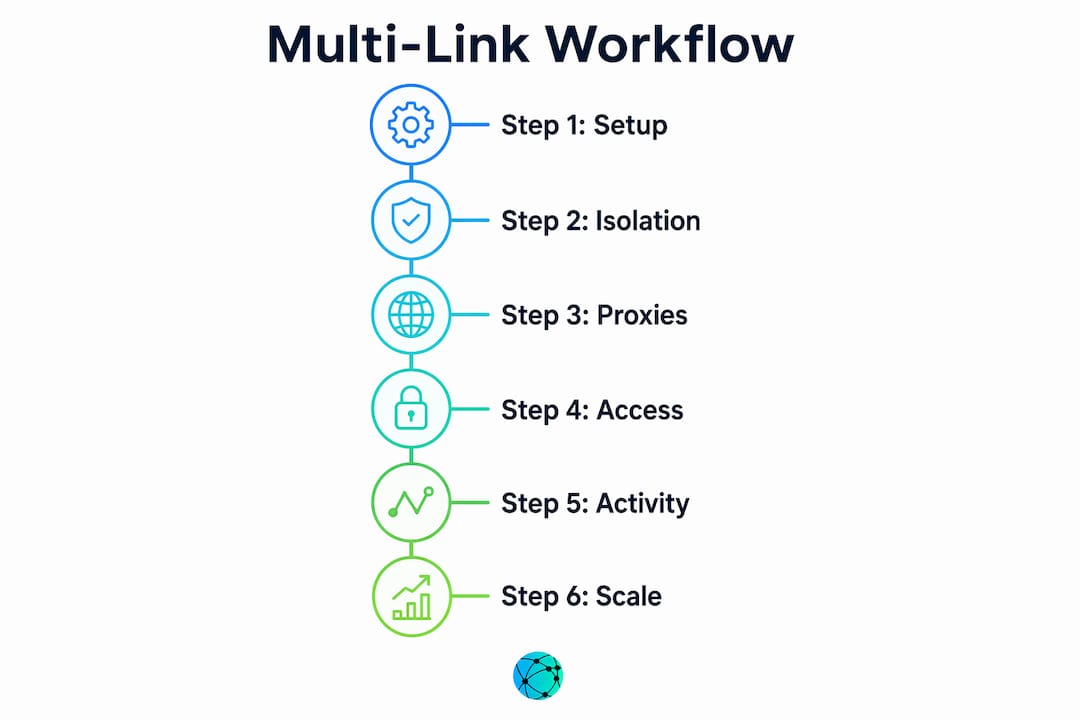
Here is the core workflow sequence:
- Set up isolated environments. Create a dedicated browser profile with a unique fingerprint for each account. Assign a residential or mobile proxy tied to that profile's location.
- Establish credentials securely. Use role-based access or a workspace-level tool. Never store passwords in shared spreadsheets.
- Create distinct personas. Write a brief style guide for each profile covering tone, topics, and the audience segment it targets.
- Run the warm-up phase. Limit daily actions to 5–10 for the first week. Increase gradually over three weeks.
- Differentiate outreach content. Write unique messages for each profile. Rotate sending windows so profiles are not active at the same hours.
- Consolidate your links. Build a centralized link hub for each profile so your audience reaches the right destination regardless of which platform they come from.
- Monitor and adjust. Review engagement data weekly. Reduce volume on any profile showing unusual restriction signals.
Pro Tip: Schedule each profile's activity during different two-hour windows throughout the day. Platforms that see multiple accounts posting or messaging at identical times flag them as coordinated.
Outreach quality also protects accounts long term. Automation tools that inject JavaScript violate most platform Terms of Service. Manual-paced, high-quality engagement reduces permanent account risk far more than high-volume automation ever could.
What are the most common mistakes in multi-link profile management?
The biggest misconception in multi-link profile management is that IP isolation alone prevents bans. Modern platform enforcement uses complex behavioral analytics, not just IP checks. Writing style, message timing, and target audience overlap all feed into detection systems.
"Impossible travel" alerts are a specific and avoidable problem. These alerts trigger when a profile logs in from two geographically distant locations within a short window. Sticky proxies that maintain a consistent IP address for each session prevent this. Rotating proxies that assign a new IP on every request are the wrong choice for profile-based workflows.
Behavioral red flags are harder to fix than technical ones. You can swap a proxy in minutes. Rebuilding a restricted account's trust score takes weeks of careful, low-volume activity. Prevention is always faster than recovery.
Here is a practical do's and don'ts list for day-to-day management:
Do:
- Use sticky residential or mobile proxies matched to each profile's location
- Write unique message copy for every profile
- Segment your target lists so no two profiles contact the same person
- Use dedicated email accounts for each profile's registration and recovery
- Review pending requests and withdraw stale ones after 30–45 days
Don't:
- Log into multiple profiles from the same browser session
- Copy and paste the same outreach message across profiles
- Use datacenter proxies for accounts you care about keeping
- Share login credentials with team members via unprotected channels
- Scale activity before completing the warm-up phase
How do centralized link hubs improve your digital presence?
A centralized link hub is a single branded URL that holds all of your important links in one place. Academic research published in 2026 confirms that centralized link hubs improve professional identity management and visibility compared to scattered individual links. For creators managing multiple profiles, this means each profile can point to its own hub rather than sending followers to a generic homepage.
The practical benefits go beyond convenience. Mobile-first design matters because most social media traffic arrives on phones. A hub that loads fast and displays cleanly on a small screen converts better than a desktop-optimized website. QR codes extend this further, letting you connect offline materials like business cards or event signage directly to your digital presence. Lflow generates free downloadable QR codes alongside every link hub, which makes this connection straightforward.
Custom branding on each hub also reinforces identity. When a creator's Instagram profile, LinkedIn page, and YouTube channel each point to a hub with matching colors, fonts, and a custom domain, the audience experiences a consistent brand rather than a collection of disconnected links. Lflow's responsive link hub examples show how this plays out across different creator categories.
| Feature | Benefit for multi-profile creators |
|---|---|
| Custom domain | Reinforces brand identity per profile |
| Mobile-optimized design | Captures social traffic on phones |
| QR code integration | Connects offline and online channels |
| Real-time analytics | Shows which profile drives the most clicks |
| Unlimited links | Accommodates growing content catalogs |
Updating a hub takes seconds, which matters when you are running multiple profiles. Changing a link in one place updates every piece of content that points to that hub. Centralized link management removes the manual work of hunting down every post that contains an outdated URL.
For creators who want to go further, marketing automation tools can connect hub analytics to broader campaign tracking, giving you a clearer picture of how each profile contributes to overall audience growth.
Key Takeaways
A reliable workflow for multi-link profiles requires three layers working together: technical isolation, behavioral differentiation, and a centralized hub that gives each profile a clean, branded destination.
| Point | Details |
|---|---|
| Environment isolation is non-negotiable | Each profile needs its own browser fingerprint, proxy, and session history to avoid detection. |
| Warm up before scaling | Start at 5–10 daily actions per profile and scale gradually over three weeks to avoid restrictions. |
| Behavior matters as much as IP | Unique messaging styles, schedules, and target lists prevent coordinated-network flags. |
| Centralized hubs improve visibility | A single branded URL per profile consolidates links and strengthens professional identity. |
| Quality outreach beats volume | Manual, high-quality engagement protects accounts better than high-volume automation. |
What I've learned after managing multi-link profiles at scale
Most creators focus entirely on the technical side and ignore the behavioral side until something breaks. I've seen well-isolated setups get flagged within two weeks because every profile was sending the same message to the same type of person at the same time of day. The platform didn't need to check the IP. The behavior was the fingerprint.
The other mistake I see constantly is treating link hubs as a one-time setup. A hub you built six months ago and never updated is a liability. Broken links, outdated offers, and missing content all erode trust with the audience you worked hard to build. Treat your hub like a living document. Review it every time you publish something new.
The platforms are also getting better at detection every quarter. What worked in 2024 is not guaranteed to work in 2026. The creators who stay ahead are the ones who monitor their account health weekly, not monthly. They catch restriction signals early and reduce volume before a flag becomes a ban.
My honest recommendation: start with fewer profiles done properly rather than many profiles done carelessly. Two well-managed profiles with distinct personas, clean technical setups, and updated link hubs will outperform ten rushed ones every time. Scale only after you have proven the workflow works at a small level. The link management practices that protect your profiles long term are the same ones that make your audience experience better.
— Axion
How Lflow fits into your multi-link workflow
Building a centralized link hub used to require design skills and a developer. Lflow removes that barrier entirely.

Lflow lets you create a fully branded link in bio page in under two minutes, with unlimited links, custom domains, and real-time analytics built in. Every hub is mobile-optimized and comes with a free QR code you can download and use on any offline material. For creators managing multiple profiles, Lflow's free templates give each profile a distinct visual identity without starting from scratch. The setup is free, the customization is deep, and the analytics show you exactly which profile is driving results.
FAQ
What is a workflow for multi-link profiles?
A workflow for multi-link profiles is a repeatable system covering environment isolation, behavioral differentiation, and centralized link management that lets creators or marketers run multiple digital profiles safely and efficiently.
How many daily actions are safe during a new profile warm-up?
Start with 5–10 actions per day for the first 3–7 days, then scale gradually to 20–25 daily actions after three weeks of consistent low-volume activity.
Why do identical messages across profiles cause account restrictions?
Platforms use behavioral analytics to detect coordinated networks. Identical message templates or overlapping target lists signal coordinated behavior and trigger simultaneous restrictions even when IP isolation is technically correct.
What type of proxy works best for multi-profile management?
Residential or mobile proxies with sticky IPs are the right choice. Datacenter proxies are cheaper but easily detected, and rotating proxies create "impossible travel" alerts by assigning different geographic locations to the same session.
How does a centralized link hub help multi-profile creators?
A centralized hub gives each profile a single branded URL that holds all relevant links, improving professional identity consistency and making it easy to update content across every platform at once.