

You've got one chance to grab your audience's attention in your bio, and Instagram or TikTok gives you exactly one clickable link to make it count. That single link forces you to choose: your latest video, your online store, your newsletter, or your newest collab. Most creators rotate links manually, lose traffic constantly, and never realize how much engagement they're leaving behind. Multi-link pages fix this problem completely, and once you understand how they work, you'll wonder how you ever managed without one.
Table of Contents
- What is a multi-link page and why does it matter?
- Top benefits of using multi-link pages
- How to use multi-link pages for maximum effect
- Real-world examples: Multi-link pages in action
- The uncomfortable truth: One link means lost opportunities
- Ready to upgrade your bio? Build your free multi-link page now
- Frequently asked questions
Key Takeaways
| Point | Details |
|---|---|
| Expand bio capabilities | A multi-link page lets you showcase all your top links and calls-to-action from one place in your social bio. |
| Boost engagement | Creators using multi-link pages see increased clicks, conversions, and more ways to measure what their audience wants. |
| Easy to set up | Setting up a multi-link page takes minutes and unlocks powerful branding and monetization features. |
| Stay adaptable | Easily update your page to spotlight trends, new offers, or content without losing past links. |
What is a multi-link page and why does it matter?
A multi-link page is a centralized landing page you host at a single URL, which then displays multiple clickable links for your followers to choose from. Instead of picking one destination, your audience sees your full menu: your YouTube channel, your merch shop, your Patreon, your latest blog post, and your email list all in one place. You share that one page URL in your bio, and the page does all the heavy lifting from there.
This matters because platforms like Instagram and TikTok deliberately restrict you to a single clickable link in your bio field. That restriction was designed for simplicity, but it creates a real bottleneck for creators who run multiple revenue streams or publish content across different platforms. Multi-link pages allow creators to share multiple destinations from a single bio link, removing that bottleneck entirely.
Here's what a multi-link page typically lets you do:
- Share your online store, course, or product launch
- Link to your latest YouTube video or podcast episode
- Drive followers to your newsletter sign-up
- Promote a brand deal or affiliate offer
- Connect audiences to all your social profiles in one tap
Pro Tip: Even if you currently only have two or three links to share, set up your multi-link page now. As your creator business grows, you'll add links fast, and having the infrastructure in place from the start saves you from scrambling later.
The link in bio tips you'll find from experienced creators all point to the same conclusion: a multi-link page is no longer a "nice to have." It's a foundational tool for anyone serious about building an audience and monetizing their content consistently.
Top benefits of using multi-link pages
Knowing what a multi-link page is, the next big question is: what practical difference does it make for your creator business?
The short answer is significant. The longer answer involves traffic, conversions, analytics, and brand perception all improving at once. Let's break it down.
Single bio link vs. multi-link page: a head-to-head comparison
| Feature | Single bio link | Multi-link page |
|---|---|---|
| Number of destinations | 1 | Unlimited |
| Analytics and tracking | None | Real-time click data |
| Branding options | None | Colors, fonts, images, custom domain |
| Audience segmentation | Not possible | Traffic split by link |
| Update frequency | Manual, time-consuming | Instant, any time |
| Conversion opportunities | One CTA | Multiple CTAs simultaneously |
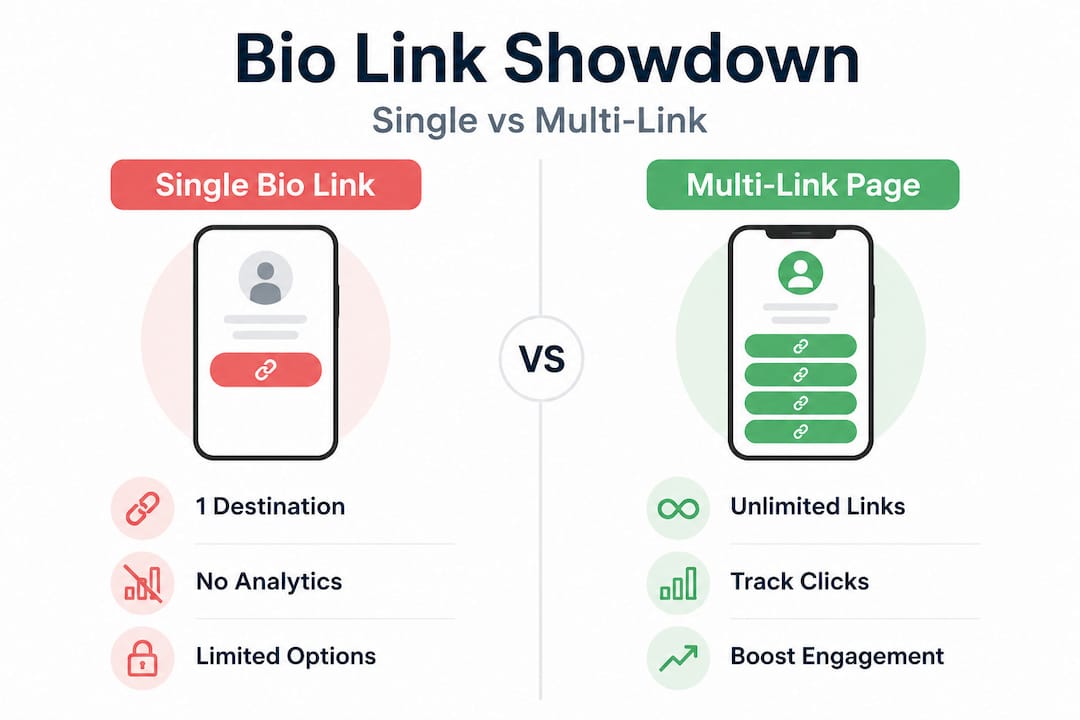
The table makes the gap obvious. A single link forces your audience into one action. A multi-link page respects that different followers have different intentions, and lets each of them find what they're looking for.
Here are the top practical benefits creators report after switching:
- Maximize every visit: Every follower who taps your bio link gets access to your full content ecosystem, not just today's priority.
- Diversify your calls to action (CTAs): Sell a product, grow your list, and promote your podcast simultaneously.
- Real analytics: Know exactly which links get clicked, when, and by how many people. This tells you what your audience actually cares about.
- Audience segmentation: If you have different audience segments (buyers vs. casual fans vs. collaborators), you can structure your page to serve all of them.
- Consistent branding: Your multi-link page should look like an extension of your brand, not a generic list of URLs.
Multi-link pages can increase total link clickthrough rates dramatically compared to single bio links, with some creators reporting up to 3x more total clicks after making the switch. That number makes sense when you consider that a single link only converts visitors who happen to want that one specific thing on that one specific day.
Using AI for bio links can take this even further by helping you write compelling button labels and page copy that drive more clicks. And customizing your bio link page with fonts and colors that match your brand makes the whole experience feel professional and intentional rather than cobbled together.
How to use multi-link pages for maximum effect
Now that you're sold on the advantages, here's how to actually set up a multi-link page that stands out and drives results.
The right structure and design can lead to more visitors taking the actions you want. That means being intentional about every choice, from which links you include to how you label each button.
Step-by-step: building a high-converting multi-link page
-
Prioritize your top three to five links. Don't list every URL you've ever used. Think about your current goals. Are you launching a product? Growing your email list? Driving YouTube views? Your top priority link goes first, at the top of the page, where eyes land first.
-
Group related links together. If you have a shop and a promo code for that shop, keep them next to each other. If you have multiple social platforms, group them at the bottom. Logical grouping reduces decision fatigue for your audience.
-
Label every link clearly and specifically. "Click here" tells your audience nothing. "Get my free workout guide" or "Watch my latest recipe video" tells them exactly what they'll find. Specific labels consistently outperform vague ones because they set expectations and attract the right clicks.
-
A/B test your link order and button labels. After your page is live, swap the position of your top two links and track which arrangement drives more total engagement. Small changes in order or wording can produce surprisingly large differences in click-through rates.
Pro Tip: Update your multi-link page at least once a week, and especially whenever you publish new content or run a promotion. A stale multi-link page with outdated links erodes trust. Followers who tap a button and find expired content won't tap again.
Visual consistency matters just as much as structure. Use a bio link template that aligns with your brand colors and fonts from the start, rather than building something from scratch every time. Adding a profile photo, a short tagline, and a branded background image transforms your page from a plain list into a polished brand hub.
Investing in making your link look good with quality images pays off immediately. Followers who land on a visually cohesive page feel confident they're in the right place and are more likely to explore multiple links rather than bouncing after one click.
Real-world examples: Multi-link pages in action
Seeing is believing. Let's break down exactly how multi-link pages are delivering results for real creators and brands.
Use case 1: The product-based creator A lifestyle influencer selling merchandise and a digital course used to manually swap their bio link every time they posted. After switching to a multi-link page, both their store and their course landing page stayed live simultaneously. Their course sign-ups increased within two weeks because followers who weren't ready to buy merch could still find and join the course without the creator doing anything different.
Use case 2: The content-first creator A YouTube creator in the personal finance niche links to their latest video, their podcast, their free budgeting spreadsheet, and their newsletter from one page. Their newsletter sign-ups tripled within a month of consolidating everything, because followers who discovered them through Instagram could now find the newsletter without the creator needing to run a dedicated "link in bio" campaign for it.
Use case 3: The local business owner A small bakery used their Instagram bio link to alternate between their online order form and their event booking page. After creating a multi-link page, both links lived side by side alongside a Google Reviews link and a seasonal catering menu PDF. Bookings increased because customers could find everything without having to search.
"Switching to a multi-link page doubled my newsletter signups in one month. I had no idea how much traffic I was losing by only showing one link at a time."
Here's a snapshot of typical engagement improvement data creators report:
| Link type | Before multi-link page | After multi-link page |
|---|---|---|
| Store visits | 120/month | 310/month |
| Newsletter sign-ups | 45/month | 130/month |
| Video views from bio | 200/month | 480/month |
| Appointment bookings | 18/month | 52/month |
Multi-link pages help businesses guide followers to book appointments, download offers, or join communities, driving real results across every type of creator and business category. The pattern holds whether you're a solo creator or a team of five.
For creators building a presence across multiple platforms, strong multi-platform branding paired with a solid multi-link page creates a unified ecosystem that feels intentional and professional to followers wherever they find you. Pairing that with solid website design tips ensures the experience feels seamless from your social profile all the way to your website.
The uncomfortable truth: One link means lost opportunities
After seeing what works, here's a bit of tough love about what's holding most creators back, and why this one upgrade matters more than almost anything else you could do for your growth.
Most creators know they should probably upgrade their bio link setup. They've seen other creators using multi-link pages. They've noticed that some profiles feel more professional and navigable than theirs. But they tell themselves "less is more" and stick with one link, often rotating it manually with every new post.
This is a costly mistake that's easy to rationalize. The logic sounds clean: "I don't want to overwhelm my audience with choices." But there's a difference between a cluttered page and a well-organized one. The goal isn't to dump every URL you own onto a page. The goal is to curate the right destinations so your audience can find what they need.
Here's the uncomfortable reality: your audience doesn't behave as a monolith. One follower taps your bio link looking for your merch. Another wants your tutorial videos. A third is a brand manager checking if you have a media kit. One link serves one of them and turns the other two away. Permanently.
The "less is more" argument works for design aesthetics. It does not work for access. Giving your audience fewer options doesn't make them more focused. It makes them leave. The Linkflow vs Linktree comparison shows how even the choice of platform affects what features you can use to serve different audience segments effectively.
As your creator business matures, your audience's expectations shift. Early followers might have been happy with one link. But as your content diversifies and your revenue streams expand, your audience starts expecting a more complete experience from you. A single link signals to potential brand partners, collaborators, and serious fans that you're still operating at a casual level. A polished multi-link page signals that you're running a real business.
Adapt your CTA strategy as you grow. In year one, one link might be fine. By year two, you almost certainly have more to offer. The creators who scale fastest are the ones who treat their bio link as a core marketing asset, not an afterthought.
Ready to upgrade your bio? Build your free multi-link page now
With these strategies in mind, taking action is the easiest next step. Here's how to get started without tech headaches.
You don't need a developer, a designer, or a big budget to build a multi-link page that looks great and performs well.

At Lflow.co, you can choose a bio template that matches your brand, add your links, and launch your multi-link page in under two minutes. The platform includes real-time analytics so you can see exactly which links your audience is clicking, free QR codes for offline promotion, and full customization options covering colors, fonts, and custom domains. There's no complicated setup and no technical knowledge required. Every template is mobile-optimized, which matters because the vast majority of your followers are tapping from their phones. Start free with Lflow and turn your bio link into the most productive part of your social media strategy today.
Frequently asked questions
Will using a multi-link page hurt my Instagram or TikTok algorithm ranking?
No, using a multi-link page does not negatively impact your ranking or reach, as algorithms evaluate content quality and engagement on your posts, not where your bio link points.
How many links should I add to my multi-link page?
Most creators see better engagement with 3 to 5 prioritized links rather than crowding the page with too many options, since curating a few prioritized links helps maintain higher engagement and clearer audience direction.
Can I update my links frequently?
Yes, you can update your multi-link page as often as you like, since regular updates allow you to respond to trends, new content launches, and time-sensitive offers without changing your bio URL at all.
Do multi-link pages work for small businesses or only influencers?
Multi-link pages help businesses guide followers to book appointments, download offers, or join communities, making them just as valuable for small business owners as they are for individual creators and influencers.