

You've got one link. One slot in your bio. But your world as a creator is anything bigger than that: a store, a podcast, a newsletter, a YouTube channel, a new collab, and whatever just launched last week. That single-link limitation on Instagram, TikTok, and Twitter/X has frustrated creators for years, and the solution hiding in plain sight is the multi-link bio. Think of it as a personal homepage you control completely, sitting behind a single shareable URL. This guide breaks down exactly what a multi-link bio is, why it matters, and how to build one that actually moves your audience.
Table of Contents
- What is a multi link bio?
- Benefits of using a multi link bio
- Choosing the right multi link bio tool or method
- Best practices for building an impactful multi link bio
- When not to use a multi link bio
- Most creators underuse analytics and simplicity in their bio strategy
- Ready to level up your bio link power?
- Frequently asked questions
Key Takeaways
| Point | Details |
|---|---|
| Unlock multiple links | A multi link bio lets you share many destinations from one simple URL in your social profiles. |
| Centralize and customize | You control what fans see, update your offers anytime, and keep your brand consistent across platforms. |
| Track what matters | Use analytics to see which links your fans love and optimize for more clicks and conversions. |
| Test and refine | Experiment with link order and calls to action for better results, keeping only your highest-value links. |
What is a multi link bio?
A multi-link bio is a single URL you place in your social profile that leads to a landing page containing multiple clickable destinations. Instead of choosing between linking to your store or your latest video, you link to a page that holds both, plus everything else you need your audience to find.
Here's how the mechanics work in practice. You sign up for a bio link service, add all the links you want to feature (your shop, your latest post, your email list, your Spotify, your merch), and the platform generates a clean, branded page. You drop that URL into your Instagram or TikTok bio. Every time someone taps it, they land on your custom page and pick where to go next.
For a full breakdown of the concept, the guide to maximizing engagement on the Lflow blog is worth bookmarking. The core idea is simple, but the strategy behind it runs deep.
Single-link vs. multi-link: a direct comparison
| Feature | Single bio link | Multi-link bio |
|---|---|---|
| Destinations per click | 1 | Unlimited |
| Customization | None | Full (colors, fonts, images) |
| Analytics | None | Real-time click tracking |
| Update frequency needed | Every campaign | Manage once, update anytime |
| Branding options | None | Custom domain, logo, themes |
| Audience experience | Friction (one-size-fits-all) | Personalized, choice-driven |
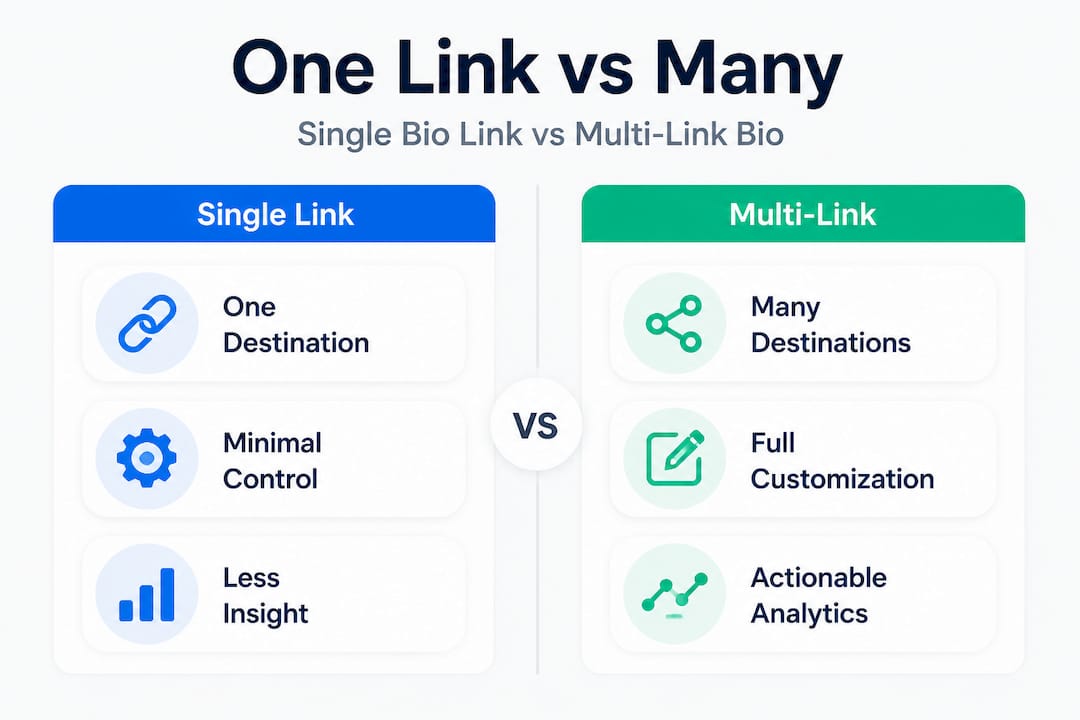
Most major platforms, including Instagram, TikTok, Twitter/X, YouTube, and LinkedIn, restrict your profile to a single clickable link. This isn't a bug; it's intentional design that keeps users on-platform. That's why creators who rely on directing followers to multiple places have turned to multi-link bios as their primary traffic tool.
Key advantages at a glance:
- Showcase your store, newest content, and social channels simultaneously
- Update links without changing your bio URL
- Track which destinations your audience actually cares about
- Match your page design to your personal brand
- Use the same link across every platform you're active on
"A multi-link bio page functions as a lightweight personal website that you can build, update, and refine on a daily basis without touching a single line of code."
This framing matters because it shifts how you think about your bio. It's not just a link. It's real estate.
Benefits of using a multi link bio
Once you understand what a multi-link bio is, the next question is obvious: does it actually move the needle? The short answer is yes, but only when you use it with intention.
The clearest benefit is audience routing. If you're a creator who sells products, shares tutorials, runs a podcast, and has a newsletter, those four audiences are not necessarily the same people. A multi-link bio lets you serve all four groups from a single tap. Someone who clicked on your cooking video wants your recipe blog. Someone who came from your business post wants your coaching page. You can boost engagement with bio links by giving followers exactly what they're looking for instead of sending everyone to the same generic destination.
Managing your call-to-action strategy also becomes dramatically easier. Instead of rewriting your bio every time you launch something new, you just log into your bio link dashboard and swap out one link. The URL in your bio stays the same. Your audience never sees friction.
Performance data: what to track
Analytics quality and the funnel stages matter significantly. There are three distinct layers to measure:
| Metric | What it measures | Benchmark range |
|---|---|---|
| Profile-to-bio CTR | % of profile visitors who click your bio link | 1% to 5% |
| Bio-page CTR | % of bio visitors who click a specific link | 20% to 50% |
| Downstream conversion | % who complete an action after clicking | Varies by destination |
Most creators only look at total clicks. That's like only checking how many people walked into your store without asking whether they bought anything. Real optimization happens when you track all three layers and find where the drop-off occurs.
If your profile-to-bio CTR is low, your bio text or profile setup may not be compelling enough to prompt a click. If bio-page CTR is low but traffic is coming in, your link layout or copy needs work. If downstream conversion suffers, the destination pages themselves need attention.
Reviewing link in bio feature comparisons can help you understand which tools give you the depth of analytics you need to track at every stage of this funnel.
Common creator use cases for multi-link bios:
- Musicians linking to streaming platforms, tour dates, and merch
- Fitness influencers directing followers to their app, program, and free guide
- YouTubers featuring their latest video, Patreon, and Amazon storefront
- Coaches sharing booking links, free resources, and testimonials
Pro Tip: Put your single most important link first. Research consistently shows that links near the top of a bio page receive disproportionately more clicks. Use your analytics to confirm this pattern in your own data and adjust weekly. You can find deeper influencer engagement strategies to pair with this approach.
Choosing the right multi link bio tool or method
Not every creator needs the same solution. Your choice depends on how many platforms you use, how sophisticated your branding requirements are, and whether you need cross-platform analytics.
Platform-native vs. tool-based decisions come down to this: if you only need basic link aggregation on one platform, native multi-link support may be enough. But if you need cross-platform reuse, advanced customization, or analytics across destinations, a dedicated multi-link bio page is almost always the stronger choice.
Here's a practical breakdown for choosing:
-
Identify your platforms. Are you active on Instagram only, or do you manage TikTok, YouTube, and LinkedIn simultaneously? A dedicated tool lets you use one link everywhere. Native tools lock you into one ecosystem.
-
Consider your customization needs. Do you have a brand with specific colors, fonts, and a logo? Dedicated tools like Lflow let you match your bio page exactly to your visual identity. Native options offer little to no design control.
-
Evaluate analytics depth. Native tools give surface-level data at best. Dedicated platforms give you click-by-click tracking, time-of-day patterns, and geographic breakdowns so you can make smarter decisions.
-
Think about how often you update. If you launch new content, products, or campaigns regularly, a dedicated tool with a simple dashboard saves you hours every month compared to manually managing individual links on each platform.
-
Factor in growth trajectory. If you're just starting out with a small audience, free tiers of dedicated tools are more than enough. As your audience scales, premium features like custom domains and A/B testing become valuable investments.
Checking out the available key bio link features before committing to any tool is a smart move. Not all platforms offer analytics, custom domains, or QR codes by default.
Pro Tip: Start with a free plan and master the basics before upgrading. Creators who jump straight to premium features without understanding their audience's behavior often miss the value entirely. Explore bio link templates to get your page live in minutes without starting from scratch.
Best practices for building an impactful multi link bio
Having the right tool only gets you halfway there. How you build and maintain your bio page determines whether followers actually engage with it or bounce immediately.
Treat your multi-link bio as a landing page that you build, update, and optimize like any other funnel page. That mindset separates creators who grow through their bio from those who set it up once and forget it.
Follow these steps to get it right:
-
Prioritize your links ruthlessly. Feature only 3 to 5 links maximum. Every additional link you add competes with every other link for your follower's attention. If everything is important, nothing is.
-
Use consistent branding throughout. Match your bio page colors, fonts, and imagery to your social profile aesthetic. A follower who taps your bio link should feel like they're still in your world, not dropped into a generic template.
-
Write clear, action-oriented labels. "Shop my look" performs better than "Store." "Listen now" beats "Podcast." Specific, benefit-driven language drives clicks far more reliably than generic labels.
-
Update strategically, not reactively. Swap links around new content drops, product launches, or campaigns. Archive older links rather than letting your page get cluttered with outdated destinations.
-
Run your own tests. Change the order of your links for one week and compare click data. Rewrite one link label and see if CTR improves. Treat your bio like a living experiment, not a finished product.
Reviewing real case study bio link examples from creators in different niches can shortcut your learning curve significantly. Seeing what works in practice is more actionable than any theory.
Pro Tip: Test different call-to-action phrasing every two to three weeks and monitor your bio-page CTR. Even small wording changes like "Download free guide" vs. "Get the free guide" can shift click-through rates noticeably.
When not to use a multi link bio
This is the part most guides skip entirely, and that's a mistake. There are genuine scenarios where a multi-link bio is not the right move, and knowing them saves you from sending your traffic into the wrong funnel.
The most common countercase is high-ticket or conversational offers. Some creators find that a simple "DM me for the link" CTA in their caption outperforms a bio link visit when it comes to affiliate offers or premium coaching. Why? Because that extra step of a direct message creates a one-on-one moment, filters out unserious leads, and starts a real conversation. Routing every follower through a link page actually adds friction in these specific cases.
Consider avoiding or simplifying your multi-link bio when:
- Your goal is a single, high-converting action (like joining a waitlist), where one direct link removes all decision paralysis
- Your audience is highly engaged and responds better to personal DM conversations than passive link browsing
- You're running a time-sensitive campaign where every second of delay between tap and action costs conversions
- Your analytics show followers are clicking into your bio page but not clicking any links, which may signal too many options or unclear copy
- You're promoting a product with a very narrow audience segment where sending general traffic to a broad page dilutes your conversion rate
The smartest creators use their bio page as the default and switch temporarily to a single direct link when running focused campaigns that demand simplicity above all else.
Most creators underuse analytics and simplicity in their bio strategy
Here's what we've observed working with creators across every niche and follower count: the biggest mistake isn't choosing the wrong tool. It's treating the bio page as a one-time setup rather than an ongoing strategy.
Most creators add links reactively. A new podcast episode goes live, they add it to the bio. A brand deal closes, that link gets added. Six months later, there are nine links on the page, three of which are outdated, and the creator has no idea which ones are actually working. The page looks busy, and the audience bounces.
Analytics quality and the funnel stages matter far more than most creators realize. A creator with six links and no analytics is flying blind. A creator with three links and weekly data review is compounding improvements every single week. The second creator will always win over time, even if they start with fewer followers.
Simplicity is the other underrated factor. The paradox of choice is real: when followers see ten options, they often pick none. When they see three, they read each one and click with purpose. Influencer engagement lessons consistently reinforce this: fewer, clearer choices outperform more options every time.
Our strong recommendation is to schedule a monthly bio audit. Look at your analytics, cut whatever isn't performing, refresh the copy on your top link, and test one new variation. This simple habit, done consistently, compounds into meaningful audience growth and revenue impact over a year.
The best creators we've seen treat their bio link like a product. They ship it, measure it, iterate on it, and never stop improving it.
Ready to level up your bio link power?
You now have the full picture: what a multi-link bio is, why it drives real results, how to pick the right tool, and how to build one that works. The next step is putting it into practice with a platform built specifically for creators like you.

Lflow.co gives you free unlimited bio links with full customization from day one. You can choose from professionally designed bio link templates, add your branding, connect all your destinations, and go live in under two minutes. Real-time analytics show you exactly which links your audience clicks most, and free downloadable QR codes let you extend your reach into offline spaces like events, packaging, and print. Whether you're just building your presence or scaling an established brand, Lflow gives you every tool you need without a complicated setup or a steep price tag.
Frequently asked questions
Can I use a multi link bio on any social platform?
Yes, most platforms like Instagram, TikTok, and Twitter/X allow a single bio link, and a multi-link bio page makes the most of that one slot by routing followers to multiple destinations.
Do multi link bios hurt my profile engagement or reach?
No, they don't. Multi-link bios give followers more targeted choices, which typically improves traffic quality. Bio links power engagement by connecting the right follower to the right destination faster.
How many links should I include in my multi link bio?
Most creators see the best results with 3 to 5 high-priority links. Treating your bio as a landing page means keeping it tight, focused, and easy to scan.
Are analytics included with most multi link bio tools?
Modern multi-link bio platforms typically include analytics, but depth varies widely. Tracking funnel stages from profile click through to downstream conversion gives you the clearest picture of what's actually working.
Recommended
- Supercharge Your Social Media Content: How AI Can Boost Your Link-in-Bio Strategy
- How bio links power influencer audience engagement
- Top Ways to Drive Traffic with One Link and Boost Engagement
- Why multi-link pages are essential for creator growth
- Navigating the social commerce wave: 5 winning strategies for E-commerce brands