

Social commerce is the practice of selling products and services directly through social media platforms, turning content into a checkout path. For creators, influencers, musicians, and small brands, the practical bottom line is this: it shortens the distance between "I want that" and "I bought it" to a few taps. The core pieces you'll need to understand are native storefronts, shoppable content, link-in-bio hubs, and the analytics that tell you what's actually working.
Table of Contents
- What is social commerce and how does it work?
- Why social commerce matters for creators and small brands
- Which platforms offer social commerce features in the U.S.?
- Why your link-in-bio hub is the center of your social commerce funnel
- How to launch a social commerce funnel step by step
- What metrics should you actually track?
- Risks, limitations, and how to protect your channel
- Tools and real examples: how creators run social commerce
- Key Takeaways
- The pattern that actually works
- Lflow makes your social commerce setup faster
- Useful sources
What is social commerce and how does it work?
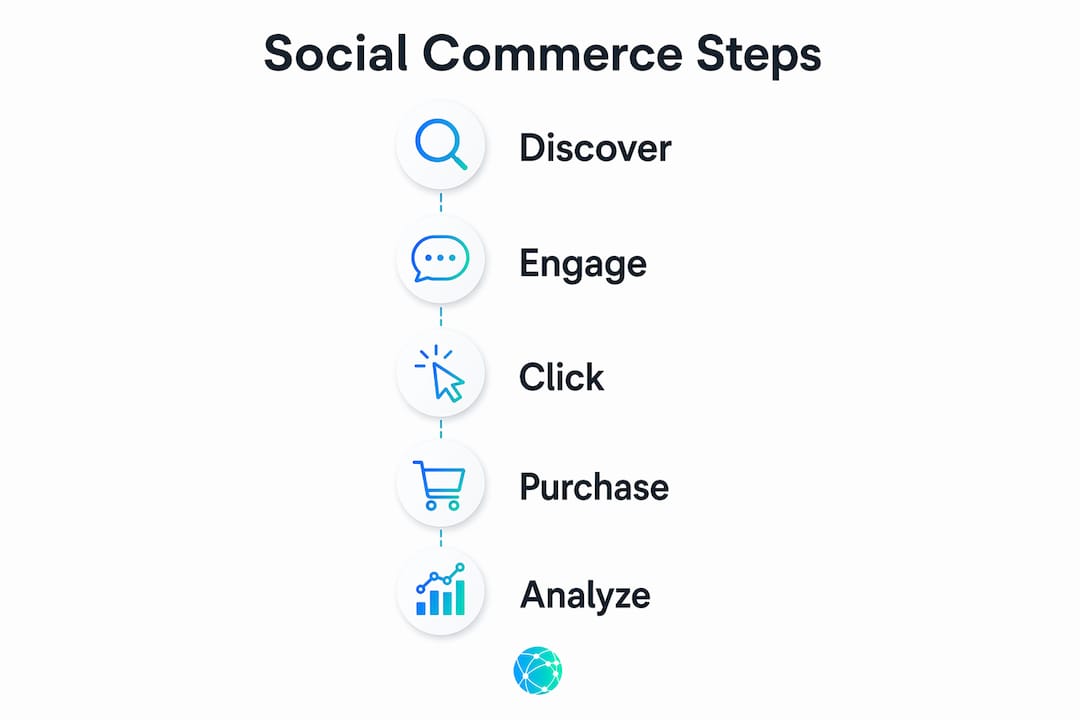
The flow runs in three steps: discovery, evaluation, and purchase. A viewer sees a product in a Reel or TikTok, reads comments and UGC that build confidence, then either checks out inside the app or follows a link to complete the purchase. Social commerce compresses that entire journey into a single session.
The core components creators need to map:
- Content discovery: Feeds, Reels, short-form video, and live streams surface products to audiences who weren't actively searching.
- Social proof: Comments, UGC, and creator endorsements do the selling that a product page can't.
- Native shopping tools: Product tags, shoppable posts, and in-app checkout let purchases happen without leaving the app.
- Link hubs: When checkout happens off-platform, a branded link-in-bio page captures the redirect and keeps the funnel intact.
Measurement runs along the same path: impressions feed into engagement, engagement into link clicks, and clicks into conversions. Each handoff is a trackable event. Social commerce integrates content, community, and commerce so that creators can monetize at peak engagement rather than hoping a viewer remembers to search later.
Why social commerce matters for creators and small brands
Engaged attention is the most valuable thing a creator produces. Social commerce converts that attention into a purchase with fewer steps than any traditional funnel. That's the whole argument.

Sprout Social and Salesforce both emphasize that shortening the path-to-purchase is the single most reliable lever for reducing cart abandonment. Multi-layered, non-mobile-optimized flows kill conversions. A creator who posts a shoppable Reel and links to a mobile-optimized hub captures buyers in the moment; a creator who sends followers to a desktop-first website loses most of them.
A branded link hub adds something platform analytics can't: visibility into what happens after the click. Platform dashboards show impressions and engagement. A link hub shows which specific link got clicked, at what time, from which platform, and whether it led to a conversion. That gap is where most creators lose money without knowing it.
Pro Tip: Use a link hub with real-time analytics to identify which posts drive the most link clicks, then double down on that content format before the algorithm shifts.
Which platforms offer social commerce features in the U.S.?
Instagram, TikTok, Facebook, Pinterest, and YouTube each offer commerce features, but they differ significantly in where purchases complete and how much setup they require.
| Platform | Best use case | Setup effort | Where purchase completes | Analytics available | Typical costs |
|---|---|---|---|---|---|
| Instagram (Meta Shops) | Creators, small brands, fashion/beauty | Moderate (catalog required) | In-app or redirect to site | Engagement + shop insights | Free; Meta ad spend optional |
| TikTok Shopping | Creators, product brands, live sellers | Moderate (seller account) | In-app checkout | TikTok analytics + shop data | Free; transaction fees apply |
| Facebook (Meta Shops) | Small businesses, local brands | Moderate (shared with Instagram) | In-app or redirect | Business Suite analytics | Free; ad spend optional |
| Visual brands, home, DIY, fashion | Low to moderate | Redirect to site | Pinterest analytics | Free; promoted pins optional | |
| YouTube | Musicians, educators, product creators | Low (merch shelf) | Redirect to site | YouTube Studio analytics | Free; no direct checkout |
Instagram and TikTok are the strongest options for creators who want in-app checkout. Facebook Shops share a catalog with Instagram through Meta, so setting up one effectively covers both. Pinterest and YouTube redirect off-platform, which means a link hub becomes even more critical for those channels.
Why your link-in-bio hub is the center of your social commerce funnel
When platform-native checkout isn't available or you're selling across multiple platforms at once, a branded link hub is the controlled transition point between discovery and purchase. Analysts caution against relying entirely on platform ecosystems, and a link hub is the practical answer to that risk.
A professional link hub must provide:
- Custom domain so the URL reinforces your brand, not a generic service name
- Mobile-optimized, responsive pages because most social traffic arrives on a phone
- Real-time analytics with click-level data, not just aggregate impressions
- Shoppable links and QR codes for both digital and offline promotion
- Scheduled and auto-archived links to manage time-sensitive drops and promos
- Password protection for exclusive content or early-access offers
- CSV export to pull your own data independent of any platform
The fallback role matters too. If a platform changes its checkout policy, restricts your shop, or your account is temporarily flagged, a link hub keeps your funnel running. Your audience still has somewhere to go. Learn more about link-in-bio features that support this kind of resilience.
Pro Tip: A custom domain on your link hub (e.g., links.yourbrand.com) increases trust and click-through rate more than any design tweak. Set it up before you run your first paid promotion.
How to launch a social commerce funnel step by step
Set up a branded link hub, connect your products or shoppable links, and publish shoppable content. That's the whole sequence. Here's the order:
- Choose your link hub and set a custom domain. Onboarding takes under two minutes with Lflow. Add your domain immediately so every link you share from day one is branded.
- Add product links or shoppable tags. Connect your store URL, product pages, or affiliate links. Use UTM parameters on each link so you can track source traffic.
- Connect your payment or redirect flow. For in-app platforms (Instagram, TikTok), set up your shop catalog. For redirect platforms (Pinterest, YouTube), point links to your hub.
- Create short-form content with product tags and a clear CTA. Tag products in posts, add a verbal or text CTA directing viewers to the link in your bio.
- Launch a timed promo or live shopping event. Urgency converts. A 48-hour drop or a live stream with in-stream links drives immediate action. Trackable links and promo codes let you measure exactly what the event generated.
- Track analytics weekly and iterate. Review click-through rate, conversion rate, and revenue per visit. Cut what doesn't convert; scale what does.
Timeline: Hub setup takes minutes. Content prep runs 1–3 days for a first batch. Optimization is ongoing, weekly work.
Cost snapshot:
- Link hub: free tier available; paid plans for custom domains and advanced analytics
- Platform shops: free to set up; transaction fees vary by platform
- Ad spend: optional, but even $50–$100 boosts a launch post's reach significantly
What metrics should you actually track?
Prioritize engagement-to-conversion metrics: click-through rate from post to hub, conversion rate on the hub, and revenue per visit. Impressions are a vanity metric until they produce a click.
Essential metrics to monitor:
- Impressions and reach (platform-reported baseline)
- Engagement rate (likes, comments, saves relative to reach)
- Click-through rate (CTR) from post to link hub
- Link-hub click-to-conversion rate
- Average order value (AOV)
- Customer acquisition cost (CAC)
| Metric | What platforms report | What a link hub adds |
|---|---|---|
| Impressions | Yes | No |
| Engagement rate | Yes | No |
| Link clicks | Limited (bio link only) | Per-link, real-time |
| UTM-level source data | No | Yes |
| Conversion rate | No | Yes (with redirect tracking) |
| CSV export | Rarely | Yes |
| Email capture | No | Yes (with form integration) |
For attribution, use UTM parameters on every link and unique promo codes for influencer campaigns. A dedicated redirect page per campaign makes it easy to isolate what drove a sale. Optimizing social links for UTM tracking takes 10 minutes and pays back every time you run a report.
Risks, limitations, and how to protect your channel
The main risk is building your entire funnel inside a single platform's ecosystem. Algorithm changes, policy updates, and sudden shop restrictions can cut your revenue overnight. Diversify.
"Native platform checkouts are growing, but owning a branded link hub reduces vulnerability to algorithm or policy changes and captures richer, real-time analytics that platforms don't share." — Brandwatch
Best practices to reduce platform dependency:
- Use a custom domain on your link hub so your audience URL never changes even if you switch tools
- Collect email addresses through your hub to build an owned list independent of any platform
- Maintain a backup redirect flow so a shop suspension doesn't kill your funnel
- Include clear FTC influencer disclosures on all paid or gifted posts (required under U.S. FTC guidelines)
Red flags to watch: a sudden drop in organic reach, loss of access to shop features, or a policy email from a platform about your product catalog. When any of these hit, your link hub is what keeps sales moving. For small businesses running social media without agency support, this practical guide covers how to manage these risks in-house.
Pro Tip: Schedule a monthly audit of your link hub links. Broken or expired product links are silent conversion killers, and most creators only notice them after a campaign has already underperformed.
Tools and real examples: how creators run social commerce
Combine a branded link hub with platform-native shoppable features and creator content. That combination is what converts browsers into buyers.
The core toolset:
- Link hub with custom domain, real-time analytics, and QR code generation (Lflow covers all three)
- Product tagging or catalog setup on Instagram/TikTok for in-app checkout
- Payment integration or redirect to your store (Shopify, WooCommerce, or direct product pages)
- Promo and discount code tracking tied to specific posts or campaigns
- Bio links for artists that consolidate merch, tickets, streaming, and exclusive content in one place
A practical example: a musician releases a limited merch drop. They post a short-form video on TikTok and Instagram showing the item, tag the product in the post, and update their link hub to feature the drop at the top with a countdown. Fans who click land on a mobile-optimized page with one clear button. The musician tracks clicks by platform in real time, sees TikTok driving a majority of the traffic, and shifts their next post budget accordingly. The drop sells out in 48 hours. No agency, no complex tech stack.
Brands that treat social commerce as a structural system rather than a content tactic are the ones that convert social attention into predictable revenue.
Key Takeaways
Social commerce works when you shorten the path-to-purchase, own your analytics, and never let a single platform control your entire funnel.
| Point | Details |
|---|---|
| Shorten the path-to-purchase | Every extra step between discovery and checkout reduces conversions; native checkout or a direct link hub redirect is the goal. |
| Use a branded link hub | A custom-domain hub gives you analytics, fallback protection, and a consistent URL your audience always finds. |
| Track CTR to conversion | Impressions don't pay bills; monitor click-through rate and conversion rate on your hub weekly. |
| Diversify checkout paths | Combine in-app checkout (Instagram, TikTok) with a link hub redirect so a platform change never kills your revenue. |
| Lflow as your hub | Lflow sets up in under two minutes with custom domains, real-time analytics, QR codes, and unlimited links — built for exactly this funnel. |
The pattern that actually works
The creators I've seen succeed with social commerce share one habit: they treat the link hub as infrastructure, not an afterthought. Most people spend 90% of their energy on content and five minutes on where the click goes. That's backwards. A polished Reel pointing to a broken or generic link page wastes every second of effort that went into the video.
The rule of thumb I'd give any creator starting out: set up your hub and your custom domain before you post a single shoppable piece of content. The content can be imperfect. The destination has to be ready. Immediacy beats perfect packaging every time, but only if the path actually works.
Lflow makes your social commerce setup faster
Your content is already doing the discovery work. Lflow handles the conversion side. It's a free link-in-bio platform built for creators, musicians, and small brands who need a professional hub without a development budget or a long setup process.

Onboarding takes under two minutes. You get unlimited links, a custom domain, real-time click analytics, free QR code generation for every link, scheduled and auto-archived links, and CSV export so your data is always yours. No agency, no monthly retainer for basic features. Add your first shoppable link, point your bio to your new hub, and your funnel is live before your next post goes up. Start free at Lflow and have your hub ready today.
Useful sources
- Sprout Social — What Is Social Commerce? Covers definition, tips, and measurement frameworks; one of the most cited practitioner resources on the topic.
- Brandwatch — Social Commerce Glossary Concise definition and analyst perspective on platform dependency risks.
- Salesforce — Social Commerce Enterprise-level breakdown of how social platforms function as full shopping destinations.
- Investopedia — Social Commerce Clear conceptual definition distinguishing social commerce from social media marketing.
- Impact — Social Commerce Examples Real-world examples showing how brands connect discovery, influence, and purchase into measurable funnels.
- Lflow.co First-party source for link-in-bio features, onboarding speed, and analytics capabilities referenced throughout this guide.