

You're a creator, marketer, or small business owner with links scattered across Instagram, TikTok, YouTube, your store, your newsletter, and your website. Each platform gets a different URL, your audience gets confused about where to go, and you have zero visibility into what's actually getting clicked. Understanding why consolidate links matters is not an SEO abstraction. It's a practical decision that affects how people find you, trust you, and engage with everything you create. This guide covers the real reasons to do it and exactly how to do it right.
Table of Contents
- Key takeaways
- Why consolidate links: the SEO case
- Practical benefits for creators and marketers
- Common mistakes that kill consolidation results
- Step-by-step link consolidation strategy
- My honest take on link consolidation
- Get all your links working together with Lflow
- FAQ
Key takeaways
| Point | Details |
|---|---|
| Link equity concentrates | Consolidating URLs focuses ranking signals on fewer, stronger pages instead of splitting authority across many weak ones. |
| One hub builds trust | A single, branded link page looks more professional and makes it easier for audiences to find everything you offer. |
| Mistakes cost traffic | Mixed canonicals and stale redirects after consolidation can quietly erase SEO gains if you skip the audit step. |
| Quality beats quantity | Fewer, more relevant links in your profile outperform a high volume of low-authority connections. |
| Creators see real engagement gains | Centralizing social links into one hub measurably increases cross-platform follower migration and click rates. |
Why consolidate links: the SEO case
When you publish multiple URLs pointing to the same or similar content, search engines face a choice: which version should rank? Without guidance, Google splits its attention and its trust across all of them. That's not a tie. That's a loss for every version.
This is the concept of link equity dilution. Every backlink pointing to your brand carries a certain amount of ranking authority. If ten different URLs all represent your portfolio, store, or content hub, that authority gets divided ten ways. Consolidating those links into a single destination means one page absorbs all of it.
The technical fix for this on the web side is the "rel=canonical` tag. Canonicalization directs authority to the page that matters most, reducing crawl waste and preventing search engines from indexing near-duplicate versions of your content. If you've ever had two similar pages competing against each other in search results, a canonical tag is how you tell Google which one wins.
Beyond equity, there's the crawl budget angle. Search engines don't crawl every page on the internet every day. They allocate a budget per site. When your site has dozens of redundant or low-value URLs, that budget gets burned on pages that don't move the needle. Consolidation reduces crawl waste and focuses the engine's attention on your strongest pages, which is exactly where you want it.
There's a user experience layer here too. Consolidated links deliver cleaner URLs that load the right page faster, reduce confusion, and improve the overall trust signal a visitor gets when they land on your content.
Pro Tip: Before implementing canonical tags, run a crawl audit with a tool like Screaming Frog to identify all the URLs currently competing for the same search intent. Fix the internal links first, then apply the canonical. Doing it in reverse order leaves ghost signals that take weeks to clean up.
The benefits of link consolidation on the SEO side are not small wins. They compound. A cleaner link profile, better crawl efficiency, and concentrated equity all point to the same outcome: higher rankings, sustained over time.
Practical benefits for creators and marketers
Here's the real-world version of the same problem. You drop a new track, publish a YouTube video, launch a product, and update your Patreon. Now you need to share all of it. You post four different links across your socials. Half your audience misses two of them. The other half doesn't click because the feed feels cluttered.
Centralizing social media links into one hub solves this immediately. Instead of four separate posts or a messy caption, you share one URL. Everything lives there. Your audience clicks once and finds everything you want them to see.
The reasons to consolidate links for creators go deeper than convenience:
- Cross-platform growth becomes easier. TikTok profile links to Instagram and YouTube convert followers at higher rates when the path is direct and obvious. One link hub makes that path a single tap.
- Analytics get cleaner. When all your links funnel through one central page, you see exactly which content drives the most clicks, which platforms send the most traffic, and what your audience actually cares about.
- Your brand looks more professional. A single, well-designed link page signals that you take your work seriously. It's a small thing that quietly builds trust before a visitor reads a single word you've written.
- Less effort, more consistency. A focused approach to essential links means less time managing platforms and more time creating. As one practical framework puts it, vital current links optimize engagement while reducing the noise that comes with managing every platform at once.
For musicians specifically, knowing why consolidate music links matters is about removing friction between the listener and the listening. If your song is on Spotify, Apple Music, and SoundCloud, one link hub with all three platforms listed is infinitely more useful than asking your audience to search for you on each one separately.
Common mistakes that kill consolidation results

Getting the strategy right matters a lot. Getting the execution wrong matters more. Many creators and marketers consolidate their links with good intentions and then watch their traffic dip because they skipped steps that look optional but aren't.
Here are the most common mistakes, in order of how quietly damaging they are:
- Leaving mixed canonical signals. Soft consolidation errors like inconsistent canonical tags confuse search engines and split equity even after you think you've fixed things. Every version of a page needs to point to exactly one canonical URL.
- Creating redirect chains instead of direct 301s. If URL A redirects to URL B, which redirects to URL C, equity bleeds at every hop. Each redirect should go directly to the final destination.
- Forgetting internal links. You can set up perfect canonicals and redirects and still lose ranking signals because your navigation menu, breadcrumbs, and XML sitemap still point to the old URLs. Updating all internal links including breadcrumbs and sitemaps is not optional. It's where most of the equity actually lives.
- Consolidating too fast, too much at once. Batch your changes. Doing everything in one weekend makes it nearly impossible to isolate the cause when something breaks.
- Skipping post-consolidation audits. Weekly crawling during consolidation with a tool like Screaming Frog catches redirect errors and canonical mismatches before they become ranking drops.
Pro Tip: Set a calendar reminder for 30 days and 90 days after any consolidation project. Pull a fresh crawl report each time. Traffic changes from consolidation often take weeks to fully register in search data, and catching a stale redirect early is far cheaper than diagnosing a traffic drop months later.
The mistake most people make is treating link consolidation as a one-time task. It's actually an ongoing maintenance practice, especially for creators who add new content and new platforms regularly.
Step-by-step link consolidation strategy
You don't need a technical background to do this well. You need a clear process and the patience to follow it completely.
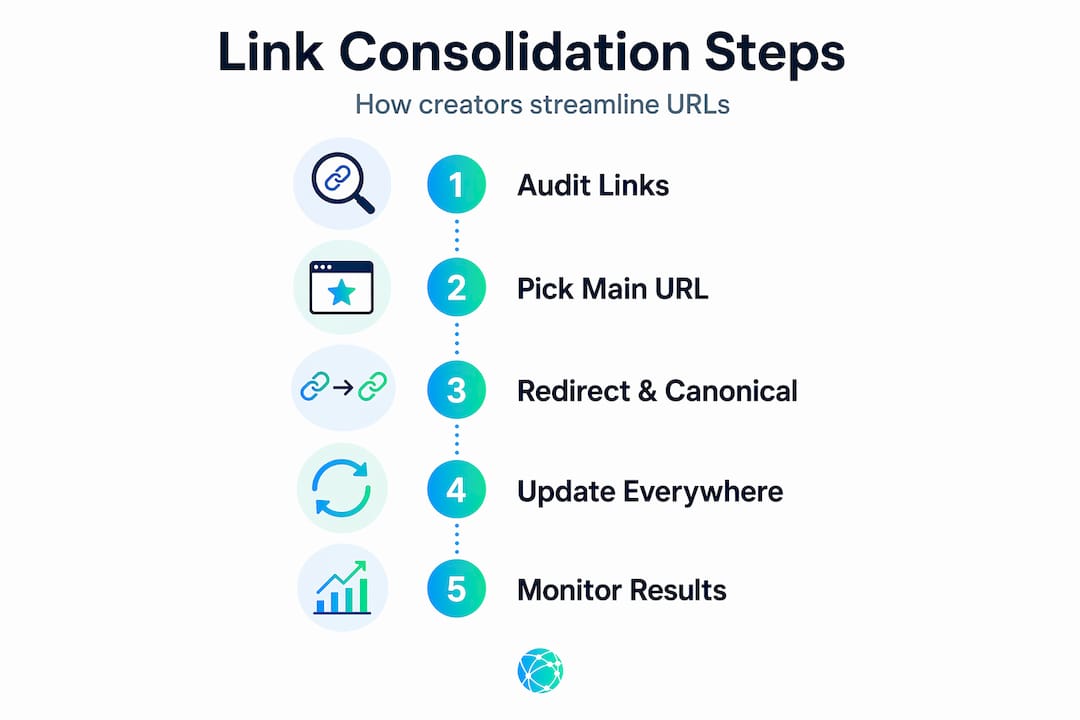
| Step | Action | Tool or resource |
|---|---|---|
| 1. Audit all existing links | List every URL associated with your brand across platforms and pages | Screaming Frog, Google Search Console |
| 2. Group by intent | Cluster URLs that serve the same purpose or audience | Spreadsheet |
| 3. Pick the strongest URL per group | Choose the one with the most traffic, backlinks, or authority | Ahrefs, Google Analytics |
| 4. Set 301 redirects | Point all weaker URLs permanently to the chosen destination | Your hosting platform |
| 5. Update internal links | Revise navigation, sitemaps, and breadcrumbs to reflect new URLs | CMS or manual update |
| 6. Run a post-audit | Validate all redirects and canonical tags are working as intended | Screaming Frog, Search Console |
The audit step is where most people are tempted to skip ahead. Don't. A proper link profile audit shows you which pages carry real authority and which are just taking up crawl budget. That information determines your prioritization for everything that follows.
For creators using a link-in-bio approach, the strategy is even more direct. You pick one central URL. You add all your destinations to it. You use that URL everywhere. The link management tips that drive the most engagement are consistently the ones built around simplicity: fewer choices, clearer paths, and one URL to remember.
High-quality links from relevant sites carry stronger authority than many low-quality links, which means your consolidation target should always be the URL most likely to attract the right kind of attention, not just the one with the highest raw link count. Quality is the variable that moves rankings. Quantity is a distraction.
My honest take on link consolidation
I've seen creators and small businesses spend weeks obsessing over the technical side of consolidation and completely miss the bigger risk: the organizational one. The redirect chains and canonical tags are fixable. The real danger is having no clear owner for the process. Someone needs to be responsible for every post-consolidation audit, every new link added to a hub, and every platform update that changes a URL structure. Without that ownership, consolidation quietly unravels over months.
What I've learned from watching projects succeed and fail is that patience is the actual skill. Search engines take time to recrawl and reindex after consolidation. Traffic might dip slightly before it recovers. Clients who panic in week three and start undoing changes are the ones who never see the long-term gain.
The other misconception I encounter constantly is the belief that more links always mean more authority. They don't. Link profile quality depends on domain relevance and editorial standards, not volume. Fifty links from irrelevant directories hurt more than help. Three links from respected publications in your field move the needle. Consolidation forces this clarity. It makes you ask whether every link you're maintaining is actually earning its place.
For creators in particular, I think the guide to consolidating social links is less about SEO mechanics and more about brand discipline. When you decide what belongs on your link hub and what doesn't, you're making decisions about how you want your audience to experience you. That's a creative choice as much as a technical one.
— Axion
Get all your links working together with Lflow
If you're ready to put this into practice, Lflow makes the process genuinely fast. The platform is built specifically for creators, marketers, and small businesses who want one place to collect every link, present it professionally, and track exactly what's getting clicked.

You can create a free link in bio page in under two minutes, add unlimited links, customize your page to match your brand, and download a QR code for offline promotion. Real-time analytics show you which links drive the most engagement, so you stop guessing and start optimizing based on actual data. If you want to see how Lflow compares before committing, the feature comparison page breaks it down clearly. For creators and business owners ready to start consolidating, Lflow's free and pro plans cover everything you need.
FAQ
What does it mean to consolidate links?
Link consolidation means combining multiple URLs or link destinations into a single, authoritative location. This improves SEO by concentrating link equity and makes it easier for audiences to find your content in one place.
Why consolidate social links specifically?
Consolidating social links into one hub reduces friction for your audience and improves cross-platform engagement. Research shows that TikTok and Instagram profiles using a single link hub convert followers to other platforms at significantly higher rates.
Does link consolidation hurt SEO during the transition?
A temporary dip is possible if redirects are set up correctly but search engines haven't reindexed yet. Using proper 301 redirects and running weekly crawl audits minimizes this risk and usually resolves within 30 to 90 days.
How many links should be on a consolidated link hub?
There's no magic number, but focus on links that serve a current and clear purpose. A minimal, focused set of links builds more trust and gets more clicks than an exhaustive catalog that overwhelms visitors.
What is the best tool for managing consolidated links?
For creators and marketers, a link-in-bio platform like Lflow handles the social consolidation side with built-in analytics, custom branding, and QR code support. For technical SEO consolidation, Screaming Frog and Google Search Console are the standard tools for validating redirects and canonical tags.