

Digital profile management is the ongoing practice of keeping your public-facing profiles consistent, discoverable, and secure so your audience can find and trust you. For creators, musicians, and small brands, that translates directly to more leads, stronger partnerships, and fewer missed opportunities.
Here is what good digital profile management covers:
- Visibility: Your name and handles surface in search results and platform discovery
- Credibility: Bios, photos, and positioning stay consistent across every platform
- Activity: Recent content signals that you are active and worth following
- Security: Multi-factor authentication (MFA) and recovery settings protect your accounts
- Discoverability: Links and SEO connect your audience to the right destinations
One term worth distinguishing upfront: digital identity management (sometimes called Digital Identity Management in enterprise contexts) refers to authentication and authorization inside IT systems. That is a cybersecurity discipline. What you are reading about here is the public-facing side: how you appear, what you link to, and whether your audience can reach you.
Table of Contents
- What digital profile management actually includes
- Why this matters for creators and small brands
- How to run a profile audit
- Tools that help you centralize and maintain profiles
- How to choose the right tool quickly
- Your ongoing maintenance routine
- What to measure and how to know it is working
- Mistakes that quietly kill your profile performance
- Your 30-day quick-start plan
- Key Takeaways
- Profile management is marketing ops, not a one-time task
- Lflow makes profile management faster and more measurable
- Useful sources and resources
What digital profile management actually includes
Digital profile management covers five core dimensions: visibility, credibility, activity, security, and discoverability. Together they determine whether a booking agent, potential collaborator, or new fan can find you, trust you, and contact you within 30 seconds.
Your digital footprint has two layers: active data (posts, bios, links you publish) and passive data (cookies, device identifiers, and tracking signals collected without your input). Profile management focuses on the active layer, though understanding the passive layer matters for privacy.
| Public profile management | Enterprise digital identity management |
|---|---|
| Update bios, photos, and handles | Authenticate users inside systems |
| Manage links and landing pages | Authorize access to internal resources |
| Monitor search results for your name | Manage credential lifecycles |
| Enable MFA on social accounts | Issue and revoke enterprise credentials |
| Archive legacy or duplicate profiles | Maintain identity registries |
The enterprise side, defined by frameworks like NIST SP 800-63, is built for IT teams. Your job as a creator is the left column.
Why this matters for creators and small brands
A broken link in your Instagram bio costs you a sale. An outdated email on your press kit costs you a collaboration. Cleaning up your digital footprint reduces reputation risk and directly controls what appears when someone searches your name.
The concrete benefits:
- More inbound leads because your contact path actually works
- Better partnership opportunities when your positioning is clear and consistent
- Less audience friction when every link goes somewhere useful
- A cleaner brand signal that builds trust faster
The risks of ignoring it are just as real: impersonation accounts, broken payment or donation links, and outdated bios that send the wrong message to potential sponsors.
How to run a profile audit
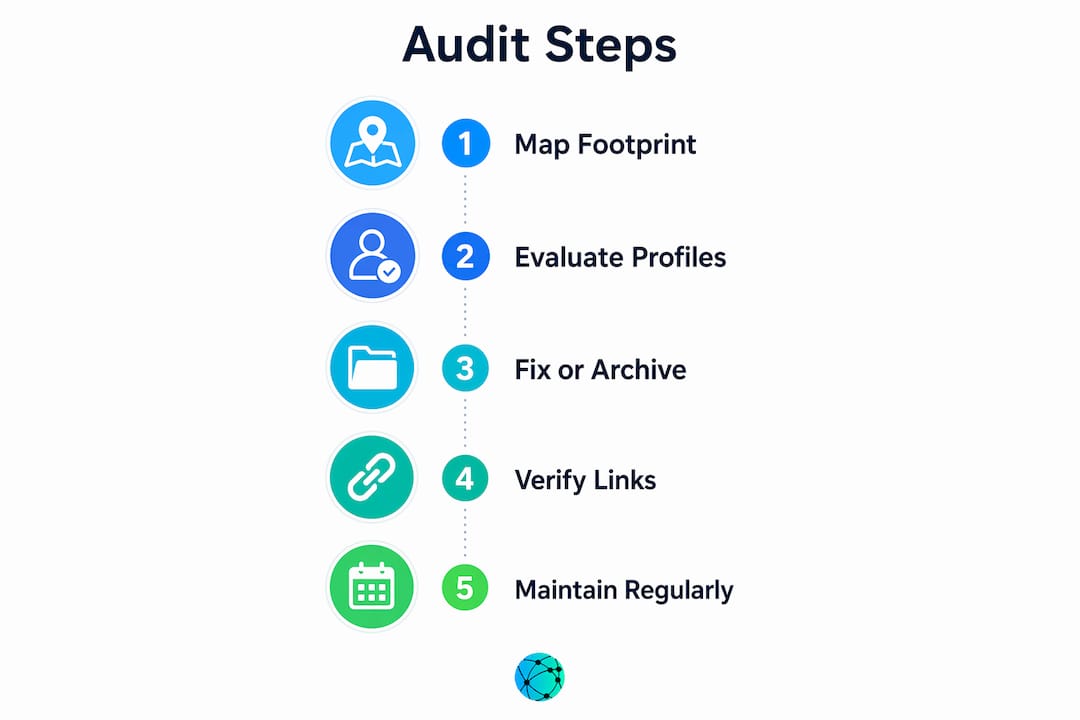
A solid audit has three steps: map your footprint, evaluate each profile, then fix or archive what is outdated. Common audit tasks include removing duplicates, updating contact paths, and verifying brand consistency.

Start by searching your name, handles, and email address in Google. You will find accounts you forgot existed. Log every result in a spreadsheet:
| Column | What to capture |
|---|---|
| URL | Direct link to the profile |
| Handle | Username on that platform |
| Last active | Approximate date of last post or update |
| Contact info shown | Email, phone, or form visible publicly |
| Action required | Update / Archive / Delete / Secure |
| Owner | You, team member, or agency |
Once you have the full list, review each profile and decide what should be easy to find, what should be harder, and what should not be public at all. Enable MFA on every account you keep. Check recovery emails and phone numbers. Remove personal addresses or direct phone numbers from public bios; use a contact form or role-based email instead.
Pro Tip: After any profile update, click through the entire path yourself: bio link → hub page → destination. A link that looks correct in edit mode often breaks in the published view.
Tools that help you centralize and maintain profiles
Every creator needs a small stack of tools to keep profiles manageable. Here are the main categories and what each one does well:
- Link-in-bio hubs: Consolidate all your destinations (store, music, newsletter, social profiles) behind one branded URL. The best ones offer custom domains, real-time analytics, and QR code generation. Lflow fits here, with unlimited links, scheduled and auto-archived links, and an AI bio generator that drafts your bio from your Instagram profile in seconds.
- URL shorteners: Create clean, trackable links for individual campaigns. Useful when you need click data on a specific promo rather than your whole hub. Lflow's free URL shortener gives you branded short links with analytics built in.
- QR code generators: Bridge offline and online. Print a QR code on merch, flyers, or event materials and track scans the same way you track clicks.
- Social schedulers: Tools like Buffer or Later handle posting cadence but do not replace a link hub for consolidation.
- Analytics dashboards: Platform-native analytics (Instagram Insights, TikTok Analytics) show content performance; your link hub's analytics show what happens after the click.
When comparing options, check for: fast onboarding (under two minutes is realistic), custom domain support, CSV data export, and whether analytics are real-time or delayed. A profile linking guide can help you map which links belong on your hub versus your individual platform bios.
How to choose the right tool quickly
Define your primary goal first. If you want to drive traffic to multiple destinations, a link-in-bio hub is the right starting point. If you need granular campaign tracking, a URL shortener with analytics matters more. Most creators need both, and an integrated platform saves the overhead of stitching them together.
The trade-off between deeper analytics and simplicity is real. Enterprise-grade dashboards give you more data but add setup time. For most creators, real-time click counts, geographic data, and device breakdowns are enough to make decisions.
Pro Tip: Before committing to any tool, run a live test: update your bio link, click through on mobile, and confirm the destination loads correctly. Do this on both iOS and Android if your audience is mixed.
Custom domain support matters more than it seems. A branded short link (yourbrand.co/music) signals professionalism and survives platform changes better than a generic subdomain.
Your ongoing maintenance routine
Practitioners recommend a tiered cadence rather than sporadic big cleanups:
- Weekly (5–10 minutes): Check that pinned links still work; scan for any new comments or DMs that signal a broken path
- Monthly (15–20 minutes): Search your name and handles in Google; look for impersonation accounts or outdated cached results
- Quarterly (30–45 minutes): Review all bios and profile photos; update links for current offers; check privacy settings on every platform
- Twice yearly (1–2 hours): Full audit using the spreadsheet template above; revoke unused app permissions; update recovery settings
Add extra audits before any launch, tour, or major collaboration. The week before a campaign goes live is the wrong time to discover your booking link is broken.
Maintaining a consistent presence across platforms also reduces the risk of an algorithm change on one platform wiping out your entire discoverability.
What to measure and how to know it is working
Good profile management produces measurable results. Track these KPIs:
| Metric | What it tells you | Review frequency |
|---|---|---|
| Link clicks (bio → hub) | Whether your bio drives traffic | Weekly |
| Click-through rate (hub → destination) | Which destinations convert | Weekly |
| Conversion events | Email signups, stream plays, purchases | Monthly |
| Bounce rate on landing pages | Whether the destination matches the promise | Monthly |
| Contact form submissions | Whether your contact path is working | Monthly |
Set up Google Alerts for your name and primary handles. Use your link hub's analytics to spot sudden drops in clicks, which often signal a broken link or an expired offer. Periodically test the full conversion path end-to-end, not just the first click.
A social profile integration workflow can help you connect platform analytics to your hub data for a cleaner picture of what is actually driving results.
Mistakes that quietly kill your profile performance
The most common problems are also the most preventable:
- Link rot: Expired offers, deleted pages, or changed URLs that nobody updated
- Inconsistent handles: Different usernames across platforms confuse both audiences and search engines
- Exposed personal contact info: A personal phone number or home address in a public bio is a security and privacy risk
- Ignored recovery settings: A hacked account with no recovery method is nearly impossible to reclaim
- Broken analytics: Tracking links that were never set up, or short links that expired
Red flags requiring immediate action: an impersonation account using your name or photo, a sudden unexplained drop in link clicks, or a broken payment or donation link during an active campaign.
Pro Tip: When you are short on time, triage by impact: fix broken payment and booking links first, then contact paths, then cosmetic inconsistencies. A broken checkout costs money today; a slightly outdated bio photo costs nothing this week.
Your 30-day quick-start plan
- Days 1–2: Search your name and handles; list every account you find
- Days 3–5: Claim any unclaimed handles on your core platforms; update bios to match your current positioning
- Days 6–7: Enable MFA on every account; update recovery emails and phone numbers
- Days 8–10: Choose a link-in-bio hub; add your top 5–8 destinations
- Days 11–12: Test every link on mobile and desktop; fix anything broken
- Days 13–14: Set up short links for your most-shared URLs; generate a QR code for offline use
- Days 15–17: Connect analytics; note your baseline click counts
- Days 18–21: Archive or delete legacy accounts you will not maintain
- Days 22–25: Polish profile photos and bios for visual consistency across platforms
- Days 26–28: Set up Google Alerts for your name; schedule your first monthly check-in
- Days 29–30: Document your maintenance cadence; set calendar reminders for quarterly reviews
By day 30, you have a clean, consistent, measurable profile setup. The consolidation workflow takes most creators less than a week of focused effort.
Key Takeaways
Digital profile management is the ongoing practice of keeping your profiles consistent, discoverable, and secure so every link in your bio actually converts.
| Point | Details |
|---|---|
| Start with a full audit | Search your name, list every account, and log each one in a spreadsheet with its status. |
| Secure every account you keep | Enable MFA and verify recovery settings before you do anything else. |
| Centralize links in one hub | A single branded URL reduces link rot and gives you unified analytics across all destinations. |
| Track clicks and conversions | Review bio-to-hub click-through rate weekly; check conversion events monthly. |
| Lflow as your link hub | Lflow consolidates unlimited links, generates QR codes, and provides real-time analytics with setup under two minutes. |
Profile management is marketing ops, not a one-time task
Most creators treat their profiles like a résumé: update it once, then forget it for two years. That framing is what causes the broken links, the outdated booking emails, and the Instagram bios that still reference a tour from three years ago.
The better mental model is marketing operations. Your profiles are live infrastructure. They route audience attention to revenue. When a link breaks, traffic leaks. When a bio is stale, a potential sponsor moves on. When your handles are inconsistent, search engines cannot confidently surface you.
What I find most underestimated is the compounding effect of small maintenance tasks. Brief regular checks catch most problems before they cost you anything. The creators who treat profile upkeep as a recurring calendar item, tied to actual KPIs like click-through rate and contact form submissions, consistently outperform those who only fix things after something visibly breaks. The audit is not the work. The cadence is.
Lflow makes profile management faster and more measurable
Every step in this guide, from link consolidation to QR code generation to real-time analytics, is something Lflow handles in one place. Instead of managing a link hub, a separate URL shortener, and a third-party analytics tool, you get all three under one branded URL with setup that takes under two minutes.

Lflow gives creators unlimited links, custom domains, scheduled and auto-archived links, and free QR codes for every campaign. The built-in analytics show click counts, geographic data, and device breakdowns in real time, so you always know which destinations are converting. The AI bio generator drafts an optimized bio from your Instagram profile, cutting one more task from your setup list.
Start with a free link-in-bio page and apply one of the ready-made link-in-bio templates to go live today.
Useful sources and resources
- NIST SP 800-63 Digital Identity Guidelines — authoritative framework for digital identity assurance levels (enterprise/technical reference)
- EFF Surveillance Self-Defense: Manage Your Digital Footprint — privacy-focused guide to auditing and minimizing your public data
- Digital presence management overview — definition and component breakdown used in this article
- How to manage your digital footprint (Reputation Week) — 7-step audit guide with practical cleanup tasks
- How to audit your online presence — step-by-step audit process including legacy account review
- Digital persona checklist — standardized checklist for cross-platform profile alignment
- Lflow AI Bio Generator — generate an optimized bio from your Instagram profile in seconds
- Lflow free link-in-bio page — free hub with unlimited links and QR code generation
- Social profile optimization tips — tactical guide to improving profile performance across platforms