

The fastest way to link your bio right now: create a free link-in-bio page, drop your most important link at the top, and paste that single URL into your Instagram, TikTok, YouTube, or X profile. Lflow.co gets you live in under two minutes, works across every major platform, and supports dynamic links you can swap without ever changing your bio URL again.
Table of Contents
- How to set up your link-in-bio page in under five minutes
- How to add your bio link on Instagram, TikTok, YouTube, and X
- How to design your bio page around one clear goal
- What to track and how to improve your bio link over time
- Is a link-in-bio tool free? Free vs. premium features explained
- Privacy, security, and compliance basics for your bio page
- Key Takeaways
- The bio link is your highest-intent real estate
- Get your bio link live with Lflow
- Useful resources to keep going
How to set up your link-in-bio page in under five minutes
This is the whole process. Follow it once and you're done.
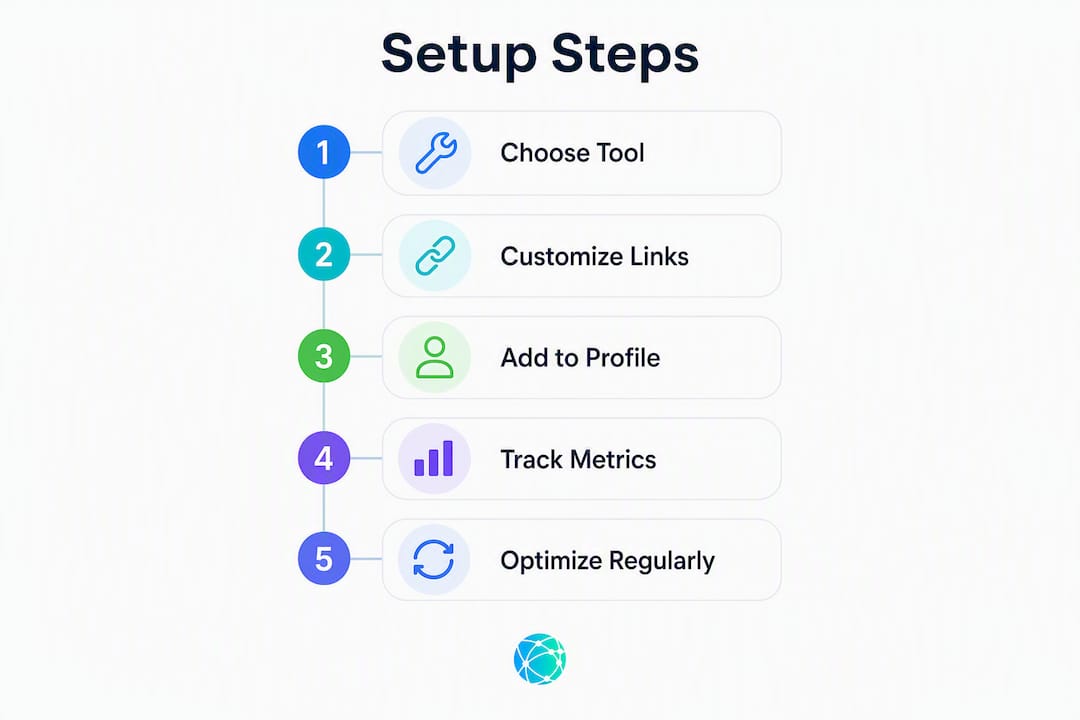
- Sign up for free at Lflow.co. No credit card required. Pick a username that matches your handle.
- Choose a mobile-first template. Templates pre-set spacing, font size, and button layout for phone screens, which is where nearly all your visitors will land.
- Add your profile photo and a one-line headline. Keep the headline to what you do and who it's for. "Fitness tips for busy moms" beats "Welcome to my page."
- Add a few prioritized links. Your top link gets the most taps by a wide margin, so put your current priority there: a product, a newsletter signup, a booking page. Secondary links go below.
- Set your short URL. Use your name or brand handle for consistency (e.g.,
lflow.co/yourname). Consistent naming also keeps UTM tracking clean across campaigns. - Copy the URL and paste it into every social bio you own. That's it. One URL, every platform.
Quick checks before you call it live:
- Preview on mobile and tap every link
- Confirm the top link loads in under two seconds
- Open real-time analytics to verify the page is tracking clicks
Pro Tip: Name your UTM campaigns consistently from day one — something like source=instagram&campaign=launch_may — so your analytics stay readable when you have six months of data. Changing naming conventions mid-campaign breaks attribution.
For ongoing management, scheduling a top link for a launch window and reverting to your evergreen layout afterward takes about 90 seconds and keeps the page relevant without a full rebuild.
How to add your bio link on Instagram, TikTok, YouTube, and X
On mobile: tap your profile photo, hit Edit Profile, and paste your URL into the Website field. On desktop, go to your profile and click Edit Profile in the top right. Both personal and creator/business accounts support a clickable link. One practical note: Instagram now lets some accounts add up to five links directly in the bio field, but a single link-in-bio URL is still the cleaner option because it gives you analytics and lets you update destinations without editing your profile every time.
TikTok
TikTok requires a Business account to add a clickable website link in the bio. Tap Profile, then Edit Profile, and paste your URL into the Website field. Personal accounts on TikTok do not get a clickable link field regardless of follower count. One thing worth knowing: TikTok's in-app browser is notoriously slow, so a fast-loading, lightweight bio page matters more here than anywhere else.
YouTube
YouTube doesn't have a traditional "bio link" field the way Instagram does. Instead, add your link-in-bio URL to your Channel About section and pin it in video descriptions. Both placements are clickable and indexed. The About section also lets you add multiple links with custom labels, which makes it a good complement to your main bio page.
X (Twitter)
Go to Edit Profile and paste your URL into the Website field. That link appears as a clickable line directly under your display name. You can also drop the URL into individual tweets when promoting a specific campaign. If you're using a branded short link, double-check that X doesn't truncate it in the display.

Common troubleshooting: If your link shows as unclickable, check for a leading space before the URL. If the in-app browser loads slowly, your page may have heavy images — compress them or use a template that loads lean.
How to design your bio page around one clear goal
The single biggest mistake creators make is treating the bio page like a sitemap. A link-in-bio page is a decision page, not a directory. Visitors arrive with limited patience and a specific intent. Your job is to make the next click obvious.
Design rules that actually move the needle:
- Lead with one primary action. Sell, subscribe, book, RSVP, or listen. Pick one for the current period and put it first. If everything is a priority, nothing is.
- Keep the visible set to 3–7 links. Every link you add competes with every link above it. Group older or secondary destinations behind a single "More" link or folder.
- Write literal CTA labels. "Listen — latest episode" converts better than "Podcast." "Get the free template" beats "Resources." Literal labels reduce the mental step between reading and clicking.
- Follow a visual hierarchy: hero image or headline, primary CTA button, supporting links, social icons at the footer. Don't bury the main button below the fold.
- Match your brand. Colors and fonts should feel like the same person behind your Instagram or TikTok. A jarring visual disconnect drops trust before anyone clicks.
Campaign modes worth saving as templates:
- Launch mode: top link goes to the product or waitlist page; everything else drops below the fold.
- Evergreen mode: top link is your highest-converting asset (best-selling product, newsletter signup).
- Sponsorship mode: lead with a "Work with me" or media kit link; secondary links show audience proof.
Pro Tip: Save each mode as a named version in your link-in-bio tool. When a launch ends, you're not rebuilding — you're just switching back to the evergreen layout.
What to track and how to improve your bio link over time
You don't need a complex analytics stack. Four numbers tell you almost everything:
| Metric | What it tells you |
|---|---|
| Total clicks | Raw traffic to the bio page |
| Click-through rate (CTR) | Share of profile visitors who actually tap the bio link |
| Primary link conversion rate | How many bio visitors click your top link |
| Source breakdown | Which platform (Instagram, TikTok, etc.) drives the most traffic |
Real-time analytics and QR-code scans are especially useful for offline promotions — a QR code on a flyer or a story sticker gives you a separate traffic source you can measure independently from your social bio.
Optimization routine that works:
- Swap the top link for a focused 1–2 week window and measure the primary link conversion rate before and after.
- Test CTA wording on the top button. One word change ("Join" vs. "Get") can shift clicks noticeably.
- Review results every 2–4 weeks. Keep the winning variant; archive what lost.
Consistent UTM naming is the unglamorous part that makes all of this work. A structure like utm_source=instagram&utm_medium=bio&utm_campaign=launch_june lets you compare campaigns across months without guessing which link drove which result.
Is a link-in-bio tool free? Free vs. premium features explained
Most platforms, including Lflow, offer a free plan that covers the core use case.
| Feature | Free plan | Premium plan |
|---|---|---|
| Unlimited links | Yes | Yes |
| Default short URL | Yes | Yes |
| Basic templates | Yes | Expanded library |
| Lightweight analytics | Yes | Advanced, real-time |
| Custom domain | No | Yes |
| Branded short links | No | Yes |
| Scheduled / auto-archived links | No | Yes |
| Password protection | No | Yes |
| CSV data export | No | Yes |
| Branding removal | No | Yes |
| Priority support | No | Yes |
| QR code generation | No | Yes |
Upgrade when you need:
- A custom domain for professional branding (e.g.,
links.yourbrand.com) - Scheduled links for product launches or limited-time offers
- Advanced analytics to report on conversions, not just clicks
- Password-protected pages for gated content or ticketed events
Start free to validate that your top link actually converts. Upgrade when branding or deeper analytics become the bottleneck, not before.
Privacy, security, and compliance basics for your bio page
A few checks that are easy to skip and occasionally costly:
Content exposure: Never place personally identifying information — Social Security numbers, private files, unannounced pricing — behind a public bio link. Use password protection for gated downloads or ticketed event pages. Lflow's custom bio page features include password protection specifically for this use case.
Analytics disclosure: If you're collecting click data on U.S. visitors, a brief disclosure in your page footer ("This page uses analytics to track clicks") keeps you aligned with standard transparency expectations. Double-check any third-party scripts on custom pages — some embed trackers you didn't explicitly add.
Account security: Enable two-factor authentication on your Lflow account, confirm your recovery email is current, and audit connected apps every few months. A compromised bio link account can redirect your entire audience to a malicious page.
Key Takeaways
A focused, regularly updated bio link page consistently outperforms a static list of links because it matches visitor intent to a single clear action.
| Point | Details |
|---|---|
| One primary action first | Place your current top priority at the top; every other link competes with it. |
| Keep links to 3–7 | Fewer visible links means more attention on each one and higher CTR. |
| Test and update every 2–4 weeks | Swap the top link, test CTA wording, and keep the variant that converts. |
| Free plan covers the basics | Start free to validate your setup; upgrade for custom domains or advanced analytics. |
| Lflow for fast setup | Lflow.co gets your bio link page live in under two minutes with real-time analytics and QR codes included. |
The bio link is your highest-intent real estate
Most creators treat the bio link as a chore — something to set up once and revisit only when a new product drops. That's the wrong frame. A profile tap is a deliberate act. Someone saw your content, decided you were worth more of their time, and went looking for what to do next. That moment is the highest-intent traffic you own, and a stale or cluttered page wastes it completely.
What actually works is small, deliberate updates on a short cycle. Not redesigns. Not new tools. Just: what is the one thing I want the next hundred visitors to do, and is that thing at the top of my page right now? Conversion metrics matter more than aesthetics here. A plain page with a clear button and a literal label will outperform a beautiful page with five equally weighted options almost every time.
The tool is genuinely secondary. Pick the simplest one that supports your goal and gives you enough analytics to know when something isn't working. Then spend your energy on the page's purpose, not its appearance.
Get your bio link live with Lflow
Lflow gives you a working bio link page in under two minutes — no design experience needed, no long-term commitment. Pick from mobile-optimized templates, add your links, and get a branded short URL you can drop into every platform bio today. Real-time analytics show you which links are getting tapped and from which platform, so you're not guessing. QR codes for offline campaigns are built in. Scheduled links let you pin a launch page for a week and revert automatically.

The free plan covers everything you need to start. When you're ready for a custom domain, advanced analytics, or branding removal, upgrading takes about 30 seconds. Start your free bio link page at Lflow.co and have it live before you finish your next cup of coffee.
Useful resources to keep going
Lflow product pages:
- Free Link App for Instagram & TikTok Bio — main signup and product overview
- Free Link in Bio Templates — one-click starter layouts
- Free QR Code Generator — QR codes for offline and story campaigns
Lflow blog guides:
- How to Drive Traffic From Bio: 2026 Guide
- Creative link in bio ideas to maximize engagement
- Bio page conversion: turn social clicks into customers
Platform help centers: Instagram, TikTok, YouTube, and X each maintain official help articles on editing your profile bio — search "[platform name] edit profile link" in their respective support centers for the most current steps.