

You have a solid following, decent engagement, and one link in your bio. So why isn't it generating real business results? Most content creators and small business owners treat bio page conversion as a simple metric — did someone click the link? Done. But what is bio page conversion, really? It's the full chain of events from the moment someone lands on your bio link page to the moment they buy, book, or sign up. That gap between "clicked" and "converted" is where most social media revenue quietly disappears, and closing it starts with understanding how the whole system works.
Table of Contents
- What is bio page conversion? Defining the term
- Why measuring bio page conversions goes beyond clicks
- Features of an effective bio link page for higher conversions
- Optimizing your social media bio to boost bio page conversions
- Advanced tactics: testing and tracking to maximize bio page conversions
- What most creators get wrong about bio page conversion — and how to fix it
- Boost your bio page conversion with Linkflow's free tools
- Frequently asked questions
Key Takeaways
| Point | Details |
|---|---|
| Bio conversion defined | Bio page conversion measures visitors completing key actions after clicking your social bio link, not just clicks. |
| Track beyond clicks | Use UTM parameters and analytics to measure actual sales or signups from bio link traffic. |
| Optimize your bio page | Design a clear, focused bio link landing page with one main goal and consistent branding. |
| Strong bio text matters | Your social media bio should include a clear call to action and relevant keywords to drive clicks. |
| Test and measure | Regularly test changes and track revenue per bio click for continuous improvement. |
What is bio page conversion? Defining the term
Bio page conversion is the percentage of visitors who complete a specific, intended action after clicking your bio link. Not just arriving at your landing page. Not just tapping a button. Actually following through to a goal that matters to your business.
A link-in-bio page is typically a single URL that redirects to a custom landing page with multiple links, acting like a micro-site designed to convert visitors to goals like signups or purchases. Think of it less like a list of links and more like a mini website with a job to do.
There are actually two layers of conversion happening here, and most people only track one:
- Micro-conversions: Actions taken inside the bio link page itself, like clicking a specific button, tapping a product link, or watching an embedded video
- Business conversions: Actions completed on the destination site, like completing a purchase, submitting a form, booking a call, or joining an email list
If you only measure micro-conversions, you see how many people clicked your "Shop Now" button. But you have no idea how many of them actually bought something. That blind spot is expensive. Getting familiar with bio link basics helps you understand the full role the bio page plays in your marketing funnel from the start.
Why measuring bio page conversions goes beyond clicks
Clicks feel satisfying. They go up, you feel progress. But clicks on your bio link page are not conversions. They're potential. Knowing whether that potential turns into revenue requires tracking that goes several steps deeper.

The core problem: bio-tool analytics often only show clicks within the bio page itself. True conversion measurement requires end-to-end tracking using UTM parameters and analytics like GA4 on destination pages. Most creators never set this up and end up flying blind on the metrics that actually matter.
Here's what end-to-end tracking actually requires:
- UTM parameters added to every link on your bio page (source, medium, campaign, content)
- Google Analytics 4 or equivalent installed on each destination page you control
- Goal or conversion events configured in GA4 so that completed purchases, form submissions, and signups get recorded
- Regular review of the traffic from your bio link source in GA4 to calculate true conversion rates
Pro Tip: Name your UTM sources consistently. Use "bio-link" as your source for all links coming from your bio page. This way, you can filter GA4 reports by that source and see exactly how much revenue or how many leads your bio page is generating month over month.
Tracking bio link performance this way gives you the full picture. Without it, you might spend hours redesigning your bio page layout while the actual problem is a broken checkout flow on your store.
Features of an effective bio link page for higher conversions
Understanding how to track conversions sets the stage for building a bio page that actually converts visitors. The design and structure of the page itself has a direct impact on how many people take action.
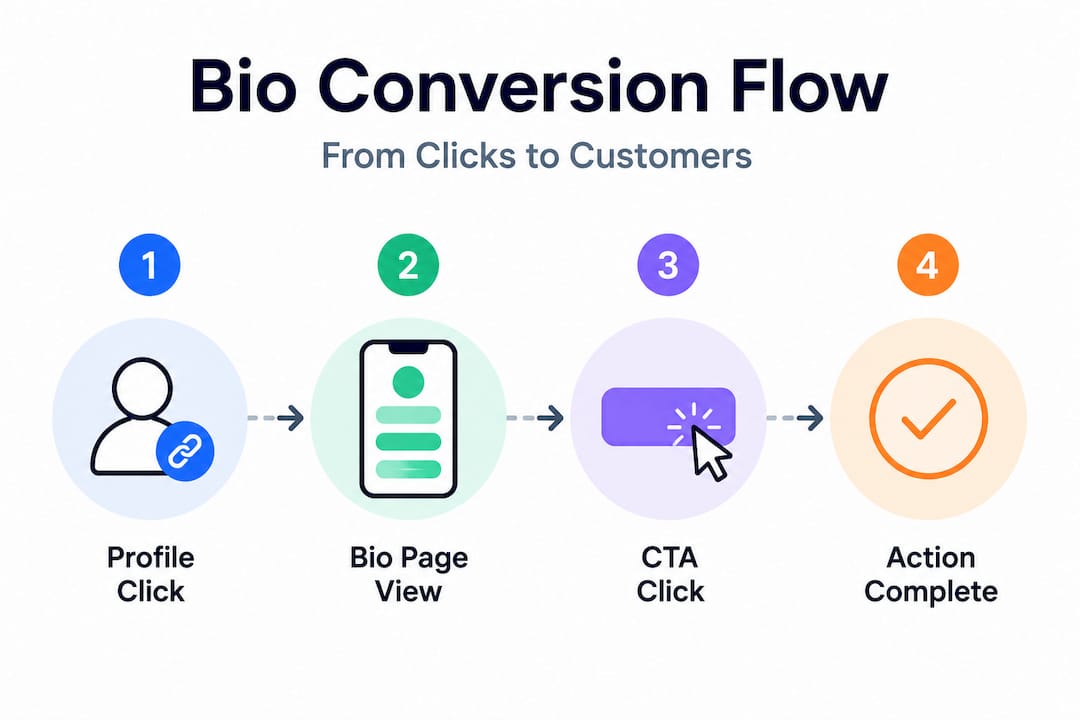
Optimized link-in-bio pages generate 25-40% higher conversion rates and 350% more click-throughs compared to static single links. That gap exists because an optimized page treats every design decision as a conversion variable.
Key elements that drive bio page effectiveness:
- One clear primary call to action. Visitors should know immediately what you most want them to do. Lead with it visually.
- Brand consistency. Colors, fonts, and imagery that match your social profile reduce cognitive friction and build trust instantly.
- Reduced link count. Paradox of choice is real. Pages with 3-5 focused links tend to convert better than pages with 12 options.
- Integrated forms or payment options. The fewer steps between interest and action, the better. Turning profile visitors into leads becomes measurably easier when people don't have to navigate through multiple pages before they can commit.
Here's a quick comparison of bio page formats and how they affect bio link conversion rates:
| Bio page type | Avg. click-through rate | Best for | Weakness |
|---|---|---|---|
| Static single link | Low | Minimal setups | Zero flexibility, no conversion tracking |
| Multi-link landing page | Medium-High | Creators with multiple offerings | Can overwhelm visitors without clear hierarchy |
| Integrated micro-commerce page | Highest | Product sellers, coaches, service providers | Requires more setup, needs regular maintenance |
Pro Tip: Put your highest-converting link at the top and test whether adding a thumbnail image next to it increases clicks. Visual cues draw the eye and communicate value faster than text alone.
Explore bio page optimization tips for specific layout ideas that work across Instagram, TikTok, and YouTube profiles.
Optimizing your social media bio to boost bio page conversions
Now, let's look upstream at how the profile bio itself can drive more visitors to your bio link page. The page quality only matters if people are clicking through to it. Your social bio is the gateway.
The first 80-100 characters of your bio are the most critical. A strong bio increases the number of profile visitors who click through to your conversion micro-landing page. That's a small amount of text doing a very heavy job.
Here are five steps to align your bio copy with your conversion goals:
- Lead with who you help. "I help fitness coaches fill their calendar" beats "Personal trainer and wellness enthusiast" every time. Specificity earns clicks.
- State your most valuable offer. One line. One offer. Don't list everything you do. Pick the thing your audience needs most right now.
- Write a direct call to action. "Grab your free guide below" or "Book your spot" tells people exactly what to do next. Vague calls to action like "Check out my links" do not drive urgency.
- Use keywords your audience searches. On platforms like TikTok and Instagram, bios are indexed. Include the terms your target customer would use to find someone like you.
- Update it with every campaign. If you're running a limited-time offer or promoting a new product, your bio should reflect that. A bio that says "Download my free course" when your link goes to a paid offer creates instant distrust.
Custom bio pages that match the messaging in your social bio create a consistent experience that moves people from curious to committed.
Advanced tactics: testing and tracking to maximize bio page conversions
With a solid bio and bio page in place, continuous testing is what separates creators who improve steadily from those who plateau. Bio page visitor engagement is not a set-and-forget metric.
The principle is simple: treat the bio link page like a landing page. Pick one goal, track relevant metrics, and test one change at a time for meaningful results. Changing your CTA text and your layout simultaneously means you'll never know which variable actually moved the needle.
One metric worth calculating is Revenue Per Bio Click, or RPBC. Tracking RPBC helps monetize your optimization efforts by keeping focus on revenue, not just click counts. The formula: total revenue from bio traffic divided by total bio link clicks. If your RPBC goes up after a change, that change worked.
Use this testing cycle:
- Plan: Identify one specific element to test, such as the headline, button color, or the order of your links.
- Implement: Make only that one change. Document what you changed and when.
- Measure: Run the test for at least 7-14 days to gather enough data. Less than that and normal traffic fluctuations skew results.
- Analyze: Compare click-through rates, RPBC, and goal completions before and after. Look at multi-link bio testing data across different link positions.
- Iterate: Keep what worked. Test the next variable. Build on each win incrementally.
Pro Tip: Set a calendar reminder to review your bio page performance every two weeks. Small, regular adjustments compound into major conversion gains over months.
What most creators get wrong about bio page conversion — and how to fix it
Here's an uncomfortable truth that most "link in bio" guides skip over: the majority of creators are optimizing the wrong thing. They spend hours tweaking their bio page layout, testing button colors, and adding new links. Then they call their click-through rate good and move on. The conversion problem remains untouched.
Many creators optimize only for micro-conversions inside the bio page without linking to tracked, optimized destination pages, missing major revenue bottlenecks. The bio page gets all the attention. The destination pages, where money actually changes hands, get none.
Think about what this means in practice. You drive 1,000 visitors to your bio page. 400 click your shop link. That looks like a 40% click-through rate, which sounds great. But only 8 people buy. That's a 2% conversion on the destination page. The problem isn't your bio page. It's your store. But because you never tracked past the click, you never found that out.
The best approach treats the entire system as a funnel with two distinct stages that each require separate monitoring. Micro-conversions tell you whether your bio page is doing its job of routing people effectively. Business conversions tell you whether your destination pages close the deal. Both numbers need to be on your dashboard. Common bio link mistakes almost always trace back to this same gap: good top-of-funnel effort, zero bottom-of-funnel visibility.
If you take one thing from this article, let it be this: clicks are a warm-up. Conversion is the main event. Track both stages, optimize both stages, and your bio link system will start generating the kind of results your follower count actually deserves.
Boost your bio page conversion with Linkflow's free tools
You now have a clear picture of how bio page conversion works, what to measure, and how to build a bio link page that drives real business results.

Linkflow makes it easy to put this into practice right now. With our free link in bio tool, you can build a conversion-focused landing page with unlimited links in under two minutes. Choose from professionally designed bio link page templates built to drive clicks and actions, add UTM parameters to every link for end-to-end tracking, and use custom domains to keep your branding tight. Need offline reach? Generate a free QR code to connect your physical marketing materials directly to your bio link page. No cost to start, no technical skills required.
Frequently asked questions
What exactly is bio page conversion?
Bio page conversion measures how many visitors click your bio link and then complete a desired action, like purchasing or signing up, tracking the full funnel from bio clicks to actual business outcomes rather than just initial link activity.
Why can't I rely on bio link tool clicks alone to measure conversions?
Because true conversion measurement requires end-to-end tracking with UTM parameters and analytics tools like GA4 on destination pages, since bio tools only record clicks within the bio page itself, not completed purchases or signups.
How can I improve conversion rates on my bio link page?
Focus on a single clear call to action, reduce friction by integrating forms or payment options, maintain consistent branding, and run data-driven tests. Optimized bio pages generate 25-40% higher conversion rates than static alternatives.
What role does my social media bio text play in conversions?
Your bio text is what drives profile visitors to click your link in the first place. The first 80-100 characters of your bio are the most critical, so a clear, specific bio with one call to action significantly increases traffic to your bio page.
How often should I update my bio and bio link page?
Review and update both at least monthly, or whenever your primary offer, campaign, or call to action changes, to keep your content relevant and your conversion rate from degrading over time.