

Your link in bio is the single most valuable piece of real estate on your social media profile, yet most creators and brands leave it completely untouched after setup. Knowing how to optimize link in bio pages goes far beyond dropping in a URL and walking away. The gap between a bio link that converts and one that bleeds traffic comes down to structure, design, and measurement. This guide covers every layer of that process, from picking the right tools to running your first A/B test, so you stop losing clicks you already earned.
Table of Contents
- Key takeaways
- How to optimize link in bio: what to prepare first
- Step-by-step setup for maximum clicks
- Design and UX best practices for your bio link page
- How to measure and improve your link performance
- Common pitfalls to avoid
- My take on what actually separates good from great
- Start building with Lflow
- FAQ
Key takeaways
| Point | Details |
|---|---|
| Limit your links | Stick to three links maximum to avoid cognitive overload and protect your click-through rate. |
| Verb-first CTA labels | Start every link label with a verb to speed up scanning and increase clicks by up to 40%. |
| Brand your URL | A custom branded link generates significantly more clicks than a generic shortener. |
| Measure beyond raw clicks | Use UTM parameters with Google Analytics 4 to understand which links actually drive conversions. |
| Audit links regularly | Broken bio links cause 40% of users to unfollow a brand, so schedule consistent link checks. |
How to optimize link in bio: what to prepare first
Before you touch a single link, you need to understand the constraints of the platform you are working on. Instagram, for example, now supports native multi-link functionality in bios, but the display is limited and lacks customization. TikTok and LinkedIn have their own restrictions. Knowing these platform rules upfront saves you from building a setup that breaks on mobile or gets overridden by a platform update.
The tools you choose matter more than most people realize. Here is a quick comparison of the main categories:
| Tool type | Multi-link support | Analytics | Custom domain | Cost |
|---|---|---|---|---|
| Native Instagram bio | Yes (limited) | Basic | No | Free |
| Generic URL shortener | No | Minimal | No | Free |
| Link in bio platform | Yes (unlimited) | Advanced | Yes | Free or paid |
| Custom landing page | Yes | Full (via GA4) | Yes | Varies |
A dedicated link in bio platform gives you the most control over branding, link order, and data. When evaluating options, prioritize platforms that offer mobile-optimized templates, real-time analytics, and custom domain support. These three features directly affect your click rate and your ability to improve it over time.
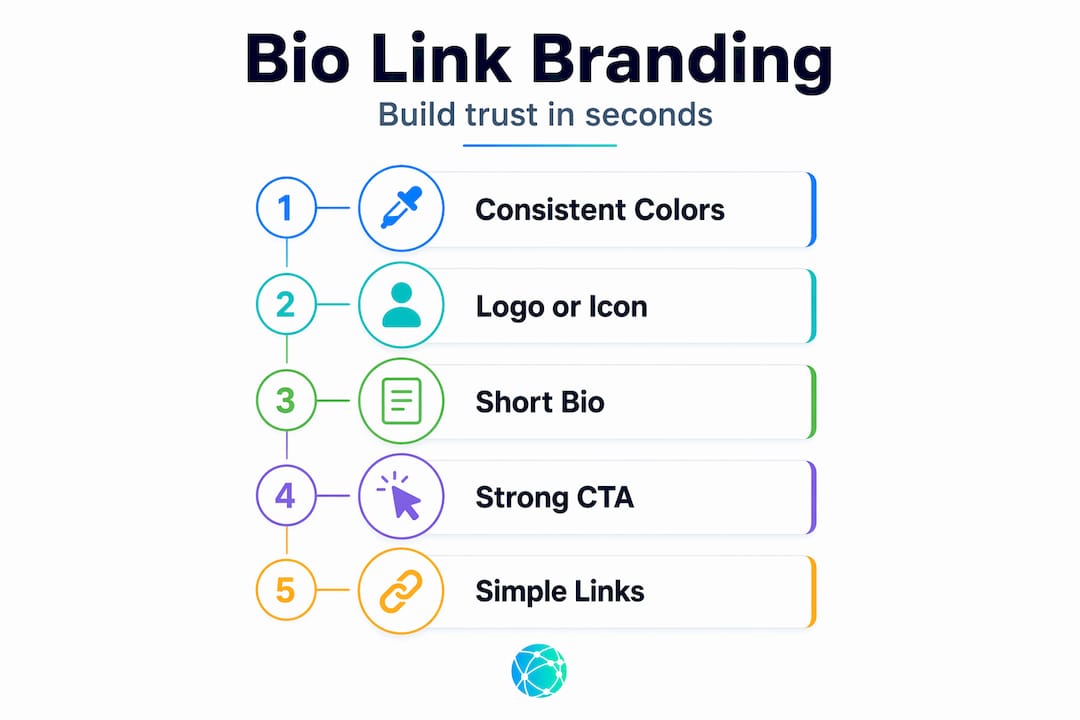
Branding alignment deserves attention before you build anything. Your bio link page should feel like a natural extension of your Instagram or TikTok profile. That means consistent colors, fonts, and tone. A mismatched landing page breaks the trust a new visitor just built by tapping your link.
Finally, set up UTM parameters before you launch. UTM tags are short strings you append to each URL, like "?utm_source=instagram&utm_medium=bio`. They let Google Analytics 4 tell you exactly which link in your bio drove a purchase or signup. Without them, accurate traffic attribution is nearly impossible, and you end up optimizing blindly.
Pro Tip: Use Instagram's Name field for your primary keyword phrase, not just your actual name. That field is the highest-weighted search index spot in Instagram's profile algorithm, so it affects discoverability directly.
Step-by-step setup for maximum clicks
Once your foundation is ready, follow these steps to build and configure your bio link page for performance.
-
Choose your links deliberately. Start by listing every destination you want to send traffic to. Then cut ruthlessly. Research shows that more than three links reduces total click-through rates by 22 to 38% due to cognitive overload. Pick your top three: usually your highest-converting product page, your most recent content, and one relationship-building destination like a newsletter signup.
-
Order by conversion intent. Put your most important link first, always. Users focus 80% of their attention above the fold on mobile screens, and the top link alone captures 40 to 60% of all clicks. Position your strongest call to action there, not your newest post or your general homepage.
-
Write verb-first CTA labels. Generic labels like "My Website" or "Store" perform poorly because they describe rather than direct. Labels that start with a verb improve scan speed by around 40%. Instead of "New Collection," write "Shop the New Collection." Instead of "Podcast," write "Listen to the Podcast." The difference feels small but the click data tells another story.
-
Add specific numbers to CTAs where possible. Vague phrases like "Learn More" are conversion killers. Specific CTAs using numbers increase click rates by 27% compared to generic phrasing. "Get 3 Free Templates" outperforms "Download Resources" every time.
-
Test load time on mobile before you publish. 64% of mobile users abandon a bio link page that feels unprofessional or takes more than two seconds to load. Run your page through a mobile speed test and remove any heavy images, videos, or third-party scripts that slow things down.
-
Build in a regular update cadence. Set a recurring reminder to review your links weekly or every time you publish new content. Stale links waste the momentum of your best posts. A link pointing to a sold-out product or a completed event actively damages your brand.
Pro Tip: Swap the second or third link position to test performance. Run each variation for at least five to seven days before drawing conclusions. Small position changes on a high-traffic profile can mean hundreds of additional clicks per week.
For more ideas on structuring your page, the guide to creative bio page ideas covers formats that work across different creator and brand niches.
Design and UX best practices for your bio link page
The visual experience of your bio link page directly affects whether visitors click or bounce. Here is what actually moves the needle.

Keep your design consistent with your social profile. If your Instagram feed is warm-toned and minimalist, your bio link page should mirror that. A visitor who taps your link should feel like they are still in your world, not redirected to a generic template that could belong to anyone. This consistency builds trust, and trust drives clicks.
Place your most important button above the fold on mobile. Most visitors will not scroll before making a decision, so your primary CTA must be visible without any interaction. Use high-contrast button colors that stand out from the background. Thumb-friendly sizing matters too: buttons should be at least 44 pixels tall on mobile to be comfortably tappable.
Pro Tip: Avoid animations, auto-playing media, and excessive icons. These elements feel dynamic but they actually slow load times and pull attention away from your links. A clean page with clear labels and breathing room between buttons consistently outperforms a "designed" page cluttered with effects.
Two more principles worth applying:
- Semantic grouping: If you do include more than three links, group them by user intent. "Shop" links in one cluster, "learn" links in another. This structure helps visitors self-select quickly instead of reading every label.
- Progressive disclosure: Make primary links open in the same tab to reduce friction. Secondary links, like social profiles or external resources, should open in a new tab so visitors do not lose your page entirely.
Accessibility is not optional. Use sufficient color contrast between button text and background, and write descriptive link labels that make sense out of context. A screen reader user should be able to navigate your page as easily as anyone else.
How to measure and improve your link performance
Raw click counts feel satisfying but they tell you almost nothing useful. Clicks are a vanity metric without context. Meaningful engagement requires on-site conversion tracking with UTM parameters tied to Google Analytics 4.
Here is how to build a measurement system that actually informs decisions:
- UTM every link: Append unique UTM parameters to each destination URL. At minimum, track source (instagram), medium (bio), and content (the specific link label). This lets GA4 show you which link drove actual conversions, not just traffic.
- Review your bio tool analytics weekly: Most dedicated link in bio platforms provide click maps, device breakdowns, and location data. Use device data to confirm your page is performing on the mobile devices your audience actually uses.
- A/B test CTA text and order: Change one variable at a time. Test "Shop the New Drops" versus "See New Arrivals" for a week each. Let the data pick the winner before moving to the next test.
- Track link health automatically: Use a URL monitoring tool or your bio platform's built-in checker to catch broken links before visitors do. 40% of users unfollow brands after hitting a broken link or 404 error in a bio.
- Analyze geographic data: If a large portion of your audience comes from a specific country or region, consider whether your primary link destination is relevant to them. A product page that ships only domestically should not be your top link if 60% of your traffic is international.
| Metric | What it tells you | How often to review |
|---|---|---|
| Click-through rate per link | Which links resonate most | Weekly |
| Bounce rate on destination page | Whether the landing page matches expectations | Weekly |
| Conversion rate from bio traffic | Actual ROI of your bio link strategy | Monthly |
| Device breakdown | Mobile vs. desktop traffic ratio | Monthly |
| Link health status | Whether all URLs are live and functioning | Daily or automated |
Following these best practices for link in bio tracking creates a feedback loop that compounds over time. Each iteration of your setup performs better than the last because your decisions are grounded in real data.
Common pitfalls to avoid
Most link in bio problems are not technical. They are behavioral. Creators set up a page once and assume the work is done.
- Too many links: Every link you add past three competes with your primary CTA for attention. The result is a page where nothing wins.
- Vague or missing labels: "Click Here" and "Link" are not CTAs. They are placeholders. Every label should tell a visitor exactly what they get when they tap.
- Slow or broken destinations: A beautiful bio link page that points to a slow-loading product page or a 404 error destroys the entire conversion path in one tap.
- Ignoring mobile: Over 90% of Instagram and TikTok browsing happens on phones. A page that looks good on desktop but breaks on mobile is a page that does not work.
- Using unreliable free tools: Some free link platforms shut down without warning or inject their own ads into your page. This can redirect your followers to competitor content or cause complete data loss.
The best bio link page is not the one with the most features. It is the one that removes every barrier between a visitor and their next logical action.
My take on what actually separates good from great
I've reviewed hundreds of bio link setups across creator and brand accounts, and the pattern is consistent. The accounts that drive meaningful traffic from their bio links are not the ones with the flashiest pages. They treat the bio link as a low-friction landing page, not a table of contents.
What I mean by that: most people build their bio link page to showcase everything they do. The most effective pages are built around a single primary action with supporting options behind it. Think of it less like a menu and more like a store entrance. You want visitors moving in one direction.
The counterintuitive lesson I keep coming back to is that minimalism requires more strategy, not less. Deciding what to leave out is harder than adding another link. When I see a page with eight links and no clear hierarchy, I know the creator has not made a decision yet. They have handed that decision to the visitor, and visitors almost always choose to leave.
Measurement is where most people stall. They set up UTMs once, glance at the data once, and never change anything. The brands I've seen grow their bio link traffic month over month treat their link page like a living document. They update it with every content push, test labels constantly, and cut anything that is not earning its position.
The strategic case for bio links is clear. Execution is what separates the accounts that see results from the ones that wonder why their profile traffic never converts.
— Axion
Start building with Lflow

Lflow gives you everything covered in this guide inside a single free platform. You can create a fully branded bio link page using one of the professionally designed free link in bio templates, add unlimited links, and connect a custom domain in under two minutes. The built-in analytics show you click rates, device data, and geographic breakdowns in real time, so your measurement strategy is ready from day one. Lflow also generates a free downloadable QR code for every page, making it easy to extend your bio link into offline marketing like packaging, events, or print ads. No coding, no design experience required.
FAQ
How many links should I put in my bio?
Stick to three links maximum. Research shows that exceeding three links reduces total click-through rates by 22 to 38% due to cognitive overload, so fewer, better-chosen links consistently outperform larger collections.
What makes a good bio link CTA label?
Start every label with a verb and include a specific number or benefit where possible. Verb-first labels improve scan speed by around 40%, and specific CTAs with numbers outperform vague phrases by 27%.
How do I track which bio link is driving conversions?
Append unique UTM parameters to every destination URL and connect them to Google Analytics 4. This gives you accurate attribution data showing which link drove actual conversions, not just clicks.
How often should I update my link in bio?
Update your bio link every time you publish new content or run a promotion. At minimum, audit all links weekly to catch broken URLs before they cost you followers.
Does a branded URL actually matter?
Yes. A clean, branded link increases clicks by 25% compared to generic shorteners, and branded URLs overall receive 39% more engagement because they signal credibility and professionalism to visitors.