

Building mobile optimized links is the practice of creating device-aware, fast-loading URLs that deliver the right destination to the right user while preserving tracking data across every redirect. With 15% of adults relying solely on smartphones for internet access, a link that breaks or misbehaves on mobile is a link that loses your audience. The industry terms you need to know are Universal Links (iOS), App Links (Android), and device-aware routing. Together, these form the technical backbone of any serious mobile link building strategy. This guide walks you through prerequisites, implementation, design best practices, and troubleshooting so you can build links that actually work where your audience lives.
What do you need to start building mobile optimized links?
The foundation of mobile link management is device-aware routing. This means your link evaluates the incoming request, identifies the device type, and sends the user to the correct destination. Without this logic, every user lands on the same URL regardless of whether they are on an iPhone, an Android device, or a desktop browser.
Two platform standards make native app routing reliable. Universal Links on iOS and App Links on Android handle app opening cleanly and fall back to the web if the app is not installed. This solves the race conditions that plague custom URL schemes, where the browser and the app fight over who handles the link. Both systems require verified association files hosted on your domain: apple-app-site-association for iOS and assetlinks.json for Android.

You also need a way to manage link parameters. Tracking parameters like UTM tags must survive every redirect in the chain. Tools that handle this range from server-side redirect scripts to dedicated link management platforms. The table below maps the main solution types to their strengths.
| Solution type | Best for | Parameter support |
|---|---|---|
| Server-side redirect script | Full routing control | Manual configuration |
| URL shortener with routing | Quick setup, branded links | Built-in forwarding |
| Deep-link SDK | App-to-app and deferred linking | Native, automatic |
| Link in bio platform | Social media creators | Managed, no code |
Pro Tip: Host your association files at the root of your domain over HTTPS with no redirects. Apple and Google crawl these files directly, and a single misconfiguration will break Universal Link or App Link behavior for every user.
For creators who want a no-code path, Lflow provides mobile-friendly short links with built-in routing and parameter forwarding. For marketers who need full control, a server-side solution with a deep-link SDK gives the most flexibility.
How do you implement device-aware routing and deep linking?
Device detection is the first decision your routing logic makes. The two main methods are User-Agent substring matching and the newer Client Hints API. User-Agent parsing reads the browser's self-reported string to identify iOS, Android, or desktop. Client Hints, supported in Chrome-based browsers, provide structured device data that is harder to spoof and more reliable for programmatic routing.
Routing logic must follow a strict order to protect your SEO. Run bot detection first. Search crawlers should always receive the standard web URL, not an app store redirect. Misordering this check sends Googlebot to the App Store, which harms crawl efficiency and indexing. After bot detection, check for iOS, then Android, then fall through to desktop as the default.
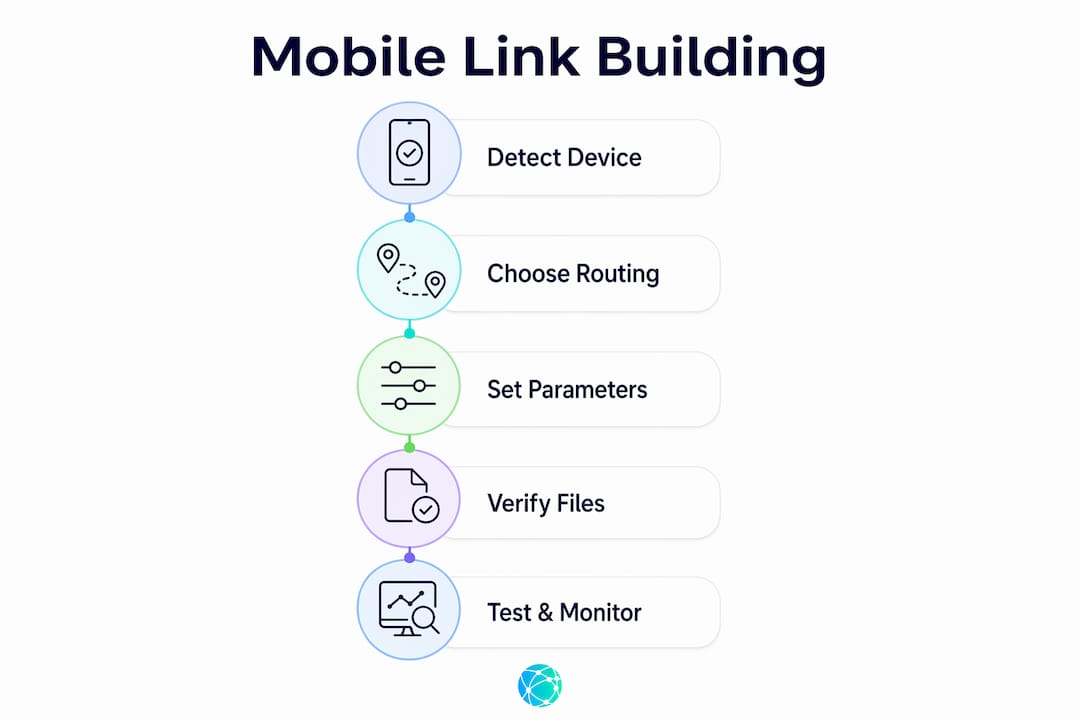
The implementation steps break down as follows:
- Set up your association files. Host
apple-app-site-associationandassetlinks.jsonon your domain. Verify them using Apple's and Google's official validation tools before going live. - Write your routing logic. Check the User-Agent or Client Hints header. Match against known bot signatures first, then iOS identifiers, then Android identifiers.
- Configure app-not-installed fallbacks. If the app is absent, redirect iOS users to the App Store and Android users to Google Play. Never leave this path empty or users hit a dead end.
- Preserve tracking parameters. Forward the full query string through every redirect. Use durable parameter names, avoid special characters, and minimize redirect chains to prevent attribution loss.
- Test across real devices. Open your link in Safari on iOS, Chrome on Android, and inside Instagram, TikTok, and Facebook's in-app browsers. Each environment handles redirects differently.
- Monitor and iterate. Track click-through rate, bounce rate, and parameter integrity from day one. Routing errors often appear only after real traffic hits the link.
Pro Tip: In-app browsers on Instagram and TikTok strip certain headers and block some redirects. Always test your links inside these apps on physical devices, not just in a desktop browser emulator.
A single smart-routing URL outperforms multiple separate links by handling device detection and fallbacks automatically. This matters most for campaign links shared across Instagram, TikTok, and email simultaneously.
What are best practices for mobile link design and user experience?
Short links perform better on mobile for two concrete reasons. First, they fit cleanly inside messaging apps and social bios without wrapping or truncating. Second, they look less suspicious to users who are cautious about clicking unfamiliar URLs. Keeping links short directly improves tap rates on small screens where long URLs feel cluttered and untrustworthy.
Anchor text quality matters as much as URL length. Descriptive, concise anchor text boosts link clarity and mobile reading speed. Generic phrases like "click here" or "learn more" give users and search crawlers no context. Replace them with specific labels like "watch the tutorial" or "get the free template." This applies to every link you publish, from Instagram captions to email newsletters.
Link placement shapes engagement as much as the link itself. Card-style content blocks outperform inline text links in mobile click-through rates. A card gives the link visual breathing room and a clear tap target. Inline links buried in a paragraph are easy to miss on a 6-inch screen.
Key UX and accessibility standards for mobile links:
- Tap target size: Keep tap areas at least 48x48 pixels to meet Google's mobile usability guidelines.
- Redirect count: Limit chains to two redirects maximum. Each additional hop adds latency and risks parameter loss.
- Load speed: Mobile page interactions must respond within 200ms to maintain user engagement. Slow redirects kill conversions before the destination page even loads.
- In-app browser compatibility: Test every link inside the social app where it will be shared, not just in a standalone browser.
- Accessibility: Use descriptive link labels that make sense when read aloud by screen readers. Avoid relying on color alone to distinguish links from body text.
For creators managing multiple destinations, an omnichannel link approach consolidates all your links into one mobile-ready hub. This reduces the number of URLs you need to manage and keeps your audience's experience consistent across platforms.
What mistakes should you avoid when building mobile links?
Parameter loss is the most common and most damaging mistake in mobile link building. It happens when a redirect chain strips query strings, when a client-side redirect fires before the server forwards parameters, or when an in-app browser blocks certain URL components. Parameter loss harms campaign measurement accuracy and breaks attribution, meaning you cannot tell which channel drove a conversion.
Custom URL schemes are a second major pitfall. Schemes like myapp:// open apps directly but have no reliable fallback. If the app is not installed, the user sees an error. Universal Links and App Links solve this by design. The biggest pitfalls involve losing deep-link context or broken app store fallbacks. Using platform-supported links with verified association files minimizes both risks.
Troubleshooting checklist for mobile link issues:
- Confirm your association files return a 200 status code with the correct content type over HTTPS.
- Verify bot detection runs before device routing. Check server logs to confirm Googlebot receives the web URL.
- Open the link in each target in-app browser and confirm the full query string arrives at the destination.
- Check redirect chain length. More than two hops is a red flag for both speed and parameter integrity.
- Review CTR and bounce rate by device segment in your analytics platform. A spike in mobile bounce rate often signals a routing or load speed problem.
- Test deferred deep linking if your campaign targets new app installs. Parameters must persist through the install flow, not just through the redirect.
Pro Tip: Set up automated monitoring with alerts for redirect failures and parameter drop rates. Catching a broken link within minutes of a campaign launch saves far more than fixing it hours later after traffic has already bounced.
Link tracking is the measurement layer that makes all of this work visible. Without it, you are routing blind.
Key Takeaways
Building mobile optimized links requires device-aware routing, verified association files, short URLs, and intact tracking parameters to deliver consistent performance across every platform and device.
| Point | Details |
|---|---|
| Run bot detection first | Always check for crawlers before device routing to protect SEO and indexing. |
| Use Universal Links and App Links | Platform-supported deep links prevent broken fallbacks and race conditions from custom URL schemes. |
| Preserve tracking parameters | Forward the full query string through every redirect to maintain campaign attribution accuracy. |
| Keep links short and descriptive | Short URLs improve tap rates; specific anchor text improves clarity for users and crawlers. |
| Test inside real in-app browsers | Social app browsers behave differently from standard browsers and must be tested on physical devices. |
The case for mobile-native thinking from day one
Most link problems I see come from the same root cause: the link was built for desktop and patched for mobile afterward. That approach always leaves gaps. The routing is incomplete, the fallbacks are missing, or the parameters drop somewhere in the chain. The fix is not more patches. It is building mobile-native from the start.
The shift to Client Hints is worth paying attention to right now. User-Agent strings are being frozen and deprecated across browsers. Marketers who still rely entirely on User-Agent parsing will find their routing logic degrading quietly over the next 12 to 18 months. Client Hints give you structured, reliable device data, but they require server-side adoption. Start testing them now before your current detection method becomes unreliable.
Deferred deep linking is the other technology most creators ignore until they need it. When a user clicks your link, does not have the app, installs it, and opens it for the first time, where do they land? Without deferred deep linking, they land on the app's home screen and your campaign context is gone. With it, they land exactly where you intended. That difference can determine whether a campaign converts or disappears.
The practical tension I keep running into is between short links and rich tracking. Short links look clean and get clicked. Long parameter strings look suspicious and get ignored. The answer is a link management layer that keeps the URL short on the surface while forwarding the full parameter set server-side. Lflow handles this automatically, which is why I recommend it to creators who want clean links without sacrificing measurement.
— Axion
Lflow makes mobile link management straightforward
Lflow was built for exactly the kind of mobile-first link management this article covers. Every link in bio page Lflow generates is fully responsive and loads fast on any device. The platform handles device-aware routing, free QR code generation, and short URL creation without requiring any technical setup.

Creators on Instagram, TikTok, YouTube, and LinkedIn use Lflow to consolidate all their destinations into one branded, mobile-ready link hub. Setup takes under two minutes. Real-time analytics show you exactly which links your audience taps and from which platform. If you are serious about optimizing links for creators, Lflow gives you the tools to do it without writing a single line of code.
FAQ
What is a mobile optimized link?
A mobile optimized link is a device-aware URL that routes users to the correct destination based on their device type, loads fast, and preserves tracking parameters through every redirect.
Why do tracking parameters get lost on mobile?
Parameter loss happens when redirect chains strip query strings, when client-side redirects fire before server forwarding, or when in-app browsers block certain URL components. Minimizing redirect chains and using server-side forwarding prevents this.
What is the difference between Universal Links and custom URL schemes?
Universal Links (iOS) and App Links (Android) fall back to the web automatically if the app is not installed. Custom URL schemes like myapp:// show an error instead, making them unreliable for public-facing campaigns.
How many redirects are too many for a mobile link?
Two redirects is the practical maximum. Each additional hop adds latency and increases the risk of parameter loss, both of which hurt user experience and campaign measurement.
How do I test mobile links in in-app browsers?
Open your link directly inside Instagram, TikTok, and Facebook on a physical device. Links behave differently in social app browsers than in standard mobile browsers, so emulators alone are not sufficient for accurate testing.