

The fastest, most effective way to shorten links for Instagram is to use a branded, trackable short link with UTM parameters attached. Skip the generic shorteners if you're building anything beyond a one-off post. Create a short link with Lflow right now and you'll have a working, analytics-ready URL in under two minutes.
Two things make Instagram links different from links anywhere else: nearly all clicks come from mobile devices, and the app frequently strips referrer data before it reaches your analytics. That combination means a plain short link isn't enough. You need branding for trust, UTMs for attribution, and a mobile-optimized destination for conversions.
Key Takeaways
Branded, trackable short links with UTM parameters are the most effective way to measure and improve Instagram link performance.
| Point | Details |
|---|---|
| Use branded short links | Custom domains build trust and lift click-through rates compared to generic short URLs. |
| Tag every link with UTMs | Add source=instagram and medium=bio/story/dm to preserve attribution in GA4. |
| Separate bio vs. story links | Create distinct short links per placement to compare performance accurately. |
| Go mobile-first on landing pages | Nearly all Instagram clicks come from mobile; keep CTAs above the fold. |
| Start with Lflow | Lflow's free plan covers branded short links, link-in-bio pages, analytics, and QR codes with no credit card required. |
Table of Contents
- How do you shorten links for Instagram quickly?
- Why branded, trackable short links matter on Instagram
- How to create a short, trackable Instagram link step by step
- Best practices for Instagram links
- Free vs. paid: what you actually get
- Quick fixes for common Instagram link problems
- How to set up a branded short domain for Instagram
- How do Instagram-specific shortener features compare?
- Security and spam filters: keeping your links trusted
- Legal and privacy considerations for link tracking
- Why branded link hubs are the right default for creators
- Lflow gives you branded short links and a free link-in-bio page
- Sources
How do you shorten links for Instagram quickly?
Three routes cover almost every situation. Pick the one that fits your goal.
- Branded short link with a custom domain (via a platform like Lflow): best for creators, brands, and anyone running campaigns. Higher click-through rates, accurate tracking, and you can swap the destination without touching your bio.
- Free generic shortener (no account required): best for one-off links or quick tests where branding doesn't matter. You get a short URL fast, but analytics are thin and the domain is shared with thousands of other users.
- Link-in-bio landing page (one permanent bio URL that routes to multiple destinations): best when you're promoting several things at once — a new video, a store, a newsletter — and can't update the bio for every post. Each row on the page should carry its own tracked short link for per-row click attribution.
If you're unsure which to start with, go branded. The setup time difference is minimal, and the data you collect from day one is worth far more than the few minutes saved by pasting into a free tool.
Why branded, trackable short links matter on Instagram
Instagram's mobile-first behavior creates a specific attribution problem. An analysis of 4,024 Instagram clicks found that nearly all of those clicks came from mobile devices, with very few from desktops and none from tablets. That's not a rounding error — it's the entire audience. Every landing page you send people to needs to load fast and look right on a phone screen.
The second problem is referrer stripping. Instagram's mobile app regularly drops referrer data before it reaches GA4, which means your analytics show that traffic as "direct" rather than "Instagram." LeadJourney's integration documentation confirms that appending UTM parameters — specifically source=instagram and medium=bio or medium=story — is the practical fix.
Branded links add a third layer of value:
- Trust and CTR: users are more likely to tap a link on a domain they recognize than a generic short URL from an unfamiliar string of characters. Link branding consistently lifts click-through rates on social platforms.
- Destination flexibility: a branded short link lets you change where it points without editing your bio. Run a flash sale, then redirect to your regular store page — same link, no bio update needed.
- Campaign-level attribution: separate short links for bio, Stories, and DMs let you compare performance across placements without guessing.
How to create a short, trackable Instagram link step by step
The short version: paste your URL into Lflow's shortener, add UTMs, pick a readable slug, save, and copy. Done.
Here's the full flow:
- Go to Lflow's URL shortener and sign in or create a free account.
- Paste your destination URL into the shortener field.
- Add UTM parameters directly in the tool: set
source=instagram, thenmedium=bio,medium=story, ormedium=dmdepending on where the link will live. - Choose a custom slug — something short and readable like
/summer-saleor/new-ep. Avoid random character strings; readable slugs reduce the interstitial friction Instagram sometimes shows for unfamiliar URLs. - Connect a custom domain if you're on a paid plan, or use Lflow's default branded domain on the free plan.
- Save and copy the short link. Paste it into your Instagram bio field, a Story link sticker, or a DM.
Fallback (generic shortener): paste your URL into a free tool like ShortURL.at, copy the result, and paste it into Instagram. You get a working link in 30 seconds. What you don't get: your own domain, editable destinations, or reliable analytics beyond basic click counts.
Where to place links on Instagram:
- Bio field: the only always-clickable link on a standard profile. Treat it as a campaign landing page and update it with each major promotion.
- Story link sticker: available to all accounts. Tap the sticker icon, select "Link," and paste your short URL.
- Reels and DMs: paste the full short link in captions or messages; Instagram renders it as tappable in DMs.
Pro Tip: Keep your landing page CTA above the fold on mobile. Since nearly all Instagram traffic is mobile, a CTA buried below a long hero image will cost you conversions before the page even loads.
Best practices for Instagram links
A few rules that separate links that convert from links that just exist:
- Use readable slugs:
/spring-dropbeats/xK9mQ2. Readable slugs also reduce the chance Instagram's trust prompt scares users off before they reach your page. - Tag every placement separately: bio link gets
medium=bio, Story getsmedium=story, DM getsmedium=dm. This is the only way to know which placement actually drives traffic. LeadJourney's UTM guidance makes the case clearly. - Keep landing pages single-column and mobile-first: above-the-fold CTAs, fast load times, no horizontal scrolling.
- Generate a QR code for each campaign link: Lflow creates a free QR code for every short link. Print it on packaging, event materials, or a story graphic to capture offline traffic.
- Update bio links on a schedule: treat the bio link like a campaign asset, not a permanent fixture. Swap it when a promotion ends.
Pro Tip: Create a link-in-bio page as your permanent bio URL, then update the individual rows inside it rather than changing the bio link itself. Your bio URL stays stable; your destinations stay current.
Free vs. paid: what you actually get
The gap between free and paid short-link tools is mostly about data and brand control, not the ability to shorten a URL.
Free tier (most platforms):
- Basic short links with a shared generic domain
- Limited click counts, no geographic or device breakdown
- Links may expire or be deleted after inactivity
- No custom slug control on some tools
Paid tier (what creators and brands actually need):
- Custom domain (your brand in the URL)
- Full analytics: device type, location, referrer, time of click
- Exportable data (CSV) for reporting
- Editable destinations after publishing
- QR code generation per link
- Link expiration and scheduling
Canva's integrated shortener is a useful convenience tool for links embedded in design assets, but it's not built for campaign-level Instagram tracking. It fits the "one-off" use case, not the "measure everything" one.
For creators building a brand, the custom domain alone justifies the upgrade. A link on your own domain reads as an extension of your brand; a link on a shared shortener domain reads as an afterthought.
Quick fixes for common Instagram link problems
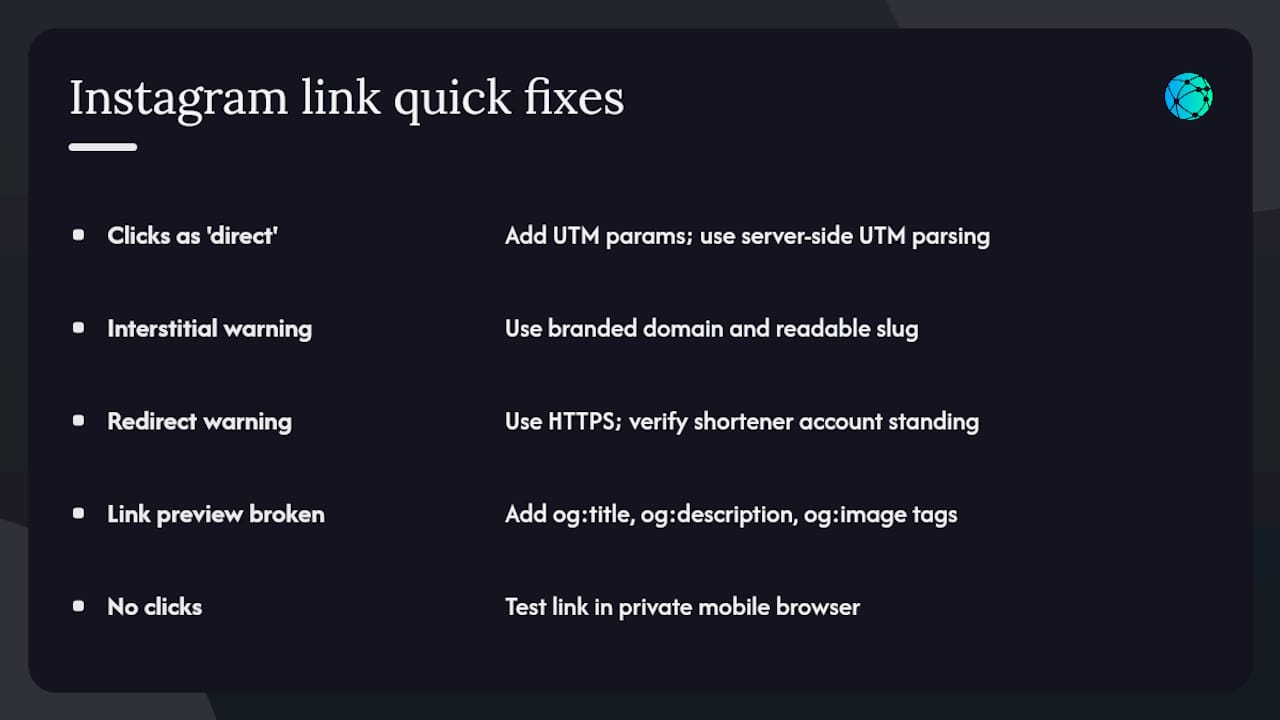
Clicks show as "direct" in GA4: Instagram's app strips referrer data. The fix is UTM parameters on every link. If you're already using UTMs and still seeing gaps, check that your analytics tool is parsing UTM parameters server-side rather than relying on JavaScript-based referrer capture.
Instagram shows an interstitial warning: this is Meta's trust prompt, not a block. It appears when users tap a non-Meta URL. A branded domain and a readable slug reduce how alarming it looks. The user taps "Continue" and lands on your page normally.
Redirect fails or shows a browser warning: confirm your destination URL uses HTTPS. HTTP destinations trigger security warnings on mobile browsers. Also check that your shortener account is in good standing — flagged accounts can have links suspended.
Link preview looks broken in Stories or DMs: this is an Open Graph issue on the destination page, not the shortener. Add proper og:title, og:description, and og:image tags to your landing page. Most website builders (Squarespace, Shopify, WordPress) handle this in SEO settings.
No clicks despite posting: test the link in a private browser window on your phone before publishing. Instagram's in-app browser sometimes behaves differently from Safari or Chrome — catch redirect issues before your audience does.
How to set up a branded short domain for Instagram
A branded short domain turns lflow.co/shorturl into something like go.yourbrand.com. Here's how to set one up:
- Buy a short domain from a registrar (Namecheap, Google Domains, Cloudflare Registrar). Aim for something under 12 characters — the shorter, the better in a bio or Story.
- Connect it to your shortener platform: in Lflow's dashboard, go to domain settings and add your custom domain. Lflow walks you through the DNS record changes needed.
- Update your DNS: add the CNAME or A record your platform specifies. DNS propagation typically takes a few minutes to a few hours.
- Test the redirect: paste a short link using your new domain into a mobile browser and confirm it resolves correctly.
- Set it as your default domain in Lflow so every new link you create uses it automatically.
Once it's live, every link you shorten carries your brand name. That consistency builds recognition across Instagram, email, and any offline materials where the link appears.
How do Instagram-specific shortener features compare?
Not all shorteners are built for social media. Here's what to look for when evaluating tools for Instagram use specifically:
| Feature | Why it matters for Instagram |
|---|---|
| Custom domain | Branded URLs build trust and lift CTR on mobile |
| UTM parameter support | Required for accurate attribution in GA4 |
| Editable destinations | Swap campaign targets without changing your bio |
| QR code generation | Extends links to offline and story graphics |
| Mobile-optimized link pages | Matches Instagram's nearly all mobile audience |
| Real-time analytics | See which posts and Stories drive clicks as they happen |
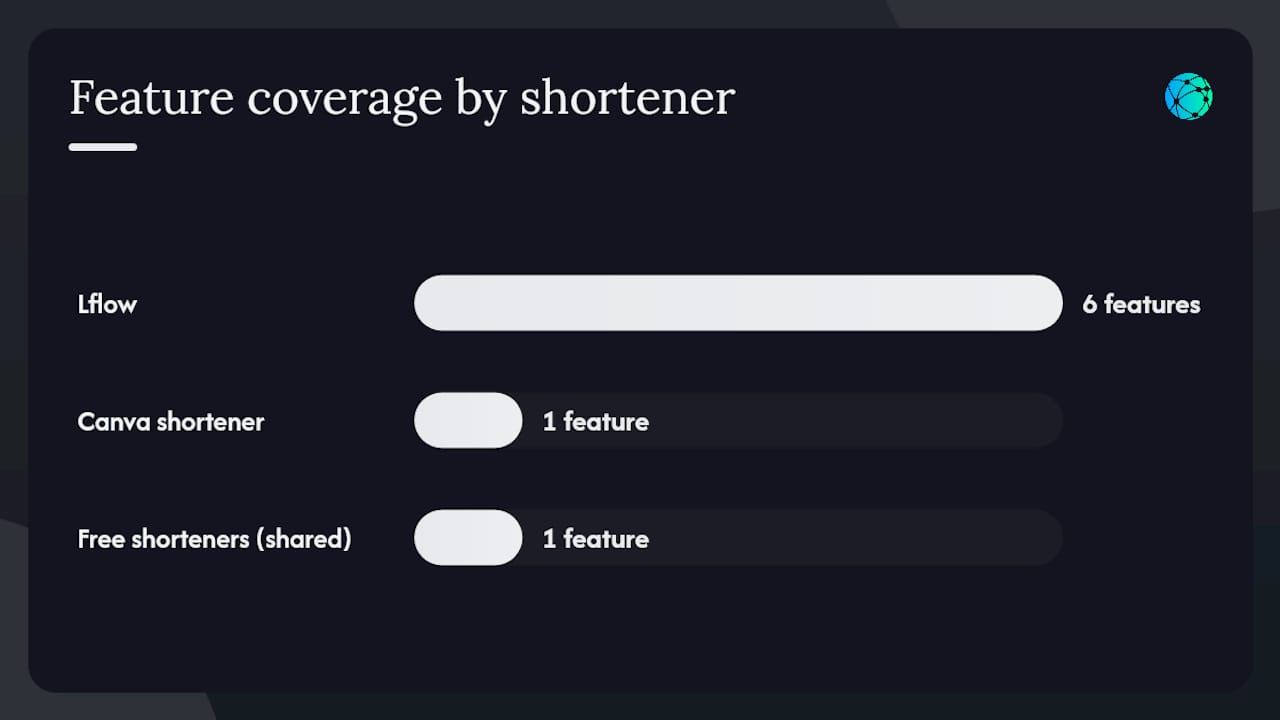
Lflow covers all six. Canva's shortener covers basic click tracking but lacks custom domains and editable destinations. Free generic shorteners typically cover only the first row — and even then, on a shared domain. For multi-link management across campaigns, the feature gap between free tools and a purpose-built platform is significant.
Security and spam filters: keeping your links trusted
Short links can trigger spam filters on Instagram if they're associated with flagged domains or redirect chains. A few rules keep your links clean:
- Use HTTPS everywhere: both your short link domain and your destination must use HTTPS. Mixed-content redirects raise flags.
- Avoid redirect chains: a link that bounces through three domains before landing looks suspicious to both Instagram and browsers. Keep it to one redirect.
- Don't reuse slugs across unrelated campaigns: a slug that previously pointed to flagged content can carry that reputation even after you change the destination.
- Use a reputable shortener platform: shared shortener domains get flagged when other users on the same platform abuse them. A custom domain isolates your links from other users' behavior entirely.
- Test with a fresh account: if you suspect a link is being suppressed, test it from an account with no history of flagged content to isolate whether the issue is the link or the account.
Legal and privacy considerations for link tracking
Tracking clicks on Instagram links involves collecting data about real people. A few things to keep in mind:
Privacy laws apply to your landing page, not just your shortener. If you're collecting email addresses or using retargeting pixels on the destination page, GDPR (for EU visitors), CCPA (for California residents), and similar state-level laws in the US may require a cookie consent notice and a privacy policy.
UTM parameters are not personally identifiable, but the analytics tools that receive them (GA4, for example) may still be subject to data-processing agreements depending on your audience's location.
Link shorteners that log IP addresses are subject to the same privacy obligations as any other data processor. Check your shortener platform's privacy policy and, if you serve EU users, confirm whether a Data Processing Agreement (DPA) is available.
Disclose tracking in your bio or link page if your audience includes users in jurisdictions with strict consent requirements. A one-line note ("this link uses click analytics") is usually sufficient for basic UTM tracking.
This is general information, not legal advice. Confirm your specific obligations with a qualified privacy attorney or your platform's compliance documentation.
Why branded link hubs are the right default for creators
The conventional wisdom says "just shorten the link." That's fine for a one-time post. For anyone building an audience, it misses the point entirely.
The real value of a branded short link isn't the shorter URL. It's the data layer underneath it: which post drove the click, which placement converted, which campaign paid off. Without that layer, you're posting into a void and guessing at what works. With it, you can make decisions — cut the placements that don't convert, double down on the ones that do, and show real numbers to brand partners or your own team.
The link-in-bio page is the same story. A single permanent URL that routes to multiple destinations isn't just convenient. It's a campaign asset you control completely, update instantly, and measure at the row level. That's a fundamentally different tool than a static bio link pointing at a homepage.
Creators who treat their links as infrastructure — not afterthoughts — consistently get more out of every post they publish.
Lflow gives you branded short links and a free link-in-bio page
Lflow is built specifically for creators and marketers who need more than a generic short URL. Here's what you get from day one:
- Branded short links with custom domains, readable slugs, and editable destinations — no bio update needed when a campaign changes.
- A free link-in-bio page with unlimited links, real-time analytics, and QR code generation for every link or campaign.
- Analytics that actually work on Instagram: real-time click data, device and location breakdowns, and CSV export for reporting.

The free plan requires no credit card and takes under two minutes to set up. Start with the free URL shortener if you need one link now, or build a free link-in-bio page if you're managing multiple destinations. Either way, your first branded, trackable Instagram link is a few clicks away.
Sources
- Instagram Link Tracking — 4,024 Real Clicks Analyzed (2026) | Track Link
- Track Instagram Bio Link, Reels & Story Leads — LeadJourney
- URL Shortener: Shorten a URL online for free