

You've got one link. One. On Instagram, TikTok, and most other major platforms, your bio gives you a single clickable URL to guide your entire audience wherever you want them to go. If you're a creator juggling a YouTube channel, an online store, a newsletter, and a new product launch, that single slot feels impossibly limiting. Constantly swapping the link every time you post something new is exhausting, and sending followers to the wrong destination costs you real engagement. A single URL profile solves exactly that problem, and understanding how it works is the first step to making your bio link do serious work for your brand.
Table of Contents
- Defining the single URL profile: What does it really mean?
- How single URL profiles work: The mechanics behind the bio link
- Single destination link vs. multi-link hub: The key trade-offs
- Real-world single URL profile strategies for creators and marketers
- Why the single URL profile is both brilliant and risky: Our take
- Ready to simplify your bio? Try a free single URL profile
- Frequently asked questions
Key Takeaways
| Point | Details |
|---|---|
| Single URL profile defined | It’s a link-in-bio page with one URL that routes followers to multiple destinations. |
| Platform limitations | Most social apps allow only one bio link, making single URL profiles essential. |
| Choose your approach | Pick a single link for focus or a hub for more options based on your goals. |
| Boost engagement | Using a customizable link-in-bio streamlines user actions and increases clicks. |
Defining the single URL profile: What does it really mean?
The term "single URL profile" gets thrown around a lot, but it's not always clear what people mean. Let's fix that.
At its core, a "link in bio" is the single clickable URL added to a social media profile, acting as a gateway to an important destination. That destination can be one of two things: a direct link to a specific page (your website, your latest YouTube video, a product page), or a mini landing page that serves as a hub for multiple links at once.
A single URL profile is exactly what it sounds like: one URL placed in your social bio that routes visitors to wherever you want them to go, whether that's a single page or a collection of everything you offer.
Understanding what a link in bio means is critical before you build one, because the two interpretations create very different experiences for your audience.
Here's where the common misconceptions happen:
- "Single URL" as a direct link: Some creators use their bio link to go straight to one place, like their homepage or a specific product. Simple and clean, but it forces you to update it constantly.
- "Single URL" as a hub page: Others use that one bio link to open a branded landing page packed with multiple links, buttons, and calls-to-action. One URL, many destinations.
- The confusion: Many creators think link in bio means only a direct link. In reality, the most powerful use is the hub approach, where one URL becomes a gateway to your entire digital world.
For audience navigation, the distinction matters enormously. If a follower clicks your bio link and lands on a random homepage with no clear direction, they bounce. If they land on a well-designed hub showing your top links, they engage. That difference in clarity directly impacts your conversion rates.
Pro Tip: Name your bio link hub page with your brand name or a recognizable phrase. A URL like "lflow.co/yourname` is instantly more trustworthy than a string of random characters, and trust drives clicks.
How single URL profiles work: The mechanics behind the bio link
Now that you know what it means, let's see how a single URL profile actually works.
A link in bio is placed in the social media profile section under the username. Mechanically, you use the one URL in your profile's website field. Visitors tap it and land on a custom page where you can offer one or more calls-to-action, like a product, a newsletter, a booking form, or a video.
Here's a typical step-by-step workflow for setting up your single URL profile:
- Choose your platform. Pick a link in bio tool (or build your own landing page) where you'll host your hub.
- Create your profile page. Add your name, photo, and a short bio. Keep it branded and on-message.
- Add your links. Include the destinations that matter most: your website, store, social channels, latest content, or booking page.
- Customize the design. Match your colors, fonts, and layout to your brand identity so it feels like a natural extension of your social presence.
- Copy your unique URL. Your platform gives you one shareable link (e.g.,
lflow.co/yourname). - Paste it in your bio. Go to your Instagram, TikTok, YouTube, or LinkedIn profile and drop your new URL into the website field.
- Monitor performance. Use real-time analytics to track which links get clicked, when, and by whom.
The process to maximize your social traffic is surprisingly straightforward once you understand the mechanics. What matters is what happens after the click.
| Platform | Bio link placement | Clickable links allowed | Best use case |
|---|---|---|---|
| Profile section, below bio text | 1 | Hub page with multiple CTAs | |
| TikTok | Profile section, below username | 1 (business accounts) | Product and content hub |
| YouTube | Channel description and banner | Multiple | Direct links per content type |
| Twitter/X | Profile section, below bio | 1 | Newsletter or latest project |
| Contact info section | 1 (website field) | Portfolio or lead magnet |
The way bio links power influencer engagement comes down to this table in practice. Instagram and TikTok force you into the one-link rule, making the hub approach almost mandatory. YouTube offers more flexibility, but even there, a hub page can consolidate your audience's journey.
When a visitor clicks your bio link, they should immediately understand who you are and what they can do next. A well-built single URL profile removes friction. A poorly built one just creates a new dead end.
Single destination link vs. multi-link hub: The key trade-offs
Not all single URL profiles are the same, so let's examine your main options.
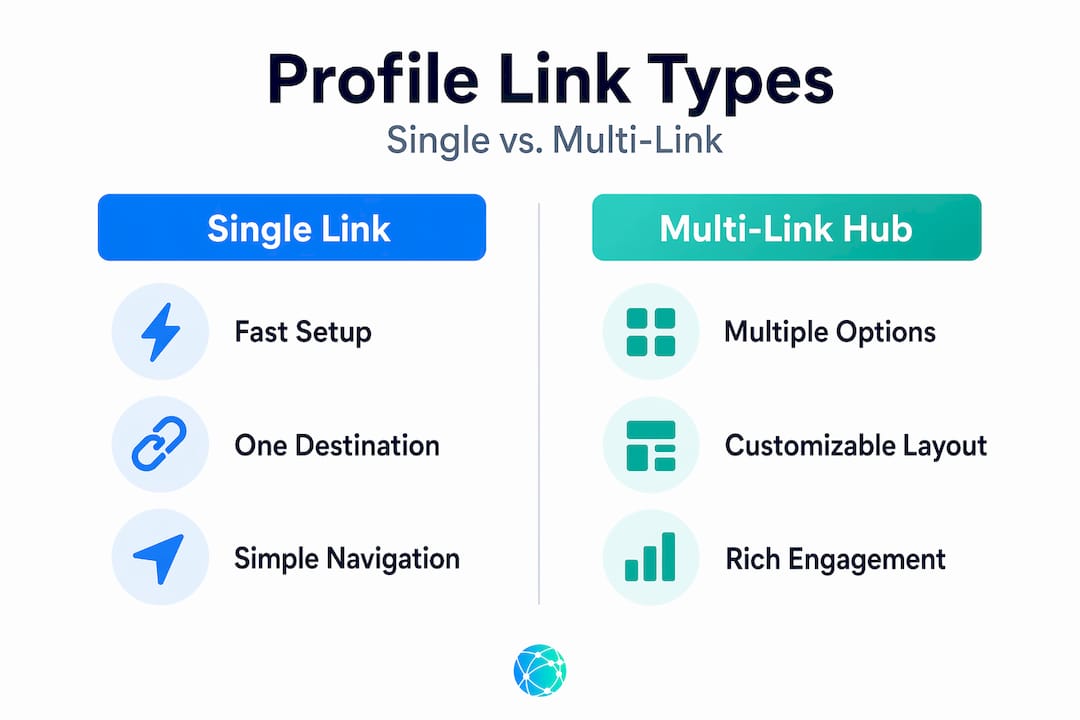
The term can be ambiguous: some people mean one single clickable link (a single destination), while others mean a link in bio tool page behind that one URL (multiple destinations). Each approach has real strengths and real weaknesses.
| Feature | Single destination link | Multi-link hub page |
|---|---|---|
| Setup time | Under 2 minutes | 5 to 15 minutes |
| Number of CTAs | 1 | Unlimited |
| Flexibility | Low (update manually) | High (update anytime) |
| Branding options | Minimal | Extensive |
| Analytics | Limited | Detailed per-link data |
| Best for | Single campaigns | Ongoing creator presence |
| SEO value | Some (links to main site) | Minimal (hosted on third-party) |
| Audience experience | Focused, no choice | Diverse, more options |
A website vs link in bio comparison makes this clear: a dedicated link in bio tool wins on speed and convenience, while a full website wins on credibility, SEO, and long-term defensibility. Neither is universally better. It depends on your goals right now versus where you want to be in two years.
Here's when each approach makes sense:
- Single destination link: You're running a time-sensitive product launch or a specific campaign. You want zero distractions. One message, one action, done.
- Multi-link hub: You're an active creator with ongoing content, a store, social channels, and new projects launching regularly. You need one place to send everyone without constantly rewriting your bio.
- Hybrid approach: Some creators use a multi-link hub as their permanent bio link but feature one prominent CTA button at the top for their current campaign. You get both focus and flexibility.
To use bio links to boost engagement, think about what your audience does right after they hit your bio. Are they looking for one specific thing, or do they want to explore? That answer tells you which approach fits.
You can also get inspiration by looking at examples of link in bio pages from successful creators to see how the hub model works in practice, and check out custom bio pages for engagement to understand why design and personalization matter as much as the links themselves.
Pro Tip: If you're unsure which approach to take, start with a multi-link hub and observe your analytics for 30 days. The data will tell you which links get clicked most, and you can streamline from there.
Studies show that adding more links doesn't automatically hurt engagement. It's all about how you organize and prioritize them. A hub with 3 to 5 clearly labeled options often outperforms a single link because it meets more audience needs in one visit.
Real-world single URL profile strategies for creators and marketers
Now, let's get practical. How do top creators actually use single URL profiles?
If a platform lets users add only one bio link (common on Instagram and TikTok-style experiences), you need either a single destination link that you update frequently, or a hub page behind that one URL to keep multiple CTAs discoverable without swapping the bio link constantly. The second option wins almost every time for active creators.
Here's how to build a strategy that actually works:
- Lead with your most urgent CTA. If you just dropped a new product, make that the first button visitors see. Your hub page should reflect what matters most right now, not what mattered three months ago.
- Limit your links to what's essential. More than seven links and visitors experience decision fatigue. Keep your hub focused: your top content, your store, your newsletter, and one or two social profiles.
- Update on a content calendar. Treat your bio link hub like a living page. Every time you publish new content or launch a campaign, update the relevant link. Set a weekly reminder if needed.
- Use descriptive button labels. "Click here" tells your audience nothing. "Watch my latest tutorial," "Shop the collection," or "Get the free guide" tells them exactly what they're getting, and that specificity drives clicks.
- Add your QR code to offline materials. Your hub page URL can be encoded into a QR code and printed on business cards, product packaging, or event materials. This bridges your online and offline presence without adding complexity.
"Your bio link is your digital handshake. It's often the first intentional action a follower takes to learn more about you. Make it count."
Multi-link pages for creator growth come into their own when you stop treating your bio link as an afterthought and start treating it as a core part of your content strategy.
Creative CTA ideas that high-performing creators use include: "Listen to this week's episode," "Join the challenge," "Get my free preset pack," "Book a 1:1 call," or "See what I'm working on." Each of these gives followers a reason to click that goes beyond generic navigation.
Pro Tip: Seasonal or campaign-specific landing pages work incredibly well. Instead of updating your main hub, create a dedicated hub for a product launch or event and swap the bio link temporarily. After the campaign, revert to your evergreen hub. This keeps things fresh without disrupting your permanent link structure.
Why the single URL profile is both brilliant and risky: Our take
With the strategies in mind, it's time to step back and consider the bigger picture.
The single URL profile is genuinely one of the smartest tools in a creator's toolkit. The accessibility it creates is remarkable. Your entire digital presence, collapsed into one tap. For a follower on mobile, that frictionless experience is the difference between converting and bouncing. Convenience at this level isn't trivial. It's a growth lever.
But here's the uncomfortable truth most "link in bio" guides skip: you're building on rented land.
Your hub page lives on a third-party platform. If that platform changes its pricing, its features, or disappears entirely, your single URL profile goes with it. Worse, the bio link itself is only as powerful as the platform hosting your social account. If Instagram changes its algorithm or access rules tomorrow, your ability to drive traffic through that bio link changes overnight.
The other hidden risk is SEO. A link in bio hub hosted on someone else's domain does almost nothing for your search engine visibility. It doesn't build domain authority for your own website. If you're a creator or brand with long-term growth ambitions, relying only on a bio link hub means you're trading SEO equity for convenience. That's sometimes the right trade, but you should make it consciously.
What serious creators do is layer their strategies. They use a hub page for immediate bio traffic because it works. They simultaneously invest in their own website and email list because those are assets they actually own. The bio link feeds the top of the funnel. The owned channels build the foundation.
Exploring link in bio platform alternatives is worth doing periodically, especially as your audience scales and your needs grow more specific. The right platform for a creator with 500 followers may not be the right one at 500,000.
Use the single URL profile confidently. Just don't let it become your only strategy.
Ready to simplify your bio? Try a free single URL profile
If you've been swapping your bio link every week or sending followers to a cluttered homepage, there's a better way to manage your digital presence starting today.

Lflow.co makes it incredibly easy to build a branded, mobile-optimized hub page in under two minutes, completely free. You get a free link in bio tool that lets you pull all your most important links into one clean, customizable profile. Not sure how to design yours? Browse ready-made link in bio templates built for creators across every niche, so you can launch without second-guessing the layout. And if you want to extend your reach to offline channels, generate a free QR code for bio link that you can add to any printed material. Real-time analytics, custom domains, and unlimited customization are all included. Your bio link should work as hard as you do.
Frequently asked questions
Is a single URL profile the same as a link in bio?
Yes, in most cases a single URL profile refers to the one link you place in your social bio, which leads to a landing page or hub with all your important links, as Hostinger explains when describing the link in bio concept.
Why do social platforms only allow one link in the bio?
Social media platforms limit bio links to maintain clean profiles and reduce spam, which is why creators rely on a single URL to direct all followers to a hub page that hosts multiple links behind one clickable URL.
Can I update my single URL profile for new campaigns?
Absolutely. You can change your bio link anytime, or use a hub page to feature multiple campaigns simultaneously without touching your bio at all, since a hub page keeps all your CTAs accessible under one permanent URL.
What's better: a single destination or a multi-link hub?
A single destination link is clean and focused for specific campaigns, but a multi-link hub offers far more flexibility and lets you promote multiple offers at once, since a link in bio tool page can host unlimited links behind the one bio URL.