

Measure TikTok clicks with UTM-tagged branded short links, or a link-in-bio page carrying per-link UTMs, then validate that every redirect preserves those tags before you trust the numbers. Three pillars make this work: tag every destination consistently, validate the click path so nothing gets stripped, and reconcile TikTok's native stats against GA4 and your link-hub dashboard. Lflow handles the tagging and per-link analytics side of that workflow directly.
TL;DR:
- Always ensure UTM parameters are consistent, correctly attached, and validated through the entire redirect chain before trusting your TikTok click data.
- Use per-link UTMs or individual bio page tags to accurately attribute conversions to specific videos or campaigns, avoiding data splitting caused by inconsistent naming.
- Regularly verify your tracking links by checking URL integrity, redirect paths, and live tests inside TikTok’s app, especially after any domain or redirect rule changes.
- Expect a 10 to 30 percent variance between TikTok native analytics, GA4 sessions, and link hub data, caused by in-app browser quirks and cookie handling.
- Employ user identification methods, like login info or redemption codes, to bridge cross-device purchase gaps when full attribution is impossible.
Table of Contents
- How to Set Up TikTok Link Tracking Step by Step
- How Do You Confirm Your Tracking Links Actually Work?
- Reconciling TikTok Analytics, GA4, and Your Link Hub
- Common Tracking Problems and Quick Fixes
- How TikTok's In-App Browser Affects Your Attribution Data
- Staying Compliant While Tracking TikTok Traffic
- Do Algorithm Updates Break Your Link Tracking Setup?
- Tracking TikTok Users Across Devices
- My Weekly Routine for Keeping TikTok Tracking Honest
- Get Your TikTok Links Tracking Correctly, Free
- Sources
How to Set Up TikTok Link Tracking Step by Step
TikTok's in-app browser makes attribution harder than it should be. Without tagged URLs, most of that traffic lands in GA4 as unlabeled direct visits, and you lose the ability to say which video actually drove a sale. The fix is mechanical, not mysterious.
- Pick your UTM parameters first. Use
utm_source=tiktok,utm_medium=socialfor organic posts orutm_medium=paid_socialfor ads,utm_campaignfor the specific push (likesummer_drop_2026), andutm_contentto identify the exact video or creative variant. - Decide between per-video links and one bio link. If you post multiple videos a week and want to know which one converts, build a distinct short link for each with its own
utm_contentvalue. If you run a single link-in-bio page, tag each outbound destination on that page individually rather than tagging the page URL itself. - Build the branded short link or bio page. A tool like Lflow's link-in-bio setup lets you create a branded destination in minutes, then attach UTMs to each button pointing to your store, music, or landing pages.
- Lock in a naming convention before you scale. Lowercase everything, no spaces, underscores instead of hyphens if your analytics tool is picky, and a fixed taxonomy for campaign names.
utm_campaign=Summer Dropandutm_campaign=summer_dropwill show up as two different rows in GA4, splitting data you meant to see as one.
The naming convention matters more than most creators expect. UTM parameters appended consistently to destination URLs are what actually get TikTok traffic into GA4 correctly, regardless of how TikTok's browser handles referrers. Get the taxonomy locked before your first post goes out, because retagging a campaign mid-flight means your data now lives in two buckets.
How Do You Confirm Your Tracking Links Actually Work?
A UTM tag is worthless if the redirect strips it before the visitor lands on your page. This happens more often than creators realize, usually because of a shortener misconfiguration or an extra server hop nobody accounted for.
Run this checklist before any link goes live in a bio or caption:
- Click the short link yourself and watch the full URL that loads, confirming the UTM string is still attached.
- Check the redirect chain with a browser network tab or an online redirect checker. More than one hop increases the risk that a query string gets dropped.
- Confirm the destination loads over HTTPS with a clean 200 OK response, not a 301 chain that terminates somewhere unexpected.
- Open the link on your own phone, ideally inside the TikTok app itself, and confirm a test session shows up in GA4 with the right source and medium.
- Re-check after any change to your shortener's domain, SSL certificate, or redirect rules, since misconfigured redirects are a common way UTMs get lost.
Pro Tip: Set a recurring 10-minute check the day after any big campaign launches. Viral spikes expose broken redirects fast, and catching it on day one beats explaining a week of missing data later.
Reconciling TikTok Analytics, GA4, and Your Link Hub
Three dashboards will show three different numbers for the same campaign, and that's normal, not broken. TikTok's native analytics reports video views, profile visits, and link clicks within its own walled garden. GA4 reports sessions and conversions once a visitor lands on your site. Your link-hub dashboard sits in between, showing raw click counts on each button before anyone reaches GA4 at all.
The gap between these numbers has a known range. Combining click totals from your link hub with GA4 session data and TikTok's own reporting is standard practice, and a 10 to 30 percent variance between click counts and GA4 sessions is common, driven by in-app browser quirks, cookie consent prompts, and slow-loading pages that cause people to bail before a session registers.
Typical weekly variance: Expect click counts from your short link or bio page to run 10 to 30 percent higher than GA4 sessions for the same campaign. If the gap is wider, check page load speed and consent banners first.
Build a simple weekly dashboard with these fields:
- Total clicks reported by your link hub, broken out per link.
- GA4 sessions filtered to
source/medium = tiktok/social(orpaid_social). - GA4 conversions or goal completions tied to that same source/medium.
- TikTok's own profile-link click count, pulled straight from the app's analytics tab.
One more piece worth understanding: TikTok's pixel can append a ttclid parameter for its own in-platform attribution, but ttclid does not populate GA4's source or medium fields. Run both side by side. Use ttclid for TikTok's ad reporting, and rely on your UTMs for anything that needs to show up correctly in GA4.
Common Tracking Problems and Quick Fixes
Most broken attribution traces back to one of a handful of repeat offenders. Here's what to check first.
- Symptom: traffic shows up as "(direct) / (none)" in GA4. Root cause is almost always a missing or stripped UTM, since TikTok's in-app browser doesn't pass a referrer on its own.
- Symptom: the same campaign splits into multiple rows. Root cause is inconsistent casing or spacing in your
utm_campaignvalue. Standardize to lowercase with no spaces. - Symptom: clicks register but conversions don't. Check landing page speed first. Slow pages lose visitors before GA4 fires a session, especially on mobile data.
- Symptom: UTMs vanish after the redirect. Your shortener or CDN is likely rewriting the URL. Reconfigure the shortener to pass query strings through untouched.
- When to escalate: if a developer manages your redirect rules or CDN and the query string still drops after you've checked shortener settings, bring them in. Server-level rewrites are outside what most creators can fix alone.
How TikTok's In-App Browser Affects Your Attribution Data
TikTok opens almost every outbound link inside its own in-app browser instead of handing off to Safari or Chrome. That single design choice is the root cause of most attribution headaches creators run into.
Standard browsers pass an HTTP referrer header when a visitor clicks through from one site to another, and GA4 uses that referrer to label traffic by source. TikTok's in-app browser frequently doesn't send that header at all, or sends an incomplete one. The result: visits from TikTok show up in GA4 as unattributed direct traffic unless the link itself carries a UTM string that identifies the source.
This is exactly why UTM tagging isn't optional for TikTok the way it might be for a platform with reliable referrer passing. A visitor clicking a plain, untagged link from your TikTok bio and a visitor typing your URL straight into their phone will look identical in GA4. Both get bucketed as direct. Your campaign performance data effectively disappears into that bucket, and no amount of after-the-fact analysis brings it back.
There's a secondary wrinkle worth knowing: TikTok's in-app browser also handles cookies and session storage a little differently than a standard mobile browser, which is part of why click counts and GA4 sessions never match exactly. A visitor might click, get counted by your link hub, then have the page reload or the session get treated as new once they leave the in-app browser for an external app like a checkout page. None of this means your tracking is broken. It means UTMs are doing the job referrers can't, and the small variance between click and session counts is the cost of TikTok's browser behavior, not a sign something needs fixing.
Staying Compliant While Tracking TikTok Traffic
Tracking clicks and building audience data both fall under privacy rules that vary by where your visitors live, and getting this wrong carries real regulatory risk under frameworks like the GDPR in the European Union and the CCPA in California.
A few practices keep you on solid ground without gutting your data collection. First, run a cookie consent banner on any landing page that sets analytics or advertising cookies, and make sure GA4 doesn't fire before a visitor has actually consented if your audience includes EU residents. Second, avoid putting personally identifiable information anywhere in a UTM string. A utm_content value should describe a video or creative, never a customer's name or email pulled from a lead form.
Third, publish a clear, findable privacy policy on any domain your short links or bio page route through, since a redirect domain that collects analytics data is still a data collection point in the eyes of most privacy frameworks. Fourth, if you're using TikTok's pixel alongside UTMs, understand that the pixel and any ttclid parameter involve TikTok's own data collection practices, separate from your site's analytics. Read TikTok's own advertiser terms for how that data gets handled before assuming your privacy policy alone covers it.
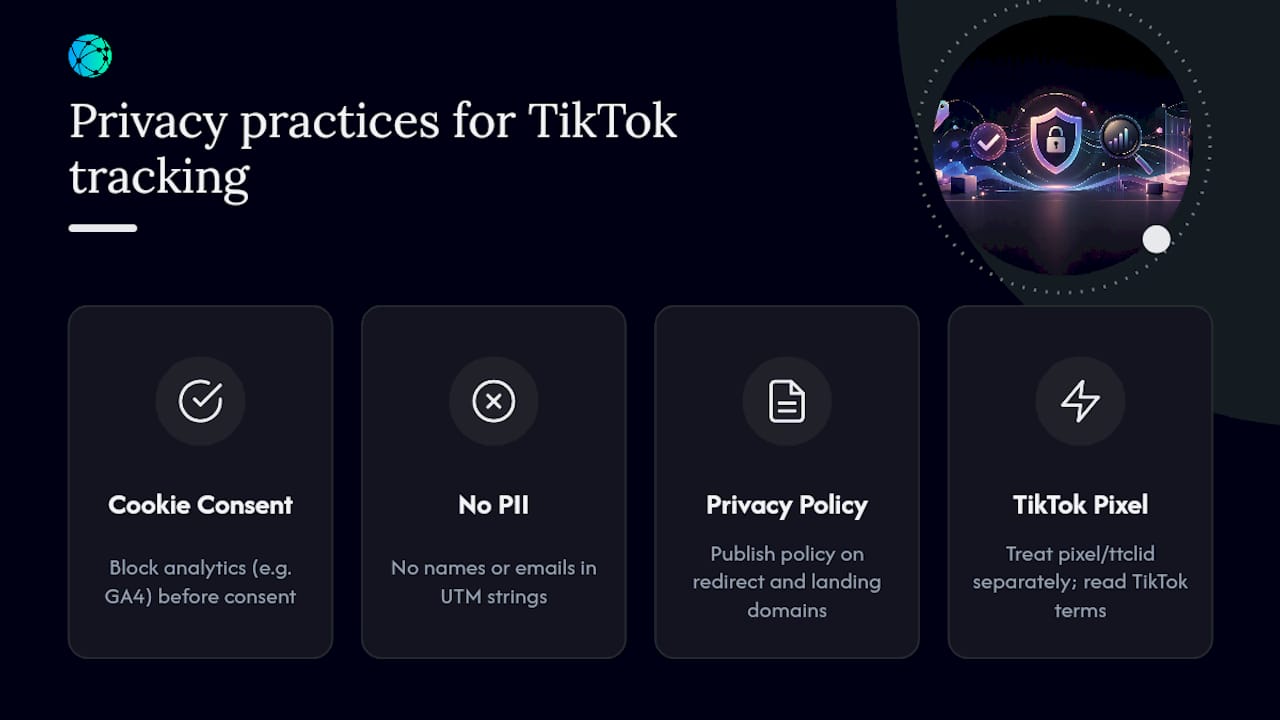
None of this requires a legal team for a typical creator's bio link setup. It does require treating your analytics stack as something that touches real people's data, not just a reporting dashboard. When in doubt on a specific jurisdiction's requirement, a quick consult with a professional familiar with your audience's location is worth more than guessing.
Do Algorithm Updates Break Your Link Tracking Setup?
TikTok changes its recommendation algorithm often, and creators sometimes assume a sudden traffic drop means their tracking broke. Usually it didn't. The algorithm changed who sees the video, not whether the UTM tag on your link still works.
That said, algorithm shifts do affect tracking indirectly, in ways worth separating from a genuine technical failure. A sudden spike in views from an unexpected audience segment, say a different country or age group, can change conversion rates without any change to your link setup. If your link-hub clicks stay steady but GA4 conversions drop, check who's actually landing on the page before you assume something's broken.
Viral spikes create a different kind of risk. When a video takes off unexpectedly, the sudden click volume can be the first real stress test your redirect chain and shortener have faced. Validating links before a campaign launches matters most during exactly these unpredictable traffic surges, because a shortener that handles ten clicks a minute fine might behave differently under a thousand.
The practical takeaway: don't chase algorithm news to explain a tracking gap. Check your own redirect chain, your UTM taxonomy, and your landing page load time first. Those three things break far more often than TikTok's recommendation system does, and they're fully within your control. Algorithm updates change reach. They don't touch the query string on your link.
Tracking TikTok Users Across Devices
A viewer scrolls TikTok on their phone, taps your bio link, browses your store, then finishes the purchase later on a laptop. Standard link tracking sees two separate, disconnected visits. This is one of the harder problems in TikTok attribution, and no single tool solves it completely.
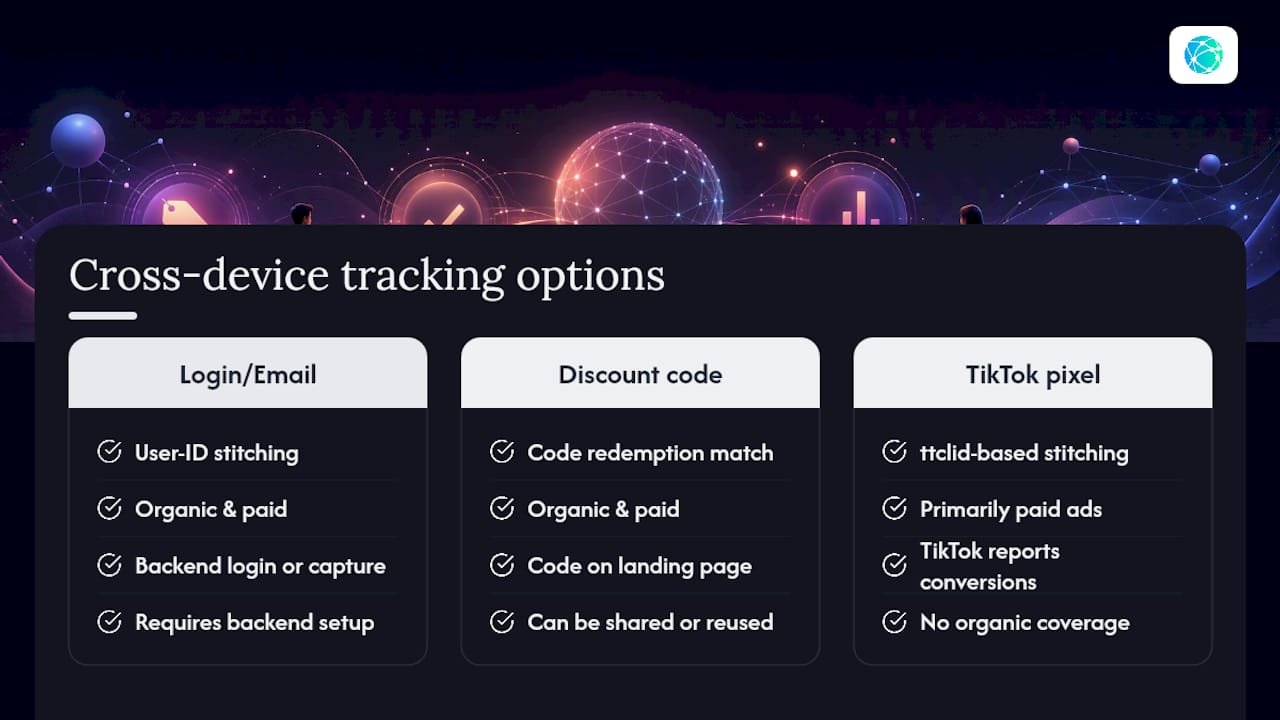
A few strategies narrow the gap. If your store or landing page requires a login or email capture, use that as a bridge. Once a visitor identifies themselves on any device, tools like GA4's user-ID feature can stitch the mobile click and the desktop purchase into one journey, provided you've implemented user-ID tracking on the backend.
Discount codes tied to a specific TikTok campaign work as a low-tech alternative. If utm_campaign=summer_drop links to a landing page offering code TIKTOK15, you can attribute a desktop purchase to that campaign even without cross-device session data, simply by tracking code redemptions.
The TikTok pixel's ttclid parameter also plays a role here for paid campaigns specifically, since TikTok's own ad platform does some of this stitching on its side for conversions that happen within its attribution window, separate from what GA4 sees. For organic content, that safety net doesn't exist, which is exactly why a login-based or code-based bridge matters more for organic TikTok traffic than for paid.
None of these fully close the loop. A realistic goal is to reduce the blind spot, not eliminate it. If your product has a considered purchase cycle, meaning people research on mobile and buy later on desktop, build the code-based bridge from the start rather than trying to retrofit it after you notice a gap between clicks and purchases.
My Weekly Routine for Keeping TikTok Tracking Honest
Every Monday, I check GA4's tiktok source/medium row against last week's link-hub click count, spot-check the top three links by clicking them fresh, and retire any bio link with a click-through rate that's gone flat. New links get the mobile smoke test before they go live, not after. It takes fifteen minutes and it's the difference between trusting your numbers and guessing.
— Axion
Get Your TikTok Links Tracking Correctly, Free
Lflow builds the tagging and validation habits from this guide directly into the setup process, so you're not manually stitching UTMs onto a dozen links every time you post. Every button on your page gets its own short link with per-link click analytics, so you see exactly which video, product, or campaign is pulling traffic without waiting on a weekly GA4 pull.

Setup takes under two minutes, and the free plan includes unlimited links, QR codes for offline promotion, and real-time click analytics out of the box. Add your UTM-tagged destinations, drop the branded link in your TikTok bio, and start watching per-link performance the same day. If you also run campaigns with an agency partner handling broader marketing, a service like HarbourSide Digital can help with the wider setup while Lflow handles the link layer. Create your free page and add your first tagged link now.
Sources
A few resources worth bookmarking if you want to go deeper on any piece of this setup:
- How to track and measure your TikTok bio link performance
- How to track a TikTok bio link with UTMs
- TikTok UTM Tracking: Tag TikTok Ads for GA4
- UTM Tracking for TikTok Ads: How to Build and Validate Campaign Links