

Step by step link consolidation is the process of merging multiple URLs into a single authoritative destination to maximize audience engagement and SEO effectiveness. Content creators and marketers who scatter links across Instagram bios, TikTok profiles, YouTube descriptions, and email campaigns split their traffic and dilute their authority. The industry term for this practice is URL consolidation, and it combines technical SEO work with content quality improvements. This link consolidation process, when done correctly, passes accumulated link equity to one strong URL and gives your audience a clear, frictionless path to your content.
What prerequisites do you need before step by step link consolidation?
Preparation determines whether your consolidation succeeds or creates a crawl mess. Before touching a single redirect, you need a complete picture of every link you own and every backlink pointing to those URLs.
Start by pulling your data from three sources. Export your URL performance data from Google Search Console. Run a backlink audit using a tool like Ahrefs or Semrush to capture every external site linking to your pages. Then list every link you actively share across social profiles, email newsletters, and paid campaigns.

Maintaining master records of source URL, destination, owner, campaign, and backlink data prevents link fragmentation during consolidation. Build a spreadsheet with these exact columns before you start.
Your pre-consolidation checklist:
- Export all URLs from Google Search Console (impressions, clicks, average position)
- Run a full backlink audit with Ahrefs, Semrush, or a comparable tool
- List every active link you share on Instagram, TikTok, YouTube, Twitter/X, and LinkedIn
- Identify which URLs serve the same audience intent (these are your consolidation candidates)
- Note which URLs carry the most backlinks and highest traffic (these become your destination URLs)
| Data Point | Why You Need It |
|---|---|
| Backlink count per URL | Determines which URL to keep as the destination |
| Traffic and impressions | Confirms audience demand before you retire a page |
| Internal link sources | Shows which pages you must update after consolidation |
| Campaign UTM parameters | Prevents broken tracking after redirects go live |
Pro Tip: Create a "redirect map" document listing every retired URL alongside its final destination. This human-readable record prevents redirect chains from rebuilding over time, which is one of the most common post-consolidation problems.
What is the step by step process for link consolidation?
This is the core of your link merging guide. Follow these steps in order. Skipping steps or reordering them causes ranking drops and broken user experiences.
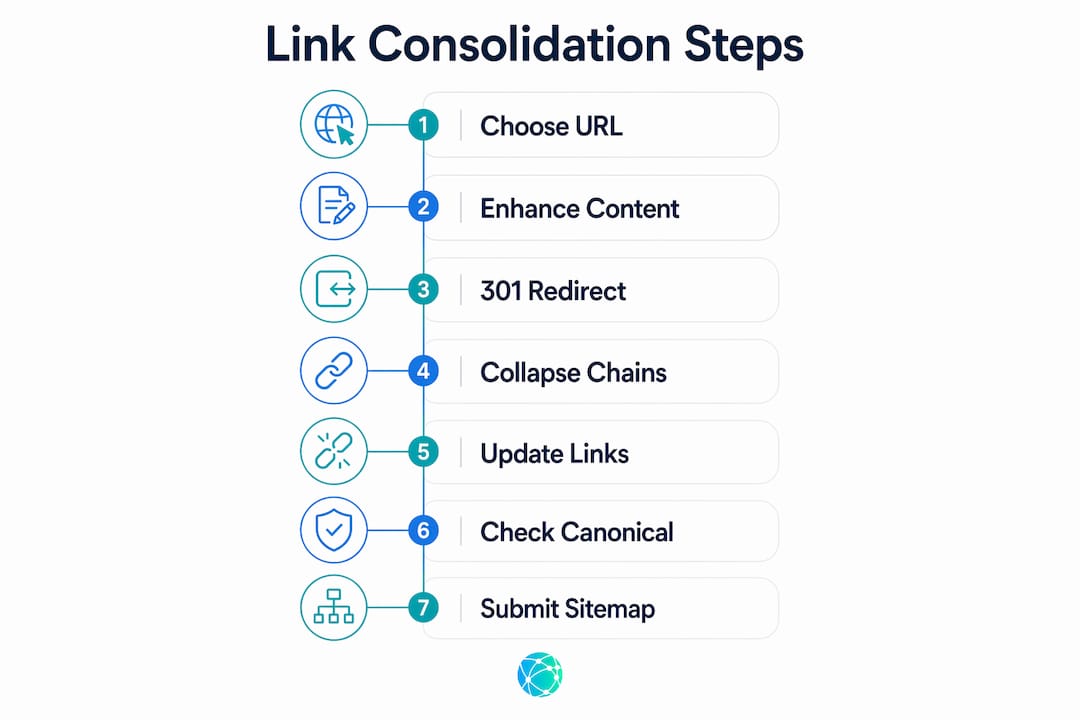
1. Choose one destination URL per intent cluster.
Choosing a single authoritative URL per content cluster based on stable impressions, strong internal linking, and on-topic titles yields the best consolidation outcomes. Pick the URL with the most backlinks, the highest traffic, and the clearest topical focus. This becomes your canonical destination.
2. Improve the content on the destination page before merging.
Content quality is paramount in consolidation. Merging mediocre pages into one will not improve SEO performance. Pull the strongest sections from every page you plan to retire and add them to the destination page. A 40–60 word direct answer placed prominently on the merged page also improves AI citation likelihood, which matters as AI-driven search grows in 2026.
3. Implement 301 redirects from every retired URL to the destination.
A 301 redirect tells search engines the move is permanent and passes link equity forward. Set these at the server level, not through JavaScript or meta refresh tags. Point every old URL directly to the final destination URL, never to an intermediate page.
4. Collapse any existing redirect chains.
Redirect chains dilute link equity and delay crawlers. If URL A already redirects to URL B, and you now want URL B to redirect to URL C, update URL A to redirect directly to URL C. One hop, not two.
5. Update all internal links to point to the new destination.
Updating internal links to point directly to the final URL improves user experience and SEO signal transfer. Redirects handle external traffic, but internal links transfer authority more cleanly when they point straight to the destination. Use a site crawler like Screaming Frog to find every internal link pointing to your retired URLs.
6. Verify canonical tags on the destination page.
The canonical tag on your destination page must point to itself. If it points anywhere else, you send conflicting signals to Google. Check this in your CMS or directly in the page source.
7. Submit the updated sitemap to Google Search Console.
Remove retired URLs from your sitemap. Add the destination URL if it is not already included. Submit the updated sitemap through Google Search Console to prompt faster re-crawling.
| Step | Action | Tool |
|---|---|---|
| Choose destination URL | Pick highest-authority URL per cluster | Google Search Console, Ahrefs |
| Improve content | Merge best sections into destination page | CMS editor |
| Set 301 redirects | Server-level redirect from all retired URLs | .htaccess, Nginx, or CDN rules |
| Update internal links | Replace all old URLs with destination URL | Screaming Frog |
| Verify canonicals | Confirm canonical tag points to itself | Browser source view or SEO plugin |
| Submit sitemap | Push updated sitemap to Google | Google Search Console |
Pro Tip: Test every redirect with a tool like Redirect Checker or your browser's developer tools before publishing. A redirect that returns a 302 instead of a 301 does not pass link equity.
For a broader view of why this process matters for your audience growth, the creator's consolidation guide on the Lflow blog covers the strategic reasoning behind each step.
What common mistakes should creators avoid during consolidation?
Most consolidation failures come from four predictable errors. Knowing them in advance saves you weeks of recovery work.
Redirecting to the homepage. Redirects must land on the most relevant page, not the homepage, to preserve intent and user satisfaction. If you retire a page about Instagram link strategies, redirect it to your best page on that topic, not to your home URL. Google treats homepage redirects from topically specific pages as soft 404 errors.
Leaving redirect chains in place. Chains spanning multiple layers, including server, code, and CDN levels, should be audited and collapsed at every layer. A chain of three hops can reduce the equity passed to the final destination significantly. Audit your redirects with a tool like Screaming Frog or CrawlSense before and after consolidation.
Soft consolidation. Avoid soft consolidation by aligning canonicals and internal links to the same final URL for clean indexing. Soft consolidation happens when you set a canonical tag but leave internal links pointing to the old URL. Crawlers follow internal links first. If those links still point to the old page, the canonical signal gets diluted.
Skipping internal link updates. Redirects handle external traffic automatically, but they do not fix your internal link structure. Internal link cleanup often yields better results than redirects themselves. Every page on your site that links to a retired URL needs a manual update.
Ranking signal consolidation requires consistent canonical and redirect signals to avoid conflicting instructions to search engines. One mismatched canonical tag can undo hours of redirect work.
Pro Tip: After setting redirects, run a full crawl with Screaming Frog and filter for 3xx status codes. Any URL still returning a redirect instead of a 200 is a candidate for an internal link update.
For practical tips on keeping your link structure healthy after consolidation, the link management tips guide covers ongoing maintenance strategies worth bookmarking.
How do you measure success after link consolidation?
Consolidation is not a one-day event. The results take weeks to stabilize, and you need to track the right metrics to confirm the process worked.
Google Search Console monitoring lasts 30 days for equity verification, and AI citation frequency stabilizes after 4–6 weeks post-merger. Set a calendar reminder for both checkpoints.
| Metric | Where to Check | What to Look For |
|---|---|---|
| Impressions on destination URL | Google Search Console | Steady increase over 30 days |
| Crawl errors on retired URLs | Google Search Console | Errors should drop to zero |
| Click-through rate | Google Search Console | Improvement as one URL gains authority |
| Backlinks pointing to destination | Ahrefs or Semrush | External links transferring from retired URLs |
| AI citation frequency | Perplexity, ChatGPT, Claude | Destination URL appearing in AI answers |
Check your sitemap weekly for the first month. Any retired URL that reappears in your sitemap needs to be removed immediately. Confirm that your destination URL is indexed by searching site:yourdomain.com/destination-url in Google.
Pro Tip: Set up a Google Search Console property filter for your destination URL and compare its performance week over week. A flat or declining impression curve after 30 days signals a canonical or redirect error that needs investigation.
Optimizing your social profile links alongside your consolidation work amplifies the results. The guide on optimizing social links explains how to align your bio links with your consolidated URL structure.
Key takeaways
Effective link consolidation requires clean redirects, updated internal links, and improved content quality working together, not any single fix in isolation.
| Point | Details |
|---|---|
| Prepare before you redirect | Build a master record of every URL, backlink, and internal link source before touching redirects. |
| Pick one destination per cluster | Choose the URL with the most backlinks, traffic, and topical clarity as your consolidation target. |
| Collapse redirect chains | Update all multi-hop redirects to single 301 hops to preserve link equity and crawl speed. |
| Update internal links manually | Redirects handle external traffic, but internal links must be updated directly for clean authority transfer. |
| Monitor for 30 to 45 days | Track impressions, crawl errors, and click-through rates in Google Search Console before declaring success. |
What i've learned from watching consolidations succeed and fail
Most creators treat link consolidation as a purely technical task. They set the redirects, check a box, and move on. That approach works about half the time. The other half ends in flat rankings and confused audiences.
The consolidations that actually move the needle share one trait: the creator improved the destination page before merging traffic to it. Sending 10 URLs worth of backlinks to a thin, poorly structured page does not produce a strong page. It produces a slightly less thin page with more equity pointing at its weaknesses. The technical work only amplifies what is already there.
I have also seen creators underestimate the internal link problem. They spend hours configuring server redirects and then leave 200 internal links pointing to retired URLs. Those internal links keep crawlers circling old pages. The fix takes 30 minutes with Screaming Frog, and it often produces faster ranking gains than the redirect work itself.
The last thing worth saying: patience is not optional. Google does not redistribute link equity overnight. The 30-day monitoring window exists because equity transfer is gradual. Creators who panic and undo their redirects after two weeks destroy the consolidation before it has a chance to work. Set your monitoring schedule, trust the data, and let the process complete.
— Axion
How Lflow makes link consolidation simpler for creators
Once your technical consolidation is complete, you still need a single, shareable URL that works across every platform your audience uses. Lflow solves that problem directly.

Lflow's free link in bio tool lets you consolidate unlimited links into one branded, mobile-optimized page in under two minutes. Add your website, store, music, videos, and social profiles in one place. Real-time analytics show you exactly which links your audience clicks, so you can make informed decisions about what to promote. Lflow also generates a free QR code for every page, making offline promotion as simple as printing a flyer. For creators on Instagram, TikTok, YouTube, and LinkedIn, Lflow turns your consolidated link strategy into a professional, trackable hub.
FAQ
What is link consolidation in SEO?
Link consolidation is the process of merging multiple URLs covering the same topic into one authoritative destination using 301 redirects, canonical tags, and updated internal links. The goal is to concentrate link equity and improve ranking signals on a single page.
How long does link consolidation take to show results?
Google Search Console equity verification takes approximately 30 days, and AI citation frequency stabilizes after 4–6 weeks post-consolidation. Tracking impressions and crawl errors weekly during this period confirms the process is working.
Should i redirect old urls to my homepage?
No. Redirecting retired URLs to the homepage signals a soft 404 to Google and destroys the topical relevance of the redirect. Always point retired URLs to the most relevant live page.
What is a redirect chain and why does it matter?
A redirect chain occurs when URL A redirects to URL B, which then redirects to URL C. Redirect chains dilute link equity and slow crawler access. Collapse all chains to single-hop 301 redirects for maximum efficiency.
Do i need to update internal links after setting redirects?
Yes. Redirects handle external traffic automatically, but internal links transfer authority more cleanly when they point directly to the final URL. Use a site crawler like Screaming Frog to find and update every internal link pointing to retired pages.