

A multilingual link hub is a single branded link-in-bio page that shows localized links or lets visitors switch languages, so a fan in Madrid and a fan in Manila both land on content they can actually read. If you post in more than one language or your audience spans multiple countries, you should be using one. The fastest fix: build a branded page, add a language block or switcher for each audience, and connect per-language analytics so you can see which version converts.
The single next step that matters most today:
- Create a branded link-in-bio page (Lflow's setup takes under two minutes) and add at least one additional language block before your next post goes live. Lflow's setup guide for creators walks through the exact steps.
Key Takeaways
A multilingual link hub works when locale-based routing, per-language analytics, and disciplined weekly maintenance replace one-size-fits-all translation and guesswork.
| Point | Details |
|---|---|
| Define the format | A multilingual link hub is one branded page with localized link blocks or a language switcher, not separate scattered pages. |
| Organize by locale, not just language | Pair language with market or region so pricing, timing, and offers match each audience correctly. |
| Tag every link for tracking | Add language suffixes like -en or -es plus a utm_language parameter so GA4 can segment performance accurately. |
| Run a lightweight weekly workflow | Sync campaign goals to link blocks and swap assets mid-week to keep the hub campaign-ready. |
| Use Lflow to launch fast | Lflow.co offers under-two-minute onboarding, mobile templates, real-time analytics, and free QR codes suited to multilingual creator pages. |
Table of Contents
- Why Multilingual Link Hubs Matter for Creators
- Must-Have Features for an Effective Multilingual Link Hub
- How Do You Set Up a Multilingual Link Hub Fast?
- Should You Use One Page or Separate Language Variants?
- How Do You Track Language-Specific Engagement?
- Keeping Multilingual Hubs Accurate Without a Full Team
- How Lflow Supports Multilingual Link Hubs
- Making a Multilingual Hub Usable for Every Visitor
- Security Considerations for Multilingual Link Hubs
- Why Page Speed Matters for International Link Hubs
- Connecting Your Hub to Every Social Platform
- What Actually Determines Whether a Multilingual Hub Works
- Ready to Build Your Own Multilingual Link Hub?
- Sources
Why Multilingual Link Hubs Matter for Creators
A follower who lands on a page in the wrong language usually leaves within seconds. That's a lost stream, a lost sale, a lost sign up. A multilingual link hub removes that friction by routing each visitor to content in their own language, which directly improves click-to-conversion rather than just raw traffic.
The use cases are specific, not theoretical:
- A touring musician announcing regional tour dates, with a Spanish-language block for Latin American shows and an English block for US dates.
- A small brand running a bilingual merch drop where French and English shoppers need separate checkout links and different currency messaging.
- An influencer posting a caption in two languages on the same Instagram post, then routing both audiences to the correct landing page from one bio link.
Industry guidance on multilingual social media management backs this up: organization and locale-based planning, not just translation, is what drives reach and engagement across markets. Treat your link hub as part of that planning, not an afterthought.
Must-Have Features for an Effective Multilingual Link Hub
Not every link-in-bio tool handles multiple languages well. Before you commit to a platform, check it against this list:
- Language switcher or auto-routing. Visitors should either pick their language manually or get routed automatically based on browser or device settings, with dedicated link blocks for each.
- Custom domain and branding controls. A branded URL, plus themes, fonts, and colors that match your existing visual identity across every language variant.
- Mobile-responsive templates. Most bio-link traffic comes from a phone tapped straight out of an Instagram or TikTok profile, so the layout needs to hold up on small screens without extra scrolling.
- Per-language analytics. You need to see clicks, not just for the whole page, but broken out by language block, plus UTM or language tagging baked into each link with specialized multilingual SEO content tools.
- Downloadable QR codes. For flyers, merch tags, or concert posters where a scan should route straight to the matching language block.
- Scheduling, password protection, and CSV export. Scheduling lets you time-release a campaign link per region; password protection is handy for pre-release drops; CSV export makes reporting to a manager or label painless.
A platform missing more than one or two of these will eventually force you into workarounds, like running separate pages per language instead of one clean hub.
How Do You Set Up a Multilingual Link Hub Fast?
You can have a working multilingual page live before your next post goes out. Here's the order that avoids rework:
- Pick your branded URL and, if available, a custom domain. Set a default language based on where most of your audience currently lives.
- Create language groups. Add localized link blocks for each audience, and order them by priority. If Spanish-speaking followers outnumber English ones this month, that block goes first.
- Apply UTMs and language tags to every link, then generate a QR code for each language-specific block so offline promotion routes correctly.
- Schedule visibility for campaign-specific links. A tour date or drop should only appear for the region it applies to. Conversion-focused link-in-bio advice treats the page as an active funnel synced to your posting schedule, not a static directory.
- Preview on mobile before publishing. Check that text doesn't truncate and that tapping each language block routes where you expect.
Run this quick verification after it's live: open the page from a different phone, switch languages manually, tap every link, and confirm the QR code lands on the right block.
Pro Tip: Keep one goal per link block. A page trying to sell merch, promote a stream, and collect email sign ups in the same block confuses visitors in any language.
Should You Use One Page or Separate Language Variants?
The locale-based model beats a language-only approach because it accounts for market differences, not just vocabulary. A locale-based approach combines language with location, since a "Spanish-speaking" audience in Mexico and one in Spain often need different currencies, offers, or even release dates. Treating "Spanish" as one bucket ignores that market split and can send the wrong pricing or availability to the wrong region.
Use separate variants when:
- Offers, currencies, or shipping differ by region (a US merch drop versus a UK one).
- Campaign timing differs (a single release date announced at different local times).
- Regional content genuinely diverges, not just the words used to say it.
Use one page with a switcher when the content is otherwise identical and only the language changes. A simple naming pattern helps here: something like yourbrand.co/go/launch-en and yourbrand.co/go/launch-es keeps routing predictable without needing enterprise SEO tooling.
How Do You Track Language-Specific Engagement?
Clicks alone don't tell you which language block is actually working. Track click-to-conversion, QR scan rate, and bounce rate broken out by language, then compare those numbers weekly.
The tagging matters as much as the tracking. Add a language identifier to your short link suffix, such as -en or -es, and include a dedicated UTM parameter for language so GA4 or your analytics tool can segment traffic by language cleanly instead of lumping everything together.
A practical reporting rhythm:
- Segment every report by language before looking at totals.
- Set one simple KPI per language block (clicks, conversions, or scans).
- Run a 7-day validation window after any campaign launch to catch a mismatched link before it costs you conversions.
Statistic Callout: Short links tagged with a language suffix and a utm_language parameter let you isolate performance by locale instead of guessing which audience drove a spike, a distinction that becomes critical the moment you run parallel campaigns in two languages at once.
Keeping Multilingual Hubs Accurate Without a Full Team
Most creators don't have a localization department, so the workflow has to be lightweight enough to run solo or with one collaborator.
- Run a weekly sync. Map your top campaign goals to specific link blocks and do a mid-week asset swap if a date or offer changes.
- Use theme presets per language or brand. This avoids the classic mistake of publishing the wrong flyer image under the wrong language block.
- Prioritize native speakers for CTAs. Machine-translated buttons often sound stiff or, worse, confusing. Keep CTAs short and always check how they look on a small screen, since translated text frequently runs longer than English and can truncate.
Multilingual management works best as a defined process, not a one-off task. Organizational discipline around language management tends to matter more than any single tool, and AI-assisted translation speeds up drafts but still needs a native reviewer before it goes live.
Pro Tip: Build a small asset gallery organized by language before campaign week starts, so swapping a link block takes thirty seconds instead of a scramble.
How Lflow Supports Multilingual Link Hubs
Lflow's onboarding is built for speed: you can go from sign up to a published page in under two minutes, with mobile-optimized templates that hold their layout regardless of screen size. That speed matters when you're managing language variants under a campaign deadline.
Specific capabilities that map directly to the checklist above:
- Real-time analytics that let you check performance per link, useful for comparing language blocks side by side.
- Downloadable QR codes for every link, so offline promotion (posters, merch tags, event flyers) routes to the right language version.
- Scheduling and CSV export, letting you time-release regional content and pull reports without manual copying.
- Custom domains and unlimited link blocks, which is what makes a single branded page workable across multiple languages instead of forcing separate pages per market.
Lflow publishes these features directly, and Lflow's own multi-link strategy guide covers how to structure a page for international campaigns from the ground up.
Making a Multilingual Hub Usable for Every Visitor
Accessibility on a multilingual page isn't just about translation quality. It's about whether someone using a screen reader, a low-vision setting, or an older phone can actually navigate your language options.
Start with the language switcher itself. It needs a clear, readable label in each language, not just a flag icon, since flags don't map cleanly to languages (a Spanish flag doesn't represent Spanish speakers in Mexico or Argentina). Use text labels like "English" and "Español" alongside or instead of icons.
Contrast and font size matter more once you're juggling multiple scripts. A font that renders cleanly in English might clip accented characters in French or render poorly in languages with different character sets. Test every language block on an actual device rather than assuming your template handles it.
Keep link labels descriptive in every language. A button that just says "Click here" tells a screen reader user nothing useful; "Listen to the new single" or "Escucha el nuevo sencillo" gives context regardless of language. This also helps sighted users scanning quickly on mobile.
Finally, keep your page structure logically ordered so that switching languages doesn't scramble the reading order. A visitor using assistive technology should encounter your links in the same priority sequence no matter which language they've selected. Consistency here builds trust faster than any visual design choice.
Security Considerations for Multilingual Link Hubs
A link hub touching multiple regions is also touching multiple sets of visitors with different expectations around privacy and trust, so a few basics are worth locking down early.
Use password protection for pre-release content, especially when you're staging a regional drop ahead of a global one. If your French audience gets early access to a product page before your English audience does, an unprotected link can leak across borders in minutes on social media.
Stick to HTTPS across every language variant and your custom domain. A visitor from any country should see the same secure connection indicator, and mismatched security signals on a translated version of your page can quietly tank trust and conversion.
Watch for link spoofing. Because multilingual pages often use short-link suffixes (-en, -es, -fr), keep those patterns consistent and predictable so followers can recognize a legitimate link at a glance and spot an impersonation attempt more easily.
Finally, review who has edit access if you're working with a translator, manager, or virtual assistant across time zones. Multiple hands on one page increase the chance of an accidental broken link or a wrong file uploaded under the wrong language block, so limit access to what each collaborator actually needs.
Why Page Speed Matters for International Link Hubs
A visitor in a different country isn't just dealing with a different language. They're often dealing with a slower connection or a server that's physically farther away, and that adds up fast on mobile.
Content delivery networks (CDNs) solve most of this by caching your page closer to wherever your visitor is located, cutting load time regardless of language selected. If your link hub platform doesn't handle CDN distribution automatically, that's a real gap for any creator with a genuinely international audience.
Image weight is the other big lever. A language switcher packed with flag icons, background photos, and multiple font files can slow a page down considerably, and a slow page loses visitors before they ever see your links, no matter how well you've translated them. Compress images and limit custom fonts to what you actually need per language.
Caching also helps repeat visitors load your page instantly if they've bookmarked it or return from a previous scan of your QR code. That's especially relevant for merch drops or ticket sales, where a visitor might check your page multiple times before a purchase decision.
Platforms built for creators, including Lflow, handle CDN delivery and caching behind the scenes so you don't have to manage server infrastructure yourself. That matters most in the exact moment it counts: right after you post to an audience spread across several time zones and connection speeds.

Connecting Your Hub to Every Social Platform
Your multilingual link hub only works if every platform's audience can actually find it, and that means treating your bio link placement differently depending on the platform.
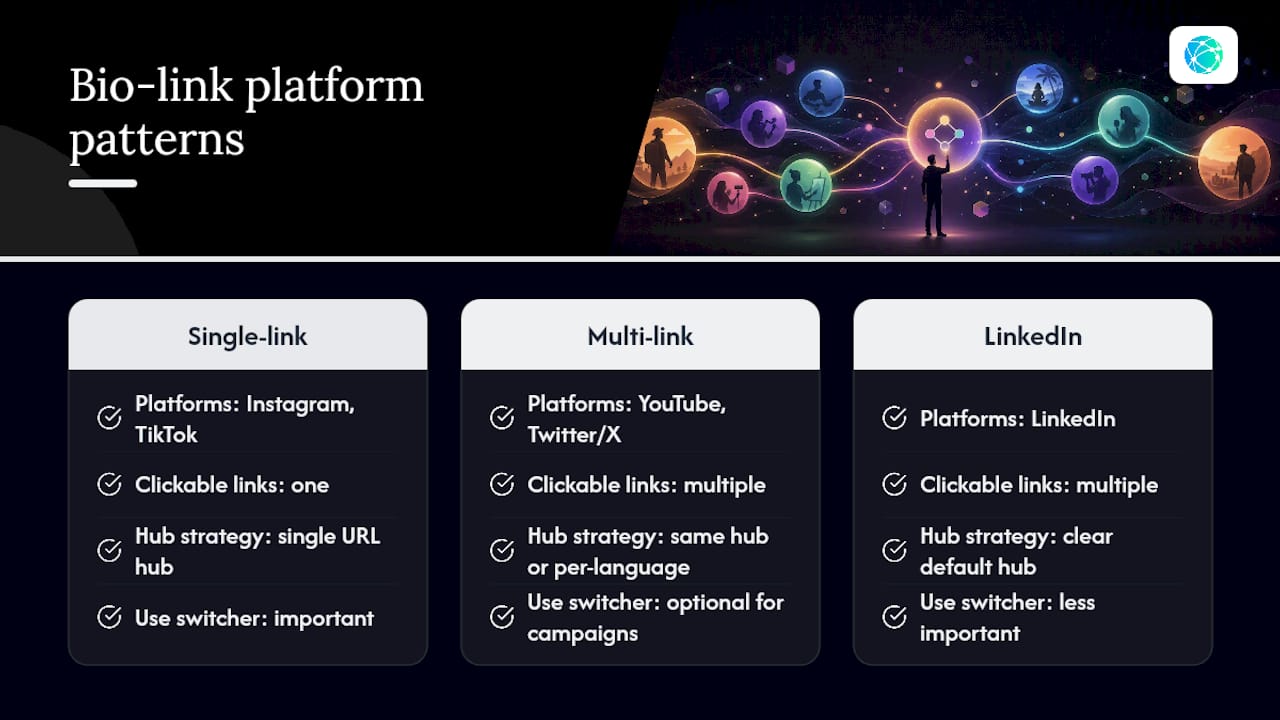
Instagram and TikTok give you one clickable link in your bio, so your multilingual hub needs to be that single URL, with the switcher or language blocks doing the work once someone lands. YouTube and Twitter/X allow multiple links, which means you can either point everyone to the same hub or, for a bigger campaign, link directly to a specific language variant from region-targeted posts.
LinkedIn behaves differently again, skewing toward a professional, often English-first audience even for creators with international followings, so a language switcher matters less there than a clear default.
When you're running a bilingual caption on the same post (a common approach for musicians announcing tour dates), the link in your bio needs to route to a page where both language audiences can immediately confirm they're in the right place. That's the exact case where a switcher outperforms two separate links, since you don't know which audience is scrolling to your bio first.
Keep your link consistent across every platform's bio field rather than swapping URLs per platform. A visitor who follows you on both Instagram and YouTube should land on the same hub either way, which also makes your per-language analytics easier to read since you're not splitting data across multiple URLs for the same campaign.
What Actually Determines Whether a Multilingual Hub Works
Most advice on multilingual anything defaults to a translation problem. Translate the caption, translate the page, done. That's backwards. The bigger failure point is routing and organization: sending the right visitor to the right block, tagged in a way you can actually measure later. A perfectly translated page that dumps every visitor into one undifferentiated link list still loses the international audience it was built for.
The conventional wisdom also overrates language-only splits. Spanish isn't one market. A locale-based structure, language paired with region, catches pricing, timing, and cultural differences that a language toggle alone misses entirely.
If you're starting from zero, prioritize the boring parts first: consistent link naming, a language tag on every UTM, and a weekly check on which block is actually converting. Design polish and clever copy matter less than whether your tracking tells you the truth about what's working. Get the structure right, and the rest becomes a lot easier to iterate on.
— Axion
Ready to Build Your Own Multilingual Link Hub?
Lflow gives you what this entire guide has been describing: a free plan with unlimited links, downloadable QR codes for every language block, and onboarding that takes less than two minutes from sign up to published page.

If you'd rather start from a design instead of a blank page, browse Lflow's free templates and pick one built for mobile from the start. Otherwise, head straight to the free link-in-bio sign up and add your first language block today. No credit card, no waiting period, and nothing to configure beyond your own links.
Sources
- Think Socially; Act Locally | MultiLingual Sept/Oct 2021 | Localization for Startups
- A Guide to Multilingual Social Media Management - Fanpage Karma Insights
- How to Create a High-Converting Link-in-Bio Page That Actually Drives Sales | MydropAI