

The fastest way to run a gated giveaway is one mobile-first landing page, one required action (email), clear official rules, and a post-entry email sequence ready before you hit publish. That's the whole framework. Everything else is optimization.
A gated giveaway link is a URL on your link-in-bio or landing page that locks entry behind a specific action — typically an email signup — before anyone can participate. Unlike native platform contests where entries live inside Instagram or TikTok's UI and disappear with the campaign, this approach puts every entrant directly into your list. Use a tool like Lflow to host the link, track clicks, and generate a QR code for offline promotion. Keep your setup compliant with CAN-SPAM for U.S. email follow-up and GDPR if any entrants are EU residents.
Quick-start checklist:
- Create a dedicated mobile-optimized landing page with prize, dates, and rules
- Set email as the single required entry field
- Add official rules with eligibility, "no purchase necessary," and winner selection method
- Build your confirmation email and winner announcement before launch
Key Takeaways
Gated giveaway links work best when email is the single required entry action, the landing page is mobile-optimized, and the follow-up sequence is built before the campaign opens.
| Point | Details |
|---|---|
| One required action | Limit mandatory entry to email only; bonus actions (share, follow) should earn extra entries, not block the first. |
| Mobile-first testing | Test the full entry flow on a real device before launch — most bio link traffic arrives on mobile. |
| Build follow-up first | Write confirmation, winner, and consolation emails before the campaign opens so the list never goes cold. |
| UTM every source | Tag every traffic channel with UTM parameters to know which post or platform drove the most entries. |
| Lflow for hosting | Lflow's free link-in-bio handles mobile pages, QR codes, real-time analytics, and CSV export in one place. |
Table of Contents
- Why gated giveaway links outperform native platform contests
- What every gated giveaway landing page must include
- Step-by-step: set up a gated giveaway link from your link-in-bio
- Promotion tactics to drive entries from one bio link
- U.S. legal and platform rules every creator must follow
- How to measure success: KPIs and tracking setup that matter
- Follow-up sequence: convert entrants into customers after the winner is chosen
- Practical templates and the one-link tool we recommend
- What creators consistently get wrong with gated giveaways
- Lflow makes gated giveaway links faster to launch
- Sources
Why gated giveaway links outperform native platform contests
Running a giveaway entirely inside Instagram or TikTok feels convenient until you realize the platform owns every entry. You get a follower count bump; they get the data. A dedicated landing page flips that equation.
Data ownership is the clearest win. Every email captured flows directly into your CRM or email platform instead of sitting in a platform dashboard you can't export. Gleam's guide to social media contests makes this explicit: a hosted page lets you manage rules centrally, run referral actions, and keep the list regardless of what any platform changes.
Cross-channel consistency matters too. One URL works in your bio, Stories link sticker, a pinned post caption, an email blast, and a printed QR code at an event. You're not rebuilding the entry point for each channel.
On conversion: the temptation to stack entry requirements (follow + tag + share + email) is real, but field guidance shows that requiring multiple mandatory actions can reduce conversion by roughly half or more. A single required action — email — keeps participation high while still capturing the data point that actually matters. Referral sharing and social follows work best as optional bonus entries, not gates.
Stat to know: Stacking three or more required entry actions can cut your conversion rate by 60–80% compared to a single-action entry. One gate. One email. That's the formula.
What every gated giveaway landing page must include
ShortStack's Instagram contest guide is direct on this: redirect traffic to an external, mobile-optimized page so you can capture emails — native tools simply don't do it. Here's what that page needs.
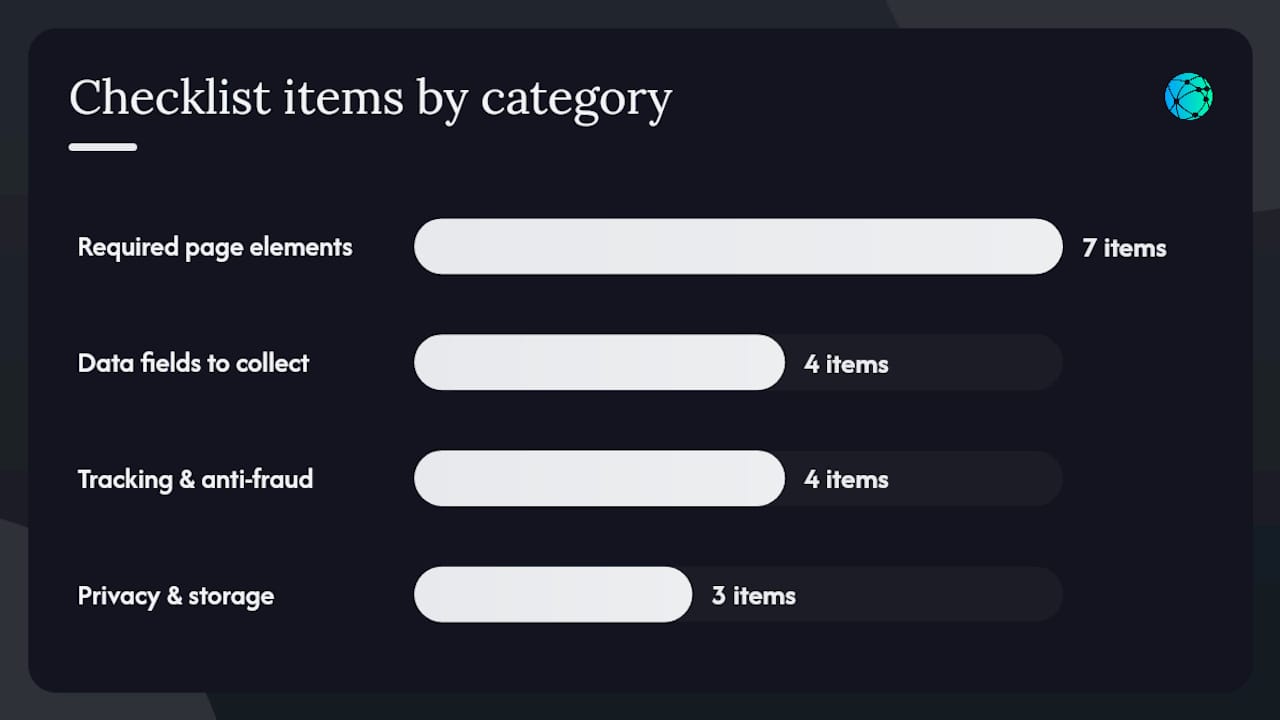
Required page elements:
- Prize description (specific value and what it includes)
- Eligibility (age, U.S. residency, or geographic restrictions)
- "No purchase necessary to enter or win" statement
- Open and close dates with timezone (e.g., 11:59 PM ET)
- Winner selection method (random draw, verified by [tool name])
- Business contact information
- Platform disclaimer ("Not affiliated with Instagram, Inc.")
Data fields to collect:
- Email address (required — the primary capture)
- First name (optional — personalizes follow-up)
- ZIP code (optional — useful for prize shipping or regional targeting)
- Phone and full address only at winner verification stage, never at entry
Tracking and anti-fraud basics:
- UTM parameters on every traffic source (more on this in the measurement section)
- Pixel firing on page view and form submission
- Referral/viral-share link generation for bonus entries
- Basic duplicate-entry check by email address
Privacy and storage:
- Short privacy notice on the form ("Your email will be used to notify you about this giveaway and future offers. Unsubscribe anytime.")
- Lawful basis for email contact (consent at point of entry)
- Store CSV exports in a secured folder or directly in your email platform; don't leave raw entrant data in a shared drive
Pro Tip: Keep the required entry action to exactly one item. Every additional mandatory step is a door you're closing on potential entrants. Bonus actions (share with a friend, follow on TikTok) should earn extra entries, not block the first one.
Ready-to-copy rules template
| Field | What to write |
|---|---|
| Promotion name | "[Brand] [Prize] Giveaway" |
| Sponsor | Full legal business name and address |
| Eligibility | "Open to U.S. residents. Void where prohibited." |
| No purchase necessary | "No purchase necessary to enter or win." |
| Entry period | "Begins [date/time ET] and ends [date/time ET]." |
| How to enter | "Submit your email address at [URL]." |
| Winner selection | "One winner selected by random draw on [date]." |
| Prize | Full description and approximate retail value |
| Winner notification | "Winner notified by email within 48 hours of selection." |
| Odds | "Odds depend on number of eligible entries received." |
| Taxes | "Winner responsible for all applicable taxes." |
| Disputes | "Governed by the laws of [State]." |
Step-by-step: set up a gated giveaway link from your link-in-bio
Customizable landing pages consistently outperform generic bio links for single-CTA campaigns. Here's the full setup sequence.
- Choose your landing page URL. Use a short, branded link (e.g.,
yourbrand.com/giveawayor a Lflow short URL). - Set prize, title, and dates. Write a headline that names the prize and the deadline — "Win a $500 Gift Card. Enter by March 31."
- Add the email field. Make it the first and only required field. Label it clearly: "Email address."
- Add optional referral action. Generate a unique share link per entrant. Label it: "Share with a friend for 3 bonus entries."
- Set eligibility rules. Display them on the page, not just in a linked PDF.
- Integrate your email platform. Connect via native integration or webhook so new entries sync to your list automatically and trigger the confirmation email.
- Enable pixels. Fire your Meta Pixel or Google tag on page view and on form submission.
- Add the link to your bio. Use Lflow's bio page setup to pin the giveaway link at the top of your page.
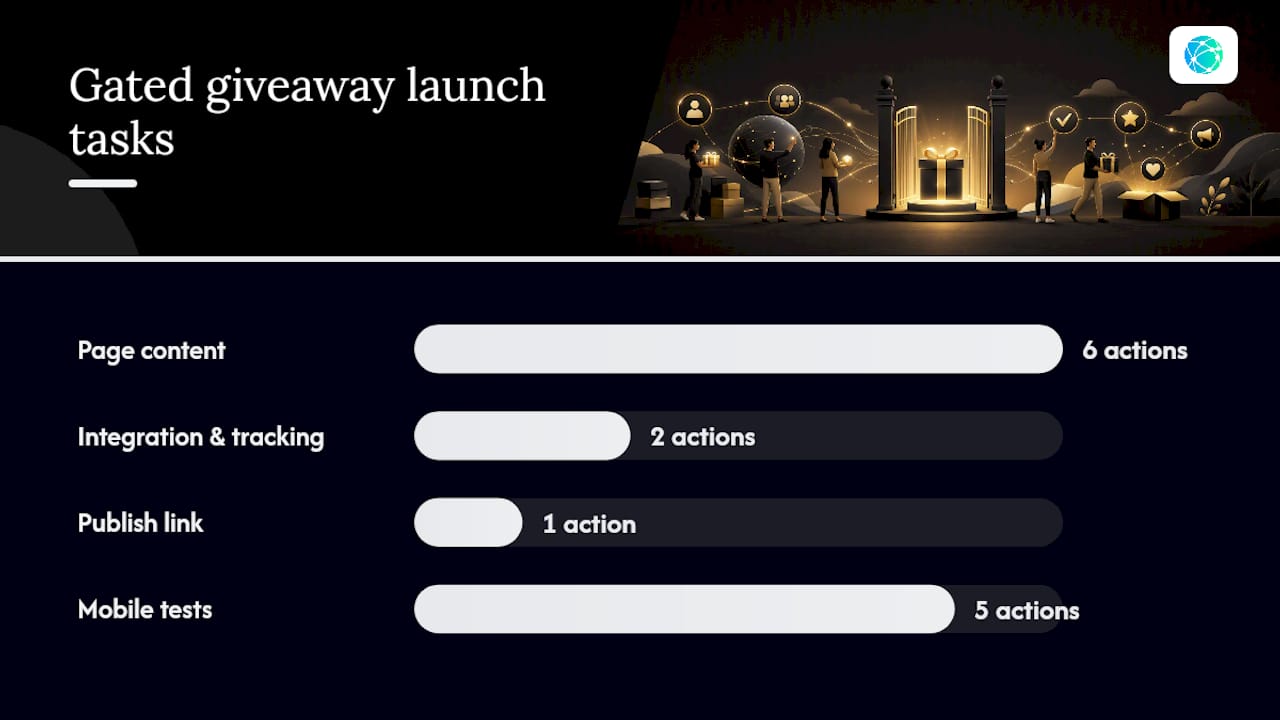
Mobile test checklist before launch:
- Open the link on iOS and Android
- Complete the entry flow end-to-end (submit, check confirmation email)
- Verify the post-entry redirect lands on a thank-you page, not a blank screen
- Test the referral share link from the thank-you page
- Confirm the bio link is tappable and loads in under 3 seconds
Pro Tip: Most link-in-bio traffic arrives on mobile. A form that looks fine on desktop but breaks on a 375px screen will cost you the majority of entries. Test on a real device, not just a browser emulator.
Promotion tactics to drive entries from one bio link
Pre-launch (3–5 days out):
- Email your existing list with a teaser and a countdown
- Post a countdown sticker in Stories and save it to a Highlights reel
- Drop a "something big is coming" post to prime the algorithm
Launch day:
- Pin a feed post with the prize image and bio link call-to-action
- Post a Reel or Short showing the prize and directing viewers to the link in bio
- Add a link sticker in Stories pointing directly to the giveaway page
- Generate a QR code for print collateral, packaging inserts, or event signage
Ongoing (every 2–3 days):
- Send a reminder email to non-openers from the teaser send
- Repost the pinned story to keep it visible
- Highlight the referral bonus — "Share your link for 3 extra entries"
- Post a "last chance" Story 24 hours before close
UTM checklist — tag every traffic source:
utm_source: instagram, tiktok, email, qrutm_medium: bio, story, reel, newsletter, printutm_campaign: [giveaway-name]utm_content: launch-post, reminder-email, qr-flyer
Use branded short links for cleaner bio display while keeping UTM parameters intact in the destination URL.
U.S. legal and platform rules every creator must follow
Platform disclaimers (required on every post and page):
- "This promotion is in no way sponsored, endorsed, administered by, or associated with Instagram." Repeat for TikTok, X, YouTube, or whichever platform you use.
Legal notices your official rules must include:
- Eligibility (age, residency, geographic limits)
- "No purchase necessary to enter or win"
- How winners are selected and notified
- How and when prizes are claimed
- Odds statement
- Governing law (your state)
Tax and prize reporting:
Prizes valued at $600 or more trigger U.S. tax reporting obligations. The sponsor (you) may need to issue a 1099-MISC to the winner. For high-value prizes, consult a CPA before launch — not after.
Privacy laws:
CAN-SPAM requires every commercial email to include your physical mailing address and a clear unsubscribe mechanism. If any entrants are EU residents, GDPR applies: collect only the data you need, state your lawful basis (consent), and link to your privacy policy on the entry form. Store entrant data securely and delete it when it's no longer needed.
For complex cross-border prize shipments or promotions with prizes above $5,000, get legal advice. The rules template above covers standard U.S. sweepstakes; it is not a substitute for professional legal review.
How to measure success: KPIs and tracking setup that matter
Core KPIs:
- Total entries (unique email captures)
- Referral rate (entries from referral links ÷ total entries)
- Cost per lead (CPL = total ad spend ÷ unique email captures)
- Confirmation email open rate
- 30-day and 90-day conversion to customer
Tracking setup:
Use UTM-tagged links and CRM tagging to attribute entries by source. Fire your pixel at two points: page view and form submission. Tag every entrant in your CRM with the campaign name and entry source.
| KPI | Formula | What to watch |
|---|---|---|
| CPL | Ad spend ÷ unique email captures | Rising CPL signals weak creative or wrong channel |
| Referral rate | Referral entries ÷ total entries | Above 20% means your share mechanic is working |
| Confirmation open rate | Opens ÷ delivered | Below 50% suggests deliverability or subject line issues |
| 30-day conversion | Purchases from entrants ÷ total entrants | Measures follow-up sequence quality |
Quick A/B test ideas:
- CTA copy: "Enter to win" vs. "Claim your entry"
- Prize creative: product photo vs. lifestyle image
- Entry gate: email-only vs. email + optional social follow
Follow-up sequence: convert entrants into customers after the winner is chosen
KickoffLabs frames this clearly: the winner is the campaign outcome; the email list is the long-term asset. Build the follow-up sequence before you launch so monetization starts the moment entries close.
Immediate (triggered at entry):
- Confirmation email — confirms entry, shows share link for bonus entries, includes a soft offer ("While you wait, here's 10% off your first order").
- Thank-you page redirect — mirrors the confirmation email's offer and share prompt.
At close (sent to all entrants):
- Winner announcement email — names the winner (first name + last initial), thanks all entrants, and includes a consolation offer with a 48–72 hour expiration.
Nurturing sequence (days 3–14 post-close):
- Welcome + value email — introduces your brand story and top content.
- Product/offer highlight — your best-selling product or service with social proof.
- Final nudge — last chance on the consolation discount before it expires.
Segmentation tags to apply at entry:
- Entry source (Instagram bio, TikTok Story, email, QR)
- Referral performance (referred 0, 1–2, 3+ friends)
- Prize category interest (if you ran multiple prize options)
High-referral entrants are your most engaged leads. Tag them separately and treat them to an early-access or VIP offer in the nurturing sequence. For a deeper lead nurturing strategy, the post-giveaway window is when most creators leave money on the table.
Pro Tip: Write all three nurturing emails before the giveaway opens. Once entries close, you'll be busy with winner verification — the last thing you want is a cold list going stale while you draft copy.
Practical templates and the one-link tool we recommend
Here are the copy-paste assets you need before launch:
Templates checklist:
- Official rules (use the table template from the required elements section above)
- Confirmation email: subject line "You're in! Here's your [Brand] giveaway entry," body confirms entry + share link + soft offer
- Winner email: subject "We have a winner! (And a thank-you for you)" — names winner, consolation offer, expiry date
- Consolation email: subject "[48 hours left] Your exclusive offer inside"
- UTM parameter preset: copy the four-field UTM structure from the promotion section and save it as a spreadsheet template
Where Lflow fits in:
Lflow handles the hosting, mobile experience, QR generation, and CSV export that make the operational side of a gated giveaway fast to deploy. Unlimited links mean you can run multiple giveaway campaigns simultaneously without rebuilding your bio page. Real-time analytics show which traffic source is driving entries. The QR code generator creates a scannable asset for every campaign link in seconds. When the campaign closes, export your entrant list as a CSV and import it directly into your email platform.
For integration, connect Lflow's landing page destination to your email platform (Mailchimp, Klaviyo, ConvertKit, and others) via webhook or native integration. New form submissions trigger the confirmation email automatically — no manual imports mid-campaign.
What creators consistently get wrong with gated giveaways
The most common mistake is overcomplicating the entry. A creator stacks five required actions — follow, tag two friends, share to Stories, join an email list, and comment — then wonders why the entry rate is low. The friction isn't building excitement; it's killing participation.
The second mistake is skipping mobile testing. Most bio link traffic arrives on a phone. A form that renders poorly on mobile, or a confirmation email that lands in spam, quietly destroys the campaign's value before it starts.
The third, and most expensive, is treating the giveaway as a standalone event rather than the top of a funnel. Creators who don't build the follow-up sequence before launch end up with a list that goes cold while they scramble to write emails after the winner is announced.
The fix for all three is the same discipline: one required action, a mandatory mobile flow check, and a segmented follow-up funnel written before the campaign opens. A small adjustment — moving from three required actions to one, with two optional bonus steps — can meaningfully lift entry rates while keeping data quality high.
Lflow makes gated giveaway links faster to launch
Running a gated giveaway means managing a landing page, a bio link, a QR code, analytics, and a CSV export — all at once. Lflow consolidates every one of those into a single free account you can set up in under two minutes.

Publish your giveaway link to a mobile-optimized bio page, generate a QR code for offline promotion, and track click-to-entry attribution in real time — all without touching a line of code. When the campaign closes, export your entrant list as a CSV and drop it straight into Mailchimp, Klaviyo, or any platform that accepts a file import. Lflow's free link-in-bio page is where most creators start: unlimited links, real-time analytics, and QR generation on the free plan. Sign up, pin your giveaway link at the top of your bio page, and you're live.
Sources
- How to Create a Social Media Contest? (The Viral Roadmap) | Gleam
- How to run an Instagram contest that actually grows your email list | ShortStack
- Social Media Giveaway Ideas: The 2026 Guide | KickoffLabs
- Giveaway Best Practices 2026 — A Field Guide for Creators & Brands
This article provides general information about running giveaways and email marketing. For large-value prizes, cross-border promotions, or complex legal questions, consult a qualified attorney and a CPA before launch.