
Copy your Etsy shop URL, format https://www.etsy.com/shop/YourShopName, or the trackable Share & Save version from Shop Manager. Open Instagram, tap Edit Profile, find the Website or Links field, paste the URL, and save. Confirm it's clickable by viewing your own profile. If you sell across multiple collections or want click data, swap that single link for a link-in-bio page instead.
TL;DR:
- Using a trackable Share & Save link from Etsy helps accurately measure referrals and should be updated after shop renames to avoid confusion.
- A link-in-bio landing page unlocks multiple links, including featured listings and newsletter signup, which is ideal for shops with diverse collections.
- Testing your Instagram bio link regularly and verifying analytics ensures tracking works correctly and helps optimize promotional efforts.
- Upgrading to an app version with multiple link slots or using a free link-in-bio tool streamlines managing several links in one profile.
- Keep your shop URL current and bookmark it for quick copying, especially during frequent promotions or product launches.
Table of Contents
- How to Add Your Etsy Shop Link to Instagram, Step by Step
- Should You Use a Link-in-Bio Page Instead?
- Writing Bio Copy That Actually Gets Clicked
- Track and Verify Every Click That Reaches Your Shop
- Fixing a Link That Won't Click or Won't Track
- A Routine Worth Repeating Every Time You Post
- Let Lflow Handle the Setup So You Can Focus on Selling
- Sources
How to Add Your Etsy Shop Link to Instagram, Step by Step
The link itself matters more than people assume. Etsy shop URLs follow one of two formats: shopname.etsy.com or www.etsy.com/shop/shopname, and Etsy's own help documentation confirms both work identically. You can grab this straight from your shop's homepage address bar, or dig into Shop Manager if you want a section link or a specific listing link instead of your general storefront.
Once you have the URL, the Instagram side takes under a minute.
- Open the Instagram app and tap your profile icon.
- Tap Edit Profile.
- Look for Website (on older app versions) or Links (on newer ones, which supports multiple entries).
- Tap Add external link, paste your Etsy URL, and give it a short label like "Shop" or "New Arrivals."
- Tap Done, then Save.
- Reopen your own profile and tap the link to confirm it loads your shop.
Instagram currently permits up to five external links in bio on many accounts, which is more room than most sellers realize they have. If you only see a single "Website" field with no option to add more, you're likely on an older app build. Update the app and check again.
One detail trips people up: if you ever rename your Etsy shop, your old URL doesn't die. Etsy automatically redirects the previous address to the new one, but it's still worth re-copying the fresh URL and re-pasting it into Instagram so your bio always shows the current shop name in the label. A five-second check now saves a confused customer later.
Pro Tip: Bookmark your shop URL in your phone's notes app. Sellers who run frequent promotions end up copying it far more often than they'd expect.
Should You Use a Link-in-Bio Page Instead?
A single Etsy link works fine if you're pointing followers at one thing: your storefront. But most Etsy sellers carry multiple product lines, a seasonal collection, and maybe an email list they'd like to grow. That's the exact situation a link-in-bio landing page was built for. It turns your one bio slot into a small commerce hub with several buttons instead of a single destination, which matters when a multi-listing shop doesn't fit neatly into one URL.
A well-built link-in-bio page for an Etsy shop typically includes:
- A "Shop Home" button linking to your full storefront
- Two or three featured listing buttons for bestsellers or new drops
- A collection button for seasonal or themed product groups
- A newsletter signup for building an email list outside Etsy's algorithm
- A downloadable QR code for markets, packaging inserts, or business cards
Setting one up doesn't require design skills. Pick a link-in-bio tool, add your shop link plus a handful of listing links, choose a template that matches your brand colors, then copy the resulting page URL into Instagram's Links field the same way you'd paste a direct Etsy link. Test it before you walk away.
Consider exploring link-in-bio tools that offer quick onboarding, templates designed for product-heavy layouts, support for unlimited links, and automatic downloadable QR codes, which can be handy for offline promotion at craft fairs.
Writing Bio Copy That Actually Gets Clicked
A link in the bio only matters if people know it's there and why they should tap it. Your bio text should answer one question fast: what do you sell, and what happens if someone taps the link? "Handmade ceramic mugs, shipped worldwide" tells a stranger more in five words than a clever tagline ever will.
Pair that with a direct call to action:
- "Shop new arrivals ⬇️"
- "Get 20% off this week only"
- "Tap to see the fall collection"
A short, specific instruction outperforms a vague one because it conditions your audience to expect a link and go find it. Use one arrow emoji or none at all; three arrows and a rocket ship read as noise, not urgency.
Consistency matters as much as wording. Mention "link in bio" in your captions, pin your best-selling post to the top of your grid, and use Instagram's Story link sticker on product teasers instead of relying on bio traffic alone. Swap your CTA the moment a seasonal collection launches. Leaving "20% off summer sale" live in October is the kind of small neglect that quietly costs clicks.
Track and Verify Every Click That Reaches Your Shop
Instagram sends real traffic. It's one of the largest social platforms in daily use, which is exactly why an untracked bio link is a missed opportunity. Etsy's Share & Save feature generates a trackable version of your shop link, and enabling it in Shop Manager before you post that link anywhere externally lets you see referrals that plain copy-paste URLs won't capture.
If you're running a link-in-bio page, embed the Share & Save link into your primary "Shop" button rather than a stripped browser URL. That preserves attribution instead of losing the referral source in transit.
Once it's live, watch three numbers:
- Clicks on your bio link (visible in link-in-bio analytics)
- Click-through rate relative to profile visits
- Orders tagged as referrals in Etsy Shop Manager
Run a quick verification after any change: click the link yourself, confirm the landing page loads correctly, then check Shop Manager referrals within 24 to 72 hours to see if traffic registered. A small test promotion, even a single "link in bio" Story, is enough to confirm the whole chain works before you lean on it for a bigger launch.
Fixing a Link That Won't Click or Won't Track
Most bio link problems fall into three buckets, and each has a quick fix.
- Link isn't clickable at all. Check that you used "Add external link" or the Website field, not a caption or bio text string Instagram can't render. Update the app if you only see one link slot instead of multiple.
- Link loads the wrong page or a dead shop. Confirm you copied the current URL after any shop rename. Etsy redirects the old address, but a fresh copy avoids confusion and mislabeled buttons.
- Clicks aren't showing up anywhere. You're likely using a plain URL instead of the Share & Save trackable link, or you pasted the raw Etsy link into a button instead of the trackable version. Swap it and test again.
When in doubt, go back to Shop Manager, copy a fresh link, and run one manual click test before trusting it with a promotion.
A Routine Worth Repeating Every Time You Post
The sellers who get the most out of their bio link treat it as a maintenance habit, not a one-time setup. Verify the link works, update the landing page the moment a new drop goes live, add a matching CTA to your next few captions, then check analytics after about a week to see what actually moved. Screenshot this if it helps: check link, update page, add CTA, review data in seven days. Repeat every time your product lineup shifts.
— Axion
Let Lflow Handle the Setup So You Can Focus on Selling
Building a link-in-bio page by hand works, but some platforms offer faster setup and tracking capabilities beyond a plain Etsy URL. Some free plans support unlimited links, eliminating concerns about which products to feature in limited bio space. You can add your Etsy shop link, then stack featured listing buttons for your current bestsellers or seasonal items.

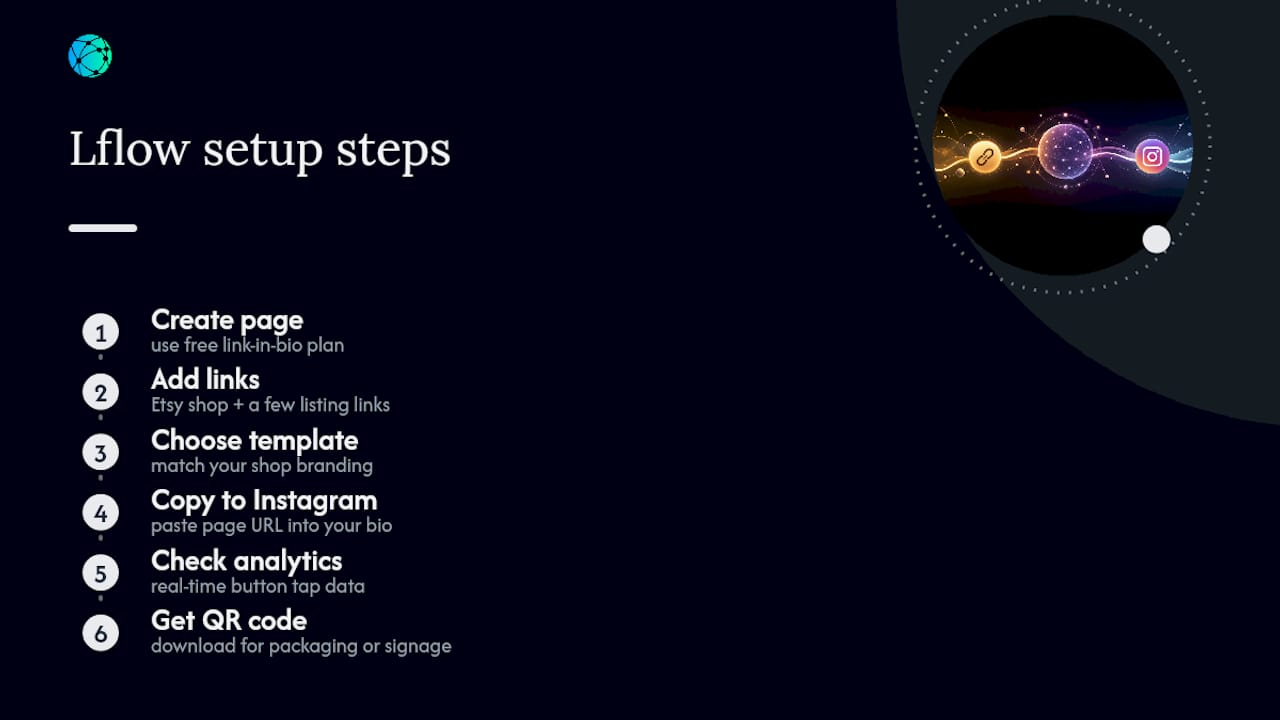
Setup is straightforward: create a free link-in-bio page, add your Etsy shop URL plus a few listing links, pick a template matching your shop's branding, then copy the page URL into your Instagram bio where your Etsy link used to sit. Real-time analytics can show which buttons are tapped, and a free downloadable QR code allows use on packaging inserts or market signage, not just Instagram.
Start with the free link-in-bio page and have it live before your next post goes up.
Sources
For exact URL formats and copying instructions, see Etsy's shop link help article. For Share & Save trackable links, review Etsy's affiliate program page. For Instagram's reach as a promotion channel, see Statista's user data.
- What’s the link for my shop? – Etsy Help
- How to link Etsy to Instagram: A Step-by-Step Guide in 2026
- Instagram: number of global users