
A single branded link-in-bio landing page is the best way to host multiple links for Instagram. Instead of swapping one URL in and out every time you post, you get a mini-menu of destinations that lives at one permanent address. Lflow lets you build that page for free in under two minutes, with mobile-optimized templates, real-time analytics, and a free QR code included from day one.
Key Takeaways
A single branded link-in-bio landing page with real-time analytics and a free QR code is the fastest, most measurable way to drive multiple destinations from one Instagram bio URL.
| Point | Details |
|---|---|
| One URL, unlimited links | A link-in-bio page hosts 5–20 buttons at a single address, solving Instagram's single-link limit. |
| Keep it to 5–7 buttons | More than seven links reduces conversions; put your highest-priority offer in position one. |
| Track CTR per link weekly | Export a CSV with link label, clicks, and CTR to see what's working before a campaign ends. |
| QR codes extend reach offline | Download your free QR code and place it on cards, packaging, and event signage for a second traffic channel. |
| Lflow free plan covers the essentials | Unlimited links, free QR code, templates, and real-time analytics are all available at no cost on Lflow. |
Table of Contents
- Why do creators and brands use a multi-link landing page?
- What features should you look for in a link-in-bio page?
- How do you set up a multi-link Instagram bio landing page?
- Best practices to maximize clicks and conversions
- What should you track to measure link-in-bio success?
- How do you promote your link-in-bio page beyond Instagram?
- Free vs. paid: when should you upgrade your link-in-bio plan?
- Ready-to-use layouts for three creator types
- Security and privacy considerations for your link-in-bio page
- Common mistakes to avoid when managing multiple links in Instagram bio
- Legal and disclosure guidelines for link-in-bio pages
- Why a creator-first link hub beats the alternatives
- Lflow gives you everything covered in this guide, for free
- Sources
Why do creators and brands use a multi-link landing page?
A link-in-bio tool creates a mobile-optimized page that hosts multiple tappable buttons, typically 5–20, along with a profile photo and a short description. It solves Instagram's single-link constraint by turning your bio URL into a navigable menu your audience can tap through.
The practical reasons creators reach for one:
- Product launches: Point followers to a new drop without editing your bio every week.
- Newsletter signups: A dedicated button converts better than a buried link in a caption.
- Latest content: Pin your newest post, podcast episode, or YouTube video at the top.
- Merch and shop: Route buyers directly to a store without losing them in a homepage.
- Ticketed events: Sell seats or RSVPs from a single tappable button.
- Social profiles: Consolidate TikTok, YouTube, and Twitter/X in one place.
Every page is mobile-optimized by default, which matters because the overwhelming majority of Instagram traffic comes from phones. Real-time analytics show which buttons get tapped, and a free QR code lets you extend the same page to printed materials and offline events.
What features should you look for in a link-in-bio page?
Must-have features
- Custom domain or branded short URL: A link like
yourname.comor a clean short URL builds trust faster than a generic platform subdomain. - Unlimited links: Caps force you to delete old links rather than archive them.
- Mobile-optimized templates: The page needs to load fast and look sharp on a 6-inch screen.
- Real-time analytics: Click counts and CTR per link tell you what's working before a campaign ends.
- CSV export: You need raw data for weekly reports and client decks.
- QR code generation: One click, printable asset, no third-party tool required.
- Password protection: Useful for pre-launch pages or private community links.
Nice-to-have features
- AI bio generator for faster profile copy
- Scheduled and auto-archived links for time-sensitive campaigns
- Pixel integrations (Meta Pixel, Google Analytics 4) for conversion tracking
- Branded short URLs for every individual link
- Embed blocks for video, music players, or email capture forms
Creators value analytics, pixel integrations, and automation to keep pages fresh and measure traffic sources accurately. Those features separate a basic link list from a real marketing asset.
Pro Tip: Fast load time beats a flashy design every time. A page that takes three seconds to load on mobile will lose a meaningful share of taps before anyone sees your links.
How do you set up a multi-link Instagram bio landing page?
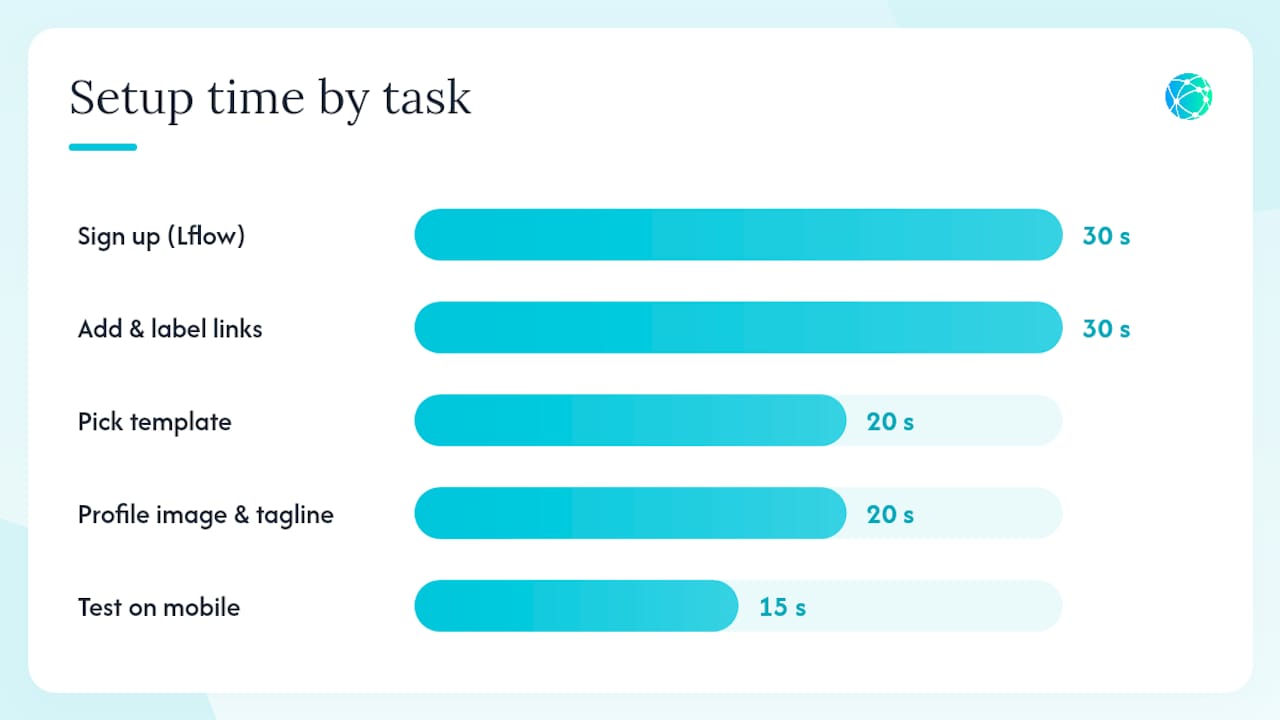
The core process is three moves: create the page, place the URL in your bio, and maintain it as priorities shift. Here is the full sequence with rough time estimates for a basic setup:
- Sign up for Lflow (30 seconds): Go to Lflow and create a free account. No credit card needed.
- Pick a template (20 seconds): Choose from the Lflow template library — ready-made layouts keep you on-brand without any design work.
- Add your profile image and tagline (20 seconds): Upload a headshot or logo and write one line that tells visitors who you are.
- Add and label your links (30 seconds): Paste each URL and write a clear, specific button label. "Shop the collection" outperforms "Click here" every time.
- Arrange priority order (10 seconds): Put your highest-converting destination at the top. Visitors rarely scroll past the third button.
- Set your custom domain or short URL (10 seconds): Claim a branded address or use Lflow's short URL generator for a clean link.
- Generate your QR code (5 seconds): Download it for print, stories, or event signage.
- Paste the URL into your Instagram bio (10 seconds): Replace whatever is there now.
- Test on mobile (15 seconds): Tap every button from your phone before you announce it.
Total: under two minutes for a basic page. The Lflow setup guide for content creators covers copy examples and a suggested maintenance cadence if you want to go deeper.
Pro Tip: Label buttons with the outcome, not the destination. "Get the free guide" converts better than "Blog post."
Best practices to maximize clicks and conversions
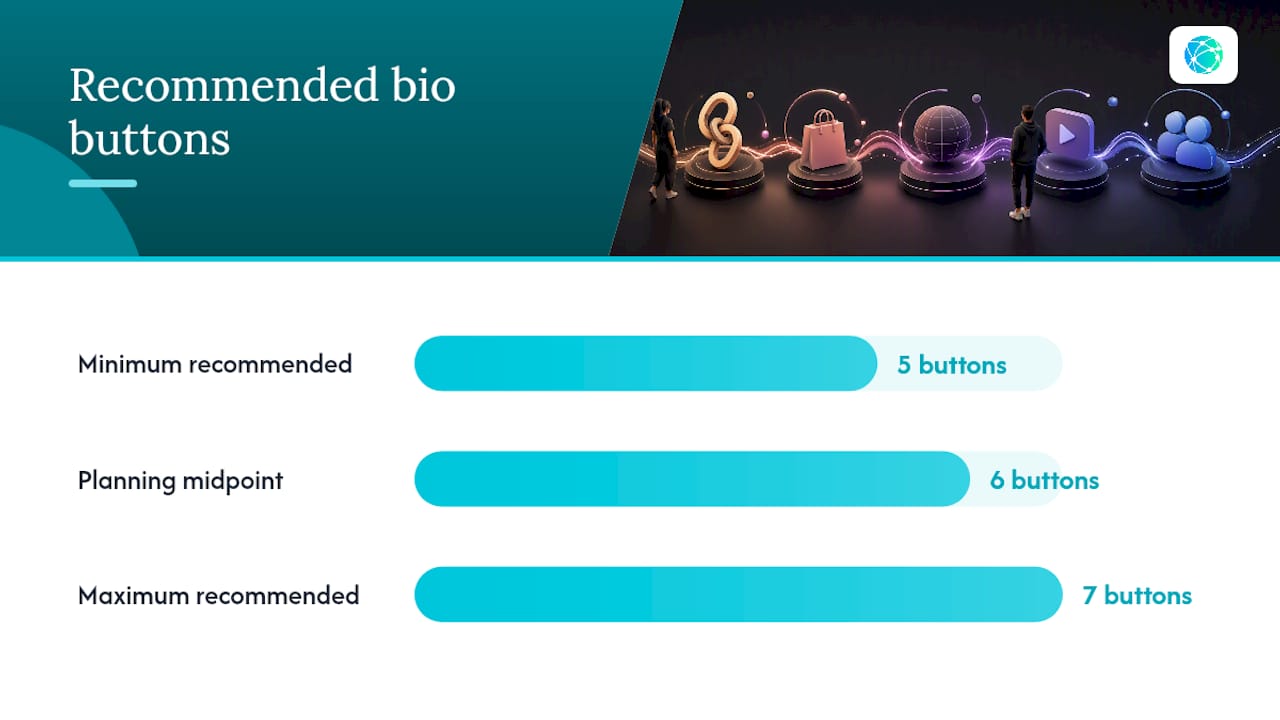
Keep the page tight. Best practice is 5–7 buttons, with your highest-converting offer at the top. A stale link list reduces trust and conversions, so treat the page like a storefront window: refresh it when priorities change.
Do:
- Put the link tied to your current campaign or post in position one.
- Write button labels that name the action ("Watch the trailer," "Book a call," "Grab the discount").
- Remove links that haven't been clicked in 30 days.
- Use a contrasting button color for your top CTA so it stands out visually.
Don't:
- Stack five links with the same generic label style.
- Leave a "Coming soon" button live for more than a week.
- Use your homepage as every button's destination.
Quick sample link orders by creator type:
- Content creator: New video → Newsletter signup → Podcast → Brand collab page → All social links
- Small shop: Shop now → New arrivals → Sale → About / Story → Contact
- Musician: Stream the new single → Tour dates → Merch → Press kit → All platforms
Pro Tip: Test two versions of your top button's label over two weeks. Even a small wording change, "Shop now" vs. "See the collection," can shift CTR noticeably. Use Lflow's scheduled links feature to swap campaign buttons automatically at launch time.
What should you track to measure link-in-bio success?
The metrics that actually matter:
- Total clicks: Baseline traffic to the page.
- CTR per link: Which buttons get tapped and which get ignored.
- Conversion events: Email signups, purchases, or form completions downstream.
- Device breakdown: Confirms your mobile optimization is working.
- Traffic source: Shows whether Instagram, TikTok, or email is driving the most visits.
- QR scans: Separate from web clicks, so you can measure offline performance independently.
For a simple weekly report, export a CSV with these fields: date, link label, link URL, clicks, CTR, and conversions. Lflow's multi-link bio guide walks through the export steps and suggested report structure.
For deeper tracking, connect a Meta Pixel or Google Analytics 4 property. That lets you attribute purchases or signups back to specific bio link clicks rather than lumping them into "direct" traffic.
| Metric | Why it matters | How to get it |
|---|---|---|
| CTR per link | Reveals which offers resonate | Analytics dashboard |
| Conversion events | Ties clicks to revenue or signups | Pixel / GA4 integration |
| Device breakdown | Validates mobile optimization | Analytics dashboard |
| QR scans | Measures offline promotion ROI | QR analytics tab |
| CSV export | Powers weekly reporting | One-click download |
How do you promote your link-in-bio page beyond Instagram?
The URL works anywhere you can paste a link. Place it on:
- TikTok bio: Same page, different audience, zero extra work.
- YouTube description: Pin it in the first line of every video description.
- Email signature: Every outbound email becomes a traffic source.
- Twitter/X and LinkedIn: Add it to your profile bio and pin a post that mentions it.
- Pinterest: Link pins directly to your page for product or content traffic.
For offline promotion, download your free QR code and place it on business cards, packaging, event signage, and printed flyers. A QR code at a minimum size of 2 cm × 2 cm scans reliably from most phone cameras.
For campaign launches, run this short checklist:
- Add UTM parameters to each link so analytics can separate campaign traffic from organic.
- Pin a post on every platform that directs followers to the bio link.
- Add the page URL to your Instagram Story highlights so it stays visible after 24 hours.
- Schedule the campaign link to go live and auto-archive using Lflow's scheduled links feature.
Free vs. paid: when should you upgrade your link-in-bio plan?
A free plan covers the basics well. Lflow's free tier includes unlimited links and free QR code generation, which is enough for most creators starting out.
What a free plan typically covers:
- Unlimited links
- Mobile-optimized templates
- Basic click analytics
- Free QR code download
- Lflow-branded short URL
Common paid add-ons:
- Custom domain (your own URL, no platform branding)
- Branding removal (no "Powered by" footer)
- Advanced analytics with CSV export and pixel integrations
- Scheduled and auto-archived links
- Priority support
Upgrade when:
- You're getting steady traffic and need link-level conversion data to justify ad spend.
- A client or brand partner requires a custom domain for credibility.
- You're running time-sensitive campaigns that need scheduled link swaps.
- You manage multiple accounts and need white-label or agency features.
A rough calculation: if your bio link drives even one additional sale per month at $30, a paid plan that costs less than that pays for itself.
Ready-to-use layouts for three creator types
These are plug-and-play link orders you can copy directly into your page. Keep button labels short and outcome-focused.
Content creator
- Button 1: "Watch my latest video" → YouTube link
- Button 2: "Join the newsletter" → Email signup
- Button 3: "Listen to the podcast" → Podcast link
- Button 4: "Work with me" → Collab/contact page
- Button 5: "Follow everywhere" → All social links
Small shop
- Button 1: "Shop now" → Store homepage
- Button 2: "New arrivals" → New products page
- Button 3: "Current sale" → Sale page
- Button 4: "Our story" → About page
- Button 5: "Contact us" → Contact form
Musician
- Button 1: "Stream [Song Title]" → Streaming link
- Button 2: "Get tickets" → Tour dates
- Button 3: "Shop merch" → Merch store
- Button 4: "Press kit" → EPK page
- Button 5: "All platforms" → Music aggregator
For accessibility, keep buttons at least 44px tall with enough spacing between them so they're easy to tap on small screens. Browse creative link-in-bio ideas for more CTA copy examples and layout variations.
If you're still setting up your Instagram profile itself, the PHENYX guide to creating an Instagram Business Account covers the profile setup steps that precede your bio link.
Security and privacy considerations for your link-in-bio page
Your link-in-bio page is a public-facing asset, so a few security and privacy habits are worth building in from the start.
Link vetting: Only add URLs you control or have verified. A compromised third-party link can redirect your audience to malicious sites and damage your credibility fast. Review every link when you add it and again during your weekly maintenance check.
Password protection: Use it for pre-launch pages, private community links, or any destination you don't want indexed publicly. Lflow's password protection feature keeps those pages accessible only to people you share the password with.
Privacy compliance: If your page collects any data, including email signups or pixel-tracked visits, you need a privacy policy that discloses it. For U.S. audiences, the California Consumer Privacy Act (CCPA) applies if you collect personal data from California residents. For any European visitors, GDPR requires a clear disclosure and, in most cases, consent before tracking. Keep your privacy policy linked from the page footer.
Analytics data: Understand what your platform stores and for how long. Check Lflow's privacy policy for data retention terms before connecting third-party pixels.
Common mistakes to avoid when managing multiple links in Instagram bio
A few patterns consistently hurt performance:
- Too many links: More than seven buttons and visitors stop reading. Curate, don't dump.
- Stale links: A "Black Friday sale" button in March tells visitors the page is abandoned.
- Vague button labels: "Click here" and "Learn more" give no reason to tap. Name the outcome.
- No mobile test after edits: A link that looks fine on desktop can break on mobile. Always test from your phone after any change.
- Skipping analytics: Adding links without tracking which ones convert means you're guessing at what your audience wants.
- Forgetting the bio itself: The URL alone doesn't drive clicks. Your Instagram bio text needs a clear call to action pointing to it, like "All my links below."
- Using an unbranded URL: A generic platform subdomain looks less trustworthy than a custom domain or clean short link, especially for brand partnerships.
Legal and disclosure guidelines for link-in-bio pages
If any button on your page leads to a sponsored destination, an affiliate product, or a paid partnership, U.S. Federal Trade Commission (FTC) guidelines require a clear disclosure. "Sponsored," "Ad," or "#ad" on the button label or immediately adjacent to it satisfies the requirement. Burying a disclosure in a footer or a separate page does not.
For affiliate links specifically, the disclosure must be hard to miss. A button labeled "Shop my favorites" that leads to an affiliate storefront needs a visible "affiliate link" or "I earn a commission" note near it, not just in your bio text.
If you collect email addresses through an embedded form on your page, the CAN-SPAM Act and, for European visitors, GDPR both require that you disclose how you'll use those addresses and provide an unsubscribe path. This is general information, not legal advice. Confirm current FTC, CAN-SPAM, and GDPR requirements with a qualified professional or the relevant primary sources before publishing.
Why a creator-first link hub beats the alternatives
The conventional wisdom says any link-in-bio tool does the job. The reality is that most creators set one up, never look at it again, and wonder why their bio traffic doesn't convert. The page isn't the problem. The habit is.
A link hub only earns its keep when you treat it like a live document. The creators who see real results from their bio link check their analytics weekly, move their top-performing offer to position one, and archive anything that hasn't been clicked in a month. That cadence takes five minutes. Most people skip it entirely.
The other thing people underestimate: the QR code. Printing it on a business card or event flyer and tracking those scans separately from web clicks gives you a channel attribution picture that most small creators never have. It's not a gimmick. It's a second traffic source you already own.
Fast setup matters for getting started, but the platforms that keep creators coming back are the ones with analytics clear enough to act on and templates flexible enough to stay on-brand without a designer. That's the combination worth prioritizing.
Lflow gives you everything covered in this guide, for free
Lflow is the free link-in-bio platform built for creators who want a professional page without the setup friction. You get unlimited links, mobile-optimized templates, real-time analytics, a free QR code, and a clean short URL, all on the free plan. Custom domains, CSV export, scheduled links, and branding removal are available on paid tiers when you're ready to scale.

The free plan covers everything a creator needs to start driving traffic today. Browse the template library to pick a layout and publish your page in under two minutes, or go straight to the free plan signup to get your link live now.