

Content creator tools are software and platforms designed to support every stage of digital content production, from planning and editing to publishing, monetization, and audience analytics. Knowing what are content creator tools and which ones actually move the needle separates creators who grind without results from those who build real, scalable businesses. The right stack does not need to be expensive or complicated. A focused set of 5–6 core tools, chosen to address your specific workflow bottlenecks, consistently outperforms a bloated collection of overlapping subscriptions.
What are content creator tools and why do they matter?
Content creator tools are specialized apps and platforms that cover the full production cycle: ideation, design, video editing, scheduling, monetization, and link management. Each category solves a distinct problem in the workflow. Without them, creators spend the majority of their time on manual, repetitive tasks instead of producing content that grows their audience.
Most creators build stacks around four to five core categories: video editing tools like DaVinci Resolve, design platforms like Canva, AI writing assistants for scripting and captions, and social media management platforms for scheduling and distribution. Together, these cover the full arc from raw idea to published post. The goal is not to collect tools. The goal is to remove friction from the steps that slow you down most.

The business case for investing in digital content creation tools is direct. 76% of social media users say social media content influences their purchasing decisions. That means the quality and consistency of your output has a measurable effect on your revenue, not just your follower count.
What are the essential categories of creator tools?
A well-built creator stack covers six functional areas. Each one addresses a different stage of the content workflow.
Planning and organization tools manage your content calendar, track deadlines, and keep campaign ideas in one place. Notion and Trello are widely used for this. Without a planning layer, most creators publish reactively instead of strategically.
Design and graphics platforms let you produce thumbnails, social graphics, and branded visuals without hiring a designer. Canva dominates this category for good reason: its template library and drag-and-drop interface make professional-looking visuals accessible at any skill level.
Video editing software is the production core for video creators. DaVinci Resolve offers professional-grade color grading and audio tools at no cost. CapCut serves creators who need fast, mobile-first editing with built-in effects and captions.
AI writing tools handle scripting, caption writing, content ideation, and repurposing. ChatGPT is the most widely adopted entry point. These tools cut the time spent on first drafts and help creators maintain output volume without burning out.
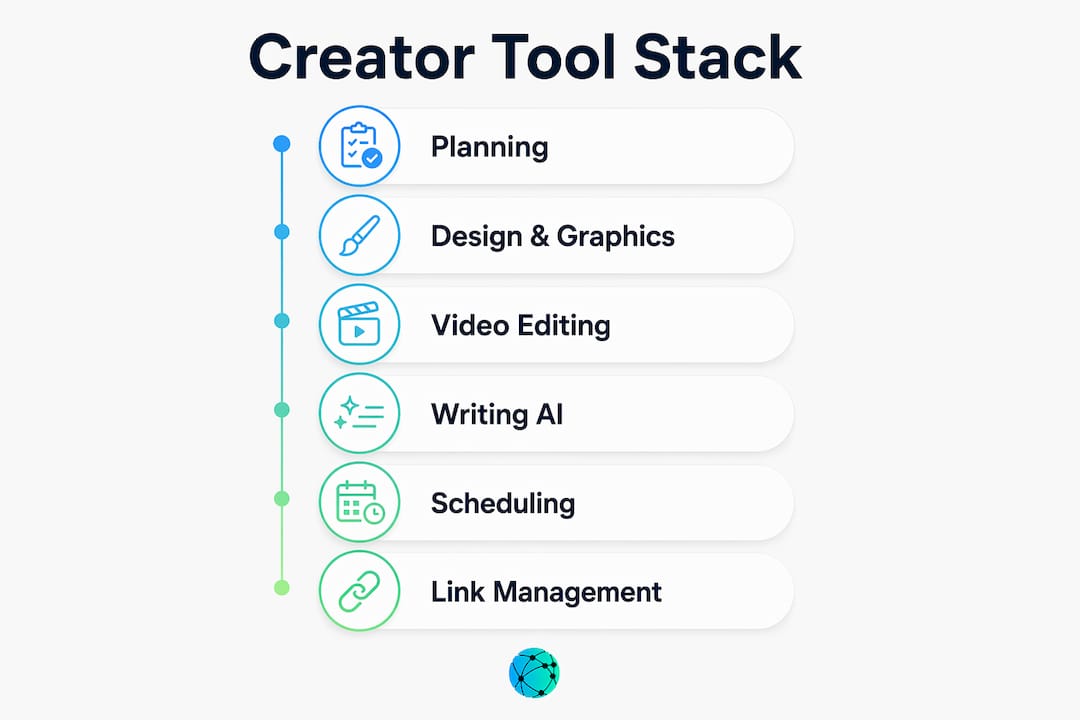
Publishing and scheduling platforms automate distribution across Instagram, TikTok, YouTube, LinkedIn, and Twitter/X. They also provide basic analytics on reach and engagement timing.
Link management hubs consolidate all your audience touchpoints into a single URL. This category is underused by beginners but critical for monetization. A well-built link in bio page connects your followers directly to your store, newsletter, affiliate links, and content in one click.
| Category | Core function | Example tools | Typical cost |
|---|---|---|---|
| Planning | Content calendars, task management | Notion, Trello | Free to $10/month |
| Design | Graphics, thumbnails, branding | Canva | Free to $15/month |
| Video editing | Production, color, captions | DaVinci Resolve, CapCut | Free to $20/month |
| AI writing | Scripts, captions, ideation | ChatGPT | Free to $20/month |
| Scheduling | Multi-platform publishing | Various platforms | $15–$50/month |
| Link management | Audience hub, monetization | Lflow | Free |
Pro Tip: Start with the free tier of every tool before upgrading. Most creators can run a complete production workflow for under $15 per month using free versions of Canva, CapCut, and ChatGPT.
How to build a lean creator tech stack
The most common mistake in tool selection is tool bloat: paying for multiple overlapping subscriptions before you have a revenue-generating workflow in place. The fix is simple. Start lean, then add tools only when a specific bottleneck appears.
A balanced creator stack covers five to six essential categories: planning, design and video, publishing and scheduling, monetization and email, and a link management hub. That structure gives you full coverage without redundancy.
Here is a practical process for building your stack from scratch:
- Map your current workflow. Write down every step from idea to published post. Note where you lose the most time or produce the lowest-quality output.
- Identify your top two bottlenecks. These are the only areas where a new tool will immediately improve your results. Start there.
- Choose free tools first. Beginners can build a complete starter stack using free tiers before spending a dollar. Upgrade only when a paid feature directly solves a documented problem.
- Check for integration. Every tool you add should connect to at least one other tool in your stack. Disconnected apps create manual handoff work that defeats the purpose.
- Set a 90-day review. After three months, audit which tools you actually use. Cancel anything that does not appear in your weekly workflow.
- Add monetization and link management last. These tools matter most once you have an audience to send somewhere. Lflow's free link in bio page takes under two minutes to set up and consolidates all your audience touchpoints in one branded URL.
Pro Tip: Treat your tech stack like a budget. Every subscription needs to justify its cost against a specific output improvement. If you cannot name the bottleneck a tool solves, you do not need it yet.
How do creator tools impact audience engagement and growth?
Professional creator workflows directly affect business outcomes, not just content quality. Integrating content creation tools with CRM and data tracking ensures your content drives real business goals rather than vanity metrics like impressions alone. Salesforce marketing experts identify this integration as a defining characteristic of creators who scale successfully.
Analytics tools are the feedback layer of the entire stack. They tell you which formats drive clicks, which posting times generate the most engagement, and which content types convert followers into buyers. Without that data, you are publishing based on guesses.
A hub-and-spoke stack model places audience relationship control at the center. Social platforms own your follower data. Your email list, link hub, and CRM do not. Creators who build around owned channels are far less exposed to algorithm changes or platform policy shifts.
The best practices for converting engagement into revenue are straightforward:
- Publish consistently using a scheduling tool so your audience knows when to expect content
- Use analytics to identify your top three performing content formats and double down on them
- Connect every piece of content to a single destination using a link management hub that tracks click behavior in real time
- Build an email list from day one using a monetization or email marketing tool
- Audit your conversion path monthly: follower sees post, clicks link, takes action
How is AI changing content creator tools in 2026?
AI has moved well beyond writing assistance. Professional creators now use automation tools like Make.com to parse podcast transcripts, identify segments to cut, and generate promotional teaser scripts automatically. That workflow alone eliminates hours of manual post-production work per episode.
AI tools now automate tedious tasks like podcast transcript editing and social media teaser creation, reducing post-production time significantly. The creators who benefit most are those who use AI to handle repetitive execution while keeping their creative judgment on strategy and storytelling.
The most practical AI applications for creators right now include:
- Script generation: AI writing tools produce first drafts from a topic and a few bullet points, cutting scripting time by more than half
- Caption and hashtag writing: AI generates platform-specific captions in seconds, freeing time for higher-value tasks
- Transcript editing: Automation tools scan raw transcripts and flag filler words, repeated segments, and low-value sections for removal
- Content repurposing: AI takes a long-form video or blog post and extracts short-form clips, social posts, and email newsletter content automatically
- Thumbnail and graphic generation: AI image tools produce multiple thumbnail variations for A/B testing without a design background
Pro Tip: Adopt AI tools one at a time. Pick the task that consumes the most time in your current workflow, find one AI tool that addresses it specifically, and use it for 30 days before adding another. Stacking AI tools too fast creates the same bloat problem as any other category.
Key Takeaways
A lean, bottleneck-focused creator stack of 5–6 tools covering planning, design, video, scheduling, monetization, and link management consistently outperforms a bloated collection of overlapping subscriptions.
| Point | Details |
|---|---|
| Define your bottlenecks first | Identify the two workflow steps that cost you the most time before selecting any tool. |
| Start with free tiers | Beginners can build a full production stack for under $15/month using free versions of core tools. |
| 76% purchasing influence | Social media content directly drives purchasing decisions, making content quality a revenue variable. |
| AI reduces post-production time | Automation tools like Make.com handle transcript editing and teaser creation without manual effort. |
| Link management closes the loop | A centralized link hub like Lflow connects your audience to every monetization channel from one URL. |
The lean stack is the only stack worth building
Every creator I have watched struggle with growth had the same problem: too many tools, too little clarity. They were paying for five design apps when Canva covered everything they needed. They had three scheduling platforms running simultaneously. They had no link hub, so every piece of content sent followers to a dead end.
The creators who scale are not the ones with the most sophisticated tech. They are the ones who removed friction from their workflow and built clear paths from content to conversion. That means one planning tool, one design tool, one video editor, one scheduler, one email platform, and one link management hub. Six tools. Full coverage. No overlap.
The AI shift makes this even more important. When automation handles transcript editing, caption writing, and content repurposing, the remaining human decisions are about strategy and audience relationships. Those decisions require clarity, not complexity. A bloated stack creates noise exactly where you need signal.
Audit your current tools today. Cancel anything you have not opened in 30 days. Then ask what your single biggest workflow bottleneck is and solve only that. Repeat every 90 days. That process, more than any specific tool, is what separates creators who grow from creators who stay stuck.
— Axion
Lflow fits directly into your creator stack
A complete creator stack needs one place where your audience lands after every post, video, and campaign. Lflow gives you a free, branded link in bio page that consolidates your store, newsletter, social profiles, and content into a single URL.

Setup takes under two minutes. Lflow includes real-time analytics so you can see exactly which links your audience clicks, free QR codes for offline promotion, and full customization with themes, fonts, and custom domains. Whether you are on Instagram, TikTok, YouTube, or LinkedIn, one Lflow link covers every platform. Start with free link in bio templates built for creators, or go fully custom with the free link in bio tool and unlimited links at no cost.
FAQ
What are content creator tools exactly?
Content creator tools are software and platforms that support the full content workflow, including planning, design, video editing, publishing, monetization, and audience analytics. They help creators produce higher-quality work faster and build scalable businesses.
How many tools does a creator actually need?
A balanced stack covers 5–6 categories: planning, design and video, scheduling, monetization and email, and link management. More than that typically creates overlapping subscriptions that waste money without improving output.
What is the best free tool for beginner creators?
Beginners can start with Canva for design, CapCut for video editing, and ChatGPT for writing, all on free tiers, and build a complete production workflow for under $15 per month.
Why do creators need a link management tool?
A link management hub like Lflow consolidates all your audience touchpoints into one URL, making it easy to direct followers to your store, newsletter, and content from a single link in bio. It also provides click analytics that social platforms do not share.
How does AI fit into a content creator tech stack?
AI tools handle repetitive tasks like transcript editing, caption writing, and content repurposing, freeing creators to focus on strategy and storytelling. Tools like Make.com and ChatGPT are the most widely adopted entry points for AI-driven post-production workflows.