

Social media traffic is the stream of visitors who land on your website, landing page, or app after clicking a link on a platform like Facebook, TikTok, Instagram, or LinkedIn. In Google Analytics 4, these sessions appear under the "Social" default channel, sitting alongside organic search, direct, and email as one of the four core acquisition channels. With 5.42 billion social media users globally in 2025, spending 14 billion hours daily on these platforms, the referral opportunity is enormous. But volume alone tells you nothing. The real question is whether those clicks are reaching assets you own and control, not just generating likes that live inside someone else's app.
Social media traffic breaks down into four main types:
- Organic social traffic: visitors from unpaid posts, shares, and community mentions on your brand profiles
- Paid social traffic: visitors from ad campaigns, boosted posts, and sponsored content on platforms like Facebook or TikTok
- Influencer traffic: visitors arriving through links shared by creators or partners in their content
- Employee advocacy traffic: visitors from posts shared by your team members on their personal profiles
Each type behaves differently in analytics and requires a different conversion approach. Organic visitors often already know your brand. Paid visitors may be encountering you for the first time. That distinction shapes everything from your landing page copy to your retargeting strategy.
Why social media traffic matters for marketers and individuals
Social media functions as a discovery channel, not a search channel. People find your brand on Instagram or TikTok before they ever type your name into Google. That awareness role is one of the most underappreciated parts of the multi-channel customer journey, where social traffic rarely converts on the first visit but plants the seed for later conversions through search, email, or direct.
Here is why the channel deserves serious attention:
- Brand discovery before intent: Social platforms introduce your content to people who were not actively searching, making them a natural top-of-funnel source.
- Indirect SEO support: Widely shared content earns backlinks and drives branded searches, both of which support organic rankings over time.
- Remarketing opportunities: Once a visitor lands from social, you can install pixels to retarget them with ads, turning a single click into a longer relationship.
- Audience trust signals: Organic social visitors often arrive with higher emotional engagement because they discovered you through content they chose to consume, not an ad they were served.
- Owned asset growth: Every click from social to your site, email signup, or product page moves the relationship off a rented platform and onto ground you control.
Quality matters more than raw volume here. A thousand visitors who bounce in five seconds contribute nothing. Fifty visitors who sign up for your newsletter or buy a product move the needle. Social traffic rarely converts immediately, but it plays a vital awareness role that shows up in revenue weeks or months later, often attributed to a different channel entirely.
The challenge is that social visitors arrive in discovery mode, interrupted mid-scroll, with lower intent than someone who searched for a specific answer. That means higher bounce rates are normal for this channel. The fix is not more traffic. It is better landing pages, faster load times, and hooks strong enough to hold attention past the first three seconds.
How to measure and track social media traffic effectively
Accurate measurement starts with Google Analytics 4. Inside GA4, navigate to Reports > Acquisition > Traffic Acquisition and filter by the "Social" default channel group. You will see sessions, engaged sessions, average engagement time, and conversions broken down by platform. That view tells you which networks are actually sending people to your site, not just generating impressions.
The single biggest measurement problem is Dark Social: traffic from private messaging apps like WhatsApp, Messenger, and Slack that gets misattributed as direct traffic in analytics. Someone shares your article link in a group chat, ten people click it, and GA4 records all ten as direct visits. UTM parameters solve this. Tag every link you share on social with a UTM source, medium, and campaign string, and GA4 will correctly attribute those visits to their actual origin.

Key metrics to monitor for social traffic analysis:
| Metric | What it tells you | Healthy benchmark |
|---|---|---|
| Sessions | Total visits from social platforms | Baseline; track trend over time |
| Engagement rate | Share of sessions lasting 10+ seconds or triggering a conversion | Varies significantly depending on niche |
| Average engagement time | How long visitors actively spend on your page | Over 2 minutes signals content match |
| Bounce rate | Inverse of engagement rate in GA4 | High bounce often signals page/post mismatch |
| Conversion rate | Percentage completing a goal (signup, purchase, form) | Varies by platform and goal type |
| Platform breakdown | Which network drives the most valuable sessions | Use to allocate content effort |
Measurement steps to get accurate data:
- Add UTM parameters to every link you share across all social platforms, not just paid campaigns.
- Set up conversion events in GA4 for the actions that matter: newsletter signups, purchases, form submissions, video plays, or scroll depth.
- Check page-level social traffic, not just site-wide totals. One viral post can lift a single article while the rest of your site sees nothing.
- Compare conversion rates across platforms. LinkedIn might send fewer visitors than Facebook but convert at a much higher rate per session.
- Review the retention report in GA4 to see how many social visitors return within 30 days. Returning visitors signal genuine audience interest.
Pro Tip: Tag your link-in-bio URL with a UTM parameter (utm_source=instagram&utm_medium=social&utm_campaign=bio) so every click from your profile link is tracked separately from post links. This is one of the fastest ways to see exactly how much traffic your bio page drives.
Matching your landing page to the social post that sent the visitor there is just as important as the tracking setup. If your TikTok video promises a free template and the link goes to your homepage, expect a high bounce rate regardless of how well the video performed.
Proven strategies to increase social media traffic in 2026
Growing social media traffic is not about posting more. It is about posting the right content in the right format with a clear reason to click. Here are the strategies that consistently move the needle.
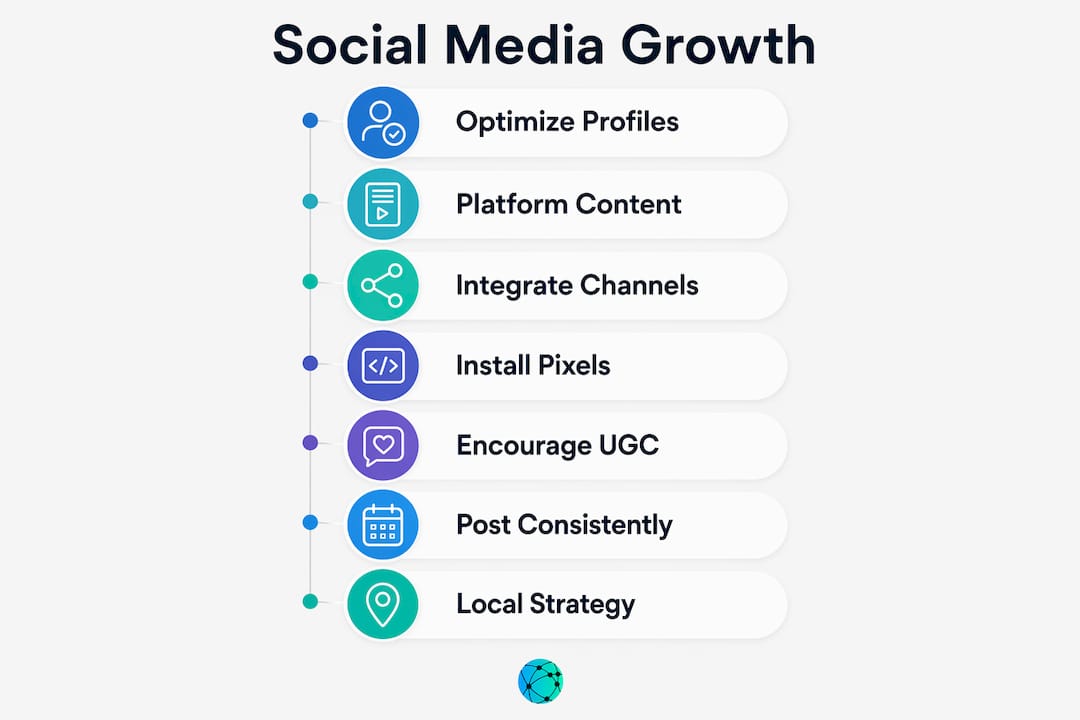
1. Optimize your social profiles with trackable links
Your profile bio is the highest-traffic real estate on any social platform. Use it to place a single, branded link that consolidates your most important destinations. Social profile optimization with branded keywords in your bio description also helps your profile appear in platform search results. Lflow lets you build a customizable link-in-bio page that tracks every click in real time, so you always know which destination your audience actually wants.
2. Create platform-specific content, not copy-paste posts
TikTok rewards fast, entertaining video. LinkedIn rewards professional insight and data-backed takes. Pinterest rewards vertical imagery with clear utility. Avoid duplicating content across platforms; tailor each post to the format and user intent of that specific channel. A post that performs well on Instagram Stories will likely underperform as a LinkedIn article, and vice versa.
3. Integrate organic, paid, and influencer channels

The most effective approach treats these three as a system, not separate campaigns. Use organic posts to test messaging and see what resonates. Put paid budget behind the posts that already show strong engagement. Layer in influencer content to build trust with audiences who do not yet follow you. Facebook accounts for a large share of referral traffic globally, while TikTok drives deeper engagement among younger audiences through video-first content. Knowing which platform dominates your niche helps you allocate budget before you spend it.
4. Install platform pixels for retargeting
The Facebook Pixel, TikTok Pixel, and LinkedIn Insight Tag let you build custom audiences from your social visitors and retarget them with ads after they leave your site. This turns a single social click into a multi-touch sequence. Paid social visitors behave differently from organic ones and need different landing pages and offers, so segment your retargeting audiences accordingly.
5. Use user-generated content for reach and authenticity
When customers or followers share content featuring your brand, it reaches their networks without any paid spend from you. Reposting user-generated content also signals social proof to new visitors. Encourage it by creating shareable moments, running contests, or simply asking your audience to tag you.
6. Post consistently and engage with your community
Algorithms on every major platform reward accounts that post regularly and respond to comments. Consistency builds the follower base that makes every future post more likely to generate clicks. Engagement in the comments section also extends a post's reach organically.
7. Use a content strategy built around your local or niche audience
A content strategy for local buyers focuses on the specific questions and interests of your target community, which produces higher click-through rates than generic content aimed at everyone. Specificity converts better than breadth.
Pro Tip: Before scaling a post with paid budget, let it run organically for 48–72 hours. The engagement data from that window (saves, shares, link clicks) tells you whether the message actually resonates before you spend money amplifying it.
Key tactics summary:
- Tag all social links with UTM parameters before sharing
- Use a link-in-bio page to consolidate and track profile clicks
- Tailor content format to each platform's native user behavior
- Retarget social visitors with platform pixels
- Test organic first, then scale winners with paid spend
- Engage consistently to build the audience that drives future traffic
Expert insights on modern social media traffic strategies
The most important thing practitioners understand about social traffic that beginners miss is the intent gap. Search visitors arrive with a question. Social visitors arrive mid-scroll, with no particular goal, and your content has roughly three seconds to give them a reason to stay. That changes everything about how you design a landing page for social traffic versus one built for organic search.
Facebook's 64% share of referral traffic globally makes it the dominant platform for driving clicks, but that number masks a more nuanced picture. TikTok users spend more time engaging with content per session, which means a well-crafted video can build deeper brand familiarity even when it drives fewer raw clicks. The right platform depends on your audience, not the aggregate stat.
Advanced practitioners focus on "save-worthy" and "share-worthy" content rather than content optimized for likes. Quality social traffic from engaged visitors who save your post, share it with their network, or click through to read more builds a loyal audience over time. Viral bait generates impressions. Save-worthy content generates return visitors.
Expert-level techniques and pitfalls to avoid:
- Design landing pages for discovery intent: Use a strong headline, a single clear call to action, and page load times under three seconds. Social visitors will not wait.
- Segment paid and organic audiences in GA4: Paid social visitors convert differently from organic ones. Mixing them in a single report hides which channel is actually performing.
- Prioritize UTM discipline across every channel: Dark Social misattribution inflates direct traffic numbers and makes social look less effective than it is. Tag everything.
- Match call-to-action friction to visitor temperature: A cold TikTok visitor is not ready to buy. Ask for an email or a free resource download first.
- Track multi-touch attribution: Social traffic's real value often shows up in a later session attributed to search or direct. Use GA4's path exploration report to see how social fits into the full conversion journey.
- Avoid chasing platform trends at the expense of consistency: Jumping to every new format resets your audience-building progress. Pick two or three platforms, go deep, and measure before expanding.
The brands that treat social traffic as a revenue channel rather than a vanity metric consistently outperform those that optimize for likes. They track the click, the landing page behavior, and the downstream conversion, then use that data to make the next post better.
Key Takeaways
Social media traffic drives real business results only when you track it accurately, match your landing pages to visitor intent, and integrate organic, paid, and influencer channels into a single system.
| Point | Details |
|---|---|
| Definition and tracking | Social traffic is visits from social platform links, tracked as the "Social" channel in Google Analytics 4. |
| Scale of the opportunity | 5.42 billion social media users globally spend 14 billion hours daily on platforms, creating a large referral pool. |
| UTM parameters are non-negotiable | Without UTM tags, Dark Social traffic is misattributed as direct, making social look less effective than it is. |
| Facebook leads referrals | Facebook accounts for 64% of referral traffic globally, but TikTok drives stronger per-user engagement through video. |
| Quality beats volume | Engaged visitors who save or share content build long-term audience value; high bounce volume does not. |
Turn your social traffic into a trackable asset with Lflow

Every click from your social profiles should land somewhere you control and can measure. Lflow gives you a free, branded link-in-bio page that consolidates all your links, tracks every click in real time, and works across Instagram, TikTok, YouTube, LinkedIn, and X. Setup takes under two minutes, and you get real-time analytics, a free QR code, and full customization with no monthly fee.
If you want to go further, Lflow's customizable templates let you build a professional link hub that matches your brand without touching a line of code. Stop sending your social audience to a homepage that was not built for them. Give them a destination that converts.