

Put one primary call to action at the top, keep your total link count between 3 and 7, and organize the rest into three tiers: current campaign, always‑on, and supporting. Run single‑variable A/B tests on that order, track clicks and click‑through rate, and let the data pick the winner instead of your gut.
TL;DR:
- Testing one change at a time and running it for at least a week ensures reliable data to identify effective link orders.
- Prioritize links based on current business goals, but also consider audience interest, especially when they differ significantly.
- Keep total links between three and seven to prevent decision paralysis and scrolling issues on mobile devices.
- Use a three-tier model: immediate priority links at the top, steady earners in the middle, and supporting links at the bottom.
- Employ specialized link management tools to automate testing, track performance, and maintain a dynamic, optimized link profile.
Table of Contents
- What Order Actually Works: The Three‑Tier Priority Model
- How Do You Test Link Order and What Should You Measure?
- Deciding Order Based On Your Business Goal and Audience Intent
- Step-by-Step Checklist: Implement, Test, and Iterate
- Why a Creator-Focused Tool Helps With Link Order Optimization
- How to Get Started With Lflow
- A Quick Take on Common Mistakes
- Sources
What Order Actually Works: The Three‑Tier Priority Model
Link order optimization isn't about guessing what looks good. It's about matching the position on the page to how much that link matters right now, and testing whether your instinct is even correct.
The model that works across music pages, influencer bios, and small business link hubs is a simple hierarchy. Think of it less like a menu and more like a triage system: what needs attention immediately, what always deserves a spot, and what's nice to have.
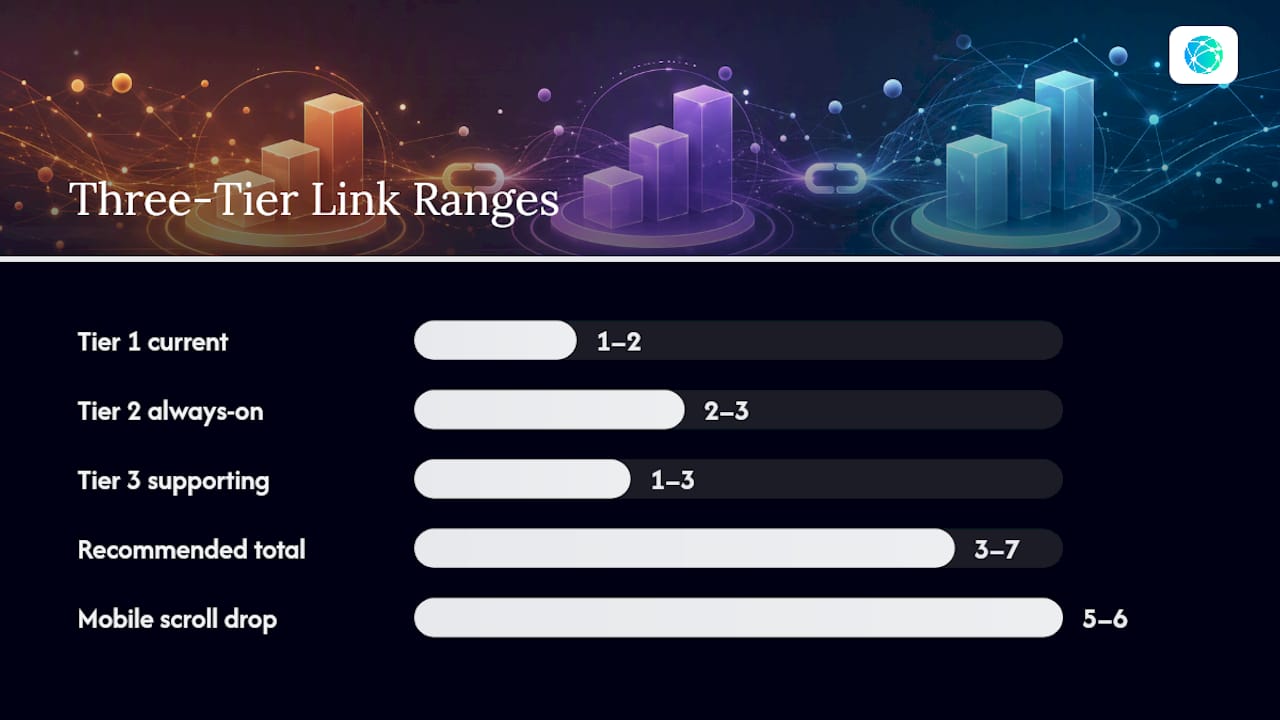
Tier 1: current priority (1 to 2 links). This is whatever you need clicks on right now. A new single, a ticket drop, a product launch, a limited-time discount. If you're a musician with a song dropping Friday, that link sits at the very top, full stop.
Tier 2: always-on (2 to 3 links). These are your steady earners. A Spotify profile, an online store, a booking page, a newsletter signup. They rarely change, but they still deserve prime real estate because they convert reliably.
Tier 3: supporting (1 to 3 links). Social profiles, press mentions, a portfolio, a "more about me" page. Useful, but not urgent. Make these visually smaller or grouped together so they read as secondary at a glance.
Total link count matters more than most creators realize. Multiple industry guides point to 3 to 7 links as the sweet spot for avoiding decision paralysis, since every extra option past that range splits attention instead of adding value. On mobile, where most bio-link traffic lands, anything past the fifth or sixth link often requires scrolling that a meaningful share of visitors never do. The three-tier structure exists precisely to keep that count tight while still covering your bases.
How Do You Test Link Order and What Should You Measure?
Guessing which order performs best is a coin flip. Testing removes the guesswork, but only if you test one thing at a time.
Here's a repeatable protocol:
- Pick one variable. Swap your top two links, rewrite your CTA copy, or cut your total link count from seven to five. Never change two things in the same test window.
- Run it for a set period. A week captures a full cycle of posting and audience behavior; for a bigger traffic spike (a viral post, a livestream announcement), 48 to 72 hours can be enough to see a clear signal.
- Track clicks, CTR, and conversion rate. Clicks tell you volume. CTR tells you relevance. Conversion rate (email signups, sales, streams) tells you whether the traffic actually did something once it left your page.
- Check click distribution across positions, not just the top link. If moving a link up doesn't change total clicks, it just stole traffic from whatever used to be in that spot.
Statistic to keep in mind: guides on bio-page testing consistently recommend changing only one variable per test, because running multiple changes together makes it impossible to know which one actually caused the lift.
A winner is the version with a clear, sustained improvement in your target metric, not a one-day spike. Once you see that pattern hold for the full test window, roll it out and move to the next hypothesis.
Deciding Order Based On Your Business Goal and Audience Intent
Your top link should mirror your most pressing goal, not whatever link has the nicest thumbnail. If you're pushing ticket sales this month, tickets go first, even above your evergreen store.
That said, business priority and audience interest don't always line up, and it's worth testing the gap between them. A merch drop might matter more to your bottom line than your latest video, but if your audience clicks the video ten times more often, burying it costs you reach that could have funneled people toward the merch anyway.
A few real scenarios show how this plays out differently by context:
- A musician with a single dropping Friday puts the streaming link in Tier 1, keeps their store and tour dates in Tier 2, and drops social profiles into Tier 3.
- An influencer running a brand partnership puts the affiliate link on top for the campaign's duration, then reverts to their usual store or content hub once it ends.
- A small business running a seasonal sale leads with the sale page, keeps their main storefront in the always-on tier, and pushes reviews or press mentions to the bottom.
- A newsletter-focused creator puts the signup link first almost permanently, since list growth compounds and rarely takes a back seat to short-term campaigns.
Rotate Tier 1 links weekly or monthly depending on how often you run campaigns. Tier 2 should barely move. Review the whole order quarterly to make sure nothing evergreen has quietly stopped performing.
Step-by-Step Checklist: Implement, Test, and Iterate
Treat your link page like a living asset, not a business card you set up once and forget.
- Audit your current analytics. List every link, its click count, and its position over the last 30 days.
- Pick one hypothesis. "Moving my store link above my Instagram will lift store clicks" is a hypothesis. "Let me redo the whole page" is not.
- Implement a single change. Reorder, reword, or trim, but only one of those at a time.
- Collect data for a defined window, then compare it against your baseline numbers from the audit.
- Prune dead weight. Links with zero clicks in 30 days should come down. They add clutter and dilute attention from links that actually work.
- Rotate campaign links on a weekly or monthly cadence so the page never feels stale to repeat visitors.
Labels matter as much as position. A benefit-driven label like "Watch the new video" or "Get the free guide" tends to outperform a bare title or your artist name with no context. Pair that with a thumbnail where your platform supports it, and build the whole layout mobile-first since that's where the overwhelming majority of clicks originate.
Pro Tip: Run your test for a full week before judging results, even if early numbers look decisive. A Tuesday spike from one story post can look like a trend and turn out to be noise.
Why a Creator-Focused Tool Helps With Link Order Optimization
Testing link order manually, with screenshots and spreadsheets, gets old fast. This is where the right tooling for prioritizing multiple links actually saves you time instead of adding another task to your list.
Certain link management platforms are built to support workflows like the one described in this article:
- Quick onboarding helps users start testing promptly.
- Some platforms offer support for managing many links without artificial caps.
- Real-time analytics can provide insight into clicks and link performance promptly.
- Features like scheduled link activation and expiration help automate rotation.
- QR codes and custom domains can facilitate offline promotion and branded sharing.
- Mobile-optimized layouts maintain consistency across devices.
The ongoing testing habit itself is what turns a link page into a growth asset rather than a static list nobody revisits.
How to Get Started With Lflow
Some services offer free plans with unlimited links, downloadable QR codes, and real-time analytics to help you start testing promptly.

Start with the smallest possible experiment: reorder your top two links and watch the analytics for a week. If you're promoting something offline too, generate a QR code for that same link and see how the two channels compare. Lflow's custom short links also make it easy to track individual campaign URLs separately from your main page, which is useful once you start rotating Tier 1 links on a regular cadence.
Set up your free link-in-bio page and run your first single-variable test this week. You'll have real numbers before your next post goes out.
A Quick Take on Common Mistakes
The biggest mistake isn't bad ordering. It's never testing at all, then blaming the platform when clicks stall. A close second: changing three things at once and having no idea what actually worked.
The counterintuitive move worth trying: put your least flashy, highest-converting link (usually a newsletter or store, never the flashiest video) in Tier 1 for one week and see what happens to your real numbers. Then share what you find and keep iterating from there.
— Axion
Sources
- How to Optimize Your Link-in-Bio Page for Maximum Conversions | ViralNote
- Link in Bio: Complete Guide for 2026 — Strategy, Setup and Analytics
- Link in Bio A/B Testing Ideas for Higher CTR
- Link in Bio Ideas: What to Put and How to Order It · Elido