

Link optimization for artists is the practice of structuring, tagging, and managing every URL that points to your music, portfolio, or social profiles so each click generates measurable data and drives real fan engagement. Most artists treat links as an afterthought. The ones who grow fastest treat them as a tracking system. Knowing how to optimize links for artists means combining UTM parameters, structured metadata, backlink development, and link in bio tools into one coordinated approach. Get this right and you gain clear attribution, better search visibility, and a fanbase that actually converts.
What tools do you need to optimize artist links effectively?
The foundation of any link strategy is an analytics setup that can read the data you send it. Google Analytics 4 is the standard starting point. Without it, UTM parameters produce tags nobody reads.
Once GA4 is running, you need a UTM builder. Tools like the Google Campaign URL Builder or LinkUTM let you generate tagged links without typos. Consistency matters here. Consistent lowercase naming in UTMs avoids data fragmentation in GA4 reports, preserving clean attribution data. One capitalization error splits a single campaign into two separate entries in your reports.

You also need a link management platform. These tools let you create branded short links, manage multiple destinations, and update URLs without reprinting QR codes or editing every social post. Lflow handles all three functions in one place, including real-time analytics and QR code generation.
Key tools for artist link optimization:
- Google Analytics 4: Reads UTM data and shows traffic sources by campaign
- UTM builder (Google or LinkUTM): Generates correctly formatted tagged URLs
- Branded short link tool: Hides long UTM strings and builds trust with fans
- Link in bio platform: Consolidates multiple destinations behind one shareable URL
- JSON-LD structured data: Tells search engines what your pages contain
Pro Tip: Set up a shared naming convention spreadsheet before you launch any campaign. List every utm_source, utm_medium, and utm_campaign value you plan to use. Stick to it across every team member and every platform.
How to create optimized links with UTM parameters and structured data
Building a properly tagged link takes five minutes. Doing it wrong costs you months of clean data.
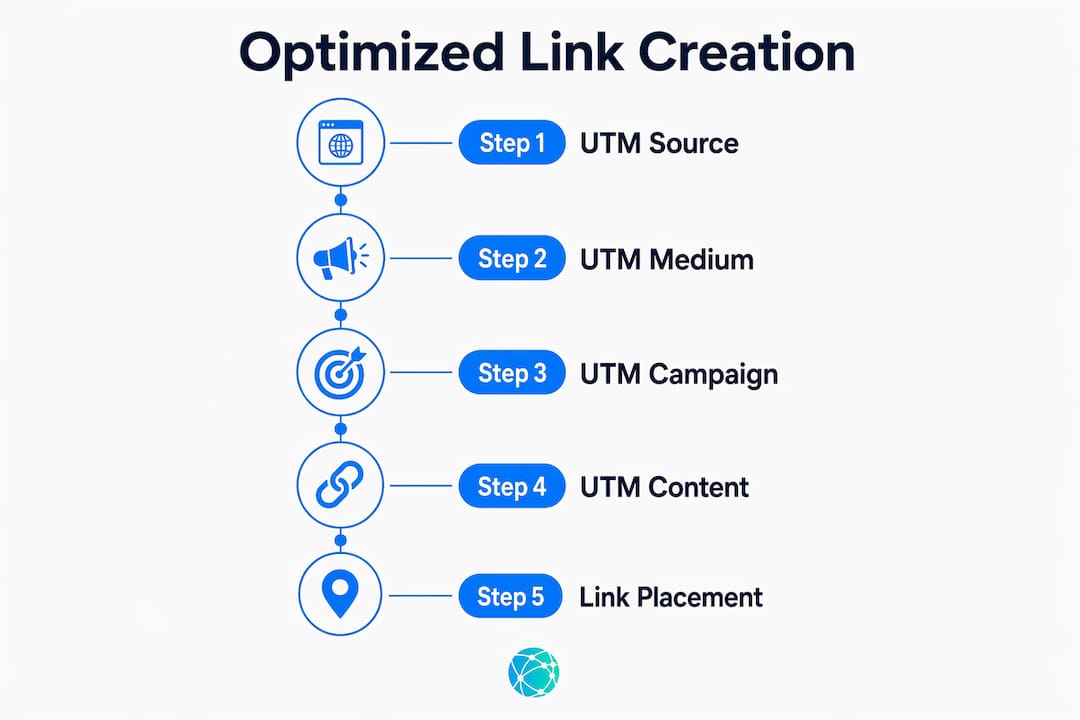
Step-by-step UTM link creation
- Define your placement first. Decide where the link will appear: Instagram bio, email newsletter, partner blog, or a printed QR code at a show.
- Set utm_source. This names the traffic origin. Use values like
instagram,newsletter, orspotify_partner. Always lowercase. - Set utm_medium. This describes the channel type. Use
social,email,referral, orqr. - Set utm_campaign. Name the specific release or promotion:
album_drop_2026orspring_tour. - Add utm_content for A/B tests. If you post two different Instagram Stories for the same release, tag them
story_v1andstory_v2to see which drives more clicks. - Shorten the URL. Paste the tagged link into a branded shortener. Branded short links preserve complete tracking tags while preventing user distrust caused by long UTM strings.
- Test before publishing. Click the link yourself and confirm GA4 records the correct source and medium in real time.
UTM tags must include at least utm_source, utm_medium, and utm_campaign for sufficient attribution. Adding utm_content for creative variants gives you the data to make better decisions on future campaigns.
The rule on placement is absolute: tag only external placements like social posts, emails, partner blogs, or offline QR codes. Never tag internal navigation links on your own website or artist page.
Where UTM tags belong vs. where they cause damage
| Placement | Use UTM tags? | Reason |
|---|---|---|
| Instagram bio link | Yes | External traffic source |
| Email newsletter | Yes | Tracks email campaign performance |
| Partner blog feature | Yes | Identifies referral source |
| Printed QR code at shows | Yes | Tracks offline-to-online conversion |
| Internal site navigation | No | Overwrites original source data |
| Spotify Canvas link | No | Platform handles attribution internally |
Structured data for music pages
Structured data for MusicAlbum and MusicEvent helps search systems display rich results and boosts SEO visibility for artists. JSON-LD markup tells Google exactly what your page contains: the performer, event date, ticket offers, and venue. Without it, search engines guess. With it, your release page can appear as a rich result with direct links to tickets or streaming.
A canonical streaming hub page with streaming links and structured data improves both fan experience and search engine indexing. One central page per release, with links to Spotify, Apple Music, and YouTube, beats scattering those links across ten different posts with no central reference point.
Pro Tip: Structured data behaves as a link behavior contract. If your JSON-LD markup says a page is a MusicEvent but the visible content shows a merch store, search engines discount both. Keep markup and visible content perfectly matched.
How do backlinks affect SEO and discovery for artists?
Backlinks are the votes other websites cast for your content. Search engines read them as signals of credibility. One link from a respected music blog carries more weight than fifty links from unrelated directories.
Backlinks with high contextual relevance drive more qualified traffic than random mentions. A playlist feature on a genre-specific blog sends fans who already like your style. A mention in a general lifestyle article sends curious visitors who may never return. The difference shows up clearly in your bounce rate and session duration data.
High-value backlinks are not just about quantity: relevant anchor text and the context of the linking site greatly influence referral traffic quality and SEO benefit.
How to earn quality backlinks as an artist
- Pitch music blogs and press outlets. Send a short, specific pitch tied to a new release or milestone. Generic "check out my music" emails get deleted.
- Offer exclusive content. Give a blog an early stream, an interview, or a behind-the-scenes video in exchange for a feature with a link back to your artist page.
- Collaborate with other artists. Guest features, joint playlists, and co-written posts generate natural cross-links between fanbases.
- Submit to curated directories. Genre-specific music directories and playlist submission platforms often include a backlink as part of the listing.
- Repurpose press mentions. When a publication covers you without linking, email them and ask for a link to your official site. Most editors add it within a day.
Use GA4 to identify which referring domains already send you traffic. Those sites are your highest-priority outreach targets. A site that linked to you once will often link again if you give them a reason.
Avoid link farms, paid link schemes, and irrelevant directory submissions. Google's spam detection has made these tactics counterproductive. One strong link from a real music publication outperforms a hundred low-quality links from unrelated sites.
How to optimize your link in bio for more fan engagement
Every social platform limits artists to one clickable link in their profile. That one link has to do a lot of work. A plain link to your homepage wastes the opportunity.
A customized bio link increases fan engagement by making navigation easier for fans and allowing control over button prominence. When a fan lands on your bio link page, they should see your most important destination first: a new release, a ticket link, or a merch drop. Everything else sits below it.
Bio link page comparison: basic vs. optimized
| Feature | Basic link page | Optimized link page |
|---|---|---|
| Branding | Generic template | Custom colors, fonts, and artist photo |
| Link order | Random | Priority-ranked by campaign goal |
| Call-to-action text | "Click here" | "Stream the new album" or "Get tickets" |
| Analytics | None | Real-time click tracking per link |
| QR code | Not available | Downloadable, linked to the same page |
| UTM support | Manual only | Built-in tagging per destination |
Lflow lets artists build these pages in under two minutes. The platform supports custom domains, so your bio link reads as your brand name rather than a generic shortener URL. That detail builds trust before a fan even clicks.
Pro Tip: Rotate your top link every time you have a new priority. Fans who visit your bio link page repeatedly will notice the change and click out of curiosity. Treat it like a storefront window, not a permanent fixture.
For more ideas on structuring your page, the guide on creative link in bio ideas covers layouts and call-to-action patterns that work specifically for artists.
What are the most common link optimization mistakes artists make?
Most link strategy failures come from a small set of repeatable errors. Fixing them takes less time than making them in the first place.
- Tagging internal links with UTMs. This is the most damaging mistake. Adding UTM parameters to internal navigation links overwrites the original traffic source and corrupts your session data. A fan who arrived from Instagram suddenly appears as direct traffic the moment they click an internal link tagged with a UTM.
- Inconsistent UTM naming. Using
Instagramin one campaign andinstagramin another creates two separate data entries in GA4. Your reports show half the traffic each source actually delivered. - Broken streaming links. A link to a Spotify track that has been removed or region-locked sends fans to an error page. Audit your streaming links after every platform update.
- Mismatched structured data. Misalignments between markup and visible content reduce SEO effectiveness. If your JSON-LD says one thing and your page shows another, search engines discount the markup entirely.
- Never auditing link health. Links break. Platforms change their URL structures. Run a link audit every quarter using a tool like Screaming Frog or a manual check of your top 20 most-shared URLs.
A monthly review of your GA4 acquisition report catches most of these problems before they compound. Look for unexpected spikes in direct traffic, which often signal UTM corruption, and check for zero-traffic campaigns that should be generating clicks.
Key Takeaways
Effective link optimization for artists combines UTM tracking, structured metadata, quality backlinks, and a well-organized bio link page to turn every URL into a measurable, fan-driving asset.
| Point | Details |
|---|---|
| UTM parameters require discipline | Use lowercase naming and tag only external placements to keep GA4 data clean. |
| Structured data amplifies search visibility | JSON-LD markup for MusicAlbum and MusicEvent pages helps Google display rich results. |
| Backlink quality beats quantity | One contextually relevant link from a music blog drives better traffic than dozens of irrelevant mentions. |
| Bio link pages need active management | Rotate your top link with each new campaign priority and track clicks per destination. |
| Regular audits prevent compounding errors | Check streaming links, UTM consistency, and structured data alignment every quarter. |
The part of link strategy most artists skip entirely
Most artists I see focus on getting more links. More press mentions, more playlist features, more shares. That instinct is not wrong, but it misses the more valuable half of the equation: reading what your existing links tell you.
Every UTM-tagged link you publish is a question you are asking your audience. "Did this Instagram Story drive more streams than the email I sent?" "Did the QR code at the merch table convert better than the one on the poster?" The answers are sitting in GA4, but most artists never look. They run a campaign, move on to the next one, and repeat the same guesses.
The artists who build real online presence treat link analytics as a feedback loop. They run two versions of a bio link page, compare click rates, and keep the winner. They notice that their newsletter drives three times more Spotify streams than Instagram does, and they shift their energy accordingly. That is not a technical skill. It is a habit of paying attention.
My honest take: the technical side of link optimization, UTMs, JSON-LD, canonical pages, takes a weekend to learn. The discipline of actually using the data is what separates artists with growing audiences from those who stay stuck. Build the habit before you build the perfect link page.
— Axion
Lflow gives artists a free link hub built for this

Lflow's free link in bio platform was built for exactly the kind of link strategy covered here. You get unlimited links on a single branded page, real-time analytics showing which destinations fans click most, and a free QR code generator for offline promotion at shows, on posters, and in physical merch packaging. Setup takes under two minutes, and the platform supports custom domains so your bio link reflects your artist brand. If you want a ready-made starting point, Lflow's free link in bio page includes template options designed for musicians and visual artists, with full customization available from day one.
FAQ
What does link optimization mean for artists?
Link optimization for artists means structuring, tagging, and managing every URL pointing to your music or portfolio so each click produces measurable data and drives fan engagement.
What are UTM parameters and why do artists need them?
UTM parameters are tags added to URLs that tell Google Analytics 4 where a visitor came from. Artists need at least utm_source, utm_medium, and utm_campaign to accurately attribute traffic from social posts, emails, and partner features.
How do backlinks help artist SEO?
Backlinks from relevant music blogs, playlist features, and press outlets signal credibility to search engines and send qualified fans directly to your pages. Contextual relevance matters more than the total number of links.
Should I tag every link on my website with UTMs?
No. UTM tags belong only on external placements like social posts, emails, and QR codes. Adding them to internal navigation links overwrites original traffic source data and corrupts your analytics.
What is the best link in bio setup for musicians?
The best setup uses a branded page with priority-ranked links, custom call-to-action text, real-time click analytics, and a downloadable QR code. Platforms like Lflow provide all of these features at no cost.