

Most creators assume that setting up a link in bio page is simple: pick a tool, drop in some links, and watch the clicks roll in. The reality is messier. Broken URLs, cluttered layouts, platform restrictions, and over-engineered designs regularly kill engagement before it even has a chance to build. If your link page isn't converting followers into real traffic, the problem usually isn't your content. It's your setup. This guide walks you through exactly what link page customization involves, where it goes wrong, and how to get it right.
Table of Contents
- Understanding link page customization
- Types of customization options available
- Common pitfalls and edge cases
- Balancing customization and usability
- What most creators miss when customizing link pages
- Get started: Create your custom link page with Linkflow
- Frequently asked questions
Key Takeaways
| Point | Details |
|---|---|
| Customization beyond basics | Customizing your link page unlocks better engagement but can introduce technical pitfalls if overdone. |
| Avoid common mistakes | Always check for broken links, platform-specific rules, and unnecessary bloat when updating your page. |
| Balance design and usability | The most effective link pages are clear, action-oriented, and easy to navigate for your followers. |
| Tools make setup easier | Templates and AI help creators optimize their link pages for both speed and effectiveness. |
Understanding link page customization
Link page customization means shaping every visible and functional element of the page where you send your social media audience. That includes the colors, fonts, and imagery visitors see, plus how your links are arranged, which ones appear first, and what happens after someone clicks.
For creators and small business owners, a well-customized link page does several important things at once. It reinforces your brand identity so that followers feel a consistent experience moving from your Instagram or TikTok profile to your page. It reduces friction by organizing links in a way that makes navigation obvious. And it signals professionalism, which matters a lot when you're trying to convert a curious follower into a paying customer or email subscriber.
Here's what most solid link page tools let you control:
- Visual design: Background colors, button styles, fonts, and profile photos
- Link arrangement: Ordering links by priority, grouping them into categories, or featuring one link above others
- Analytics: Seeing which links get clicked, when, and by which audience segments
- Integrations: Connecting to email platforms, stores, music streaming services, or booking tools
Understanding multi-link pages for creator growth helps you see why the arrangement and hierarchy of your links matters just as much as the visual design.
"A link page that's hard to navigate is a missed opportunity every single time someone lands on it."
One thing creators often overlook is the risk of changing links after they've already been shared. As noted in link customization guidance, updating or replacing links can break old URLs, and some tools offer no redirect options, meaning anyone who bookmarked or shared your old link hits a dead end. That's a real cost, especially if you've shared a link in a YouTube description or a blog post.
Pro Tip: Before you change any existing link, check whether your platform offers redirect functionality. If it doesn't, keep the old link active and create a new one instead.
Types of customization options available
So, what choices do you have for customizing your link page? Here's a breakdown.
Visual customization is the most obvious layer. Most platforms let you pick from preset themes or build your own look using a color picker. You can upload a profile photo, add a short bio, and choose fonts that match your brand. These details sound minor, but they directly affect whether someone trusts your page enough to click.
Link management is where strategy comes in. You can typically add as many links as you want, but smart creators prioritize ruthlessly. Put your most important link at the top. If you're launching a product, that link goes first. If you're growing your email list, the signup form takes priority. Some platforms let you group links under headers, which helps when you have a larger catalog to organize.
Analytics separate good tools from great ones. Knowing that your "Shop Now" button gets three times more clicks than your podcast link tells you exactly where your audience's interest lies. That data should drive every future decision about which links to add, remove, or reposition.
Here's a quick comparison of customization features across different link page tool tiers:
| Feature | Free tier | Mid-tier | Premium tier |
|---|---|---|---|
| Custom colors and fonts | Limited | Full | Full |
| Click analytics | Basic | Detailed | Advanced with exports |
| Custom domain | No | Sometimes | Yes |
| Link grouping | No | Yes | Yes |
| QR code download | Rarely | Sometimes | Yes |
| Priority link pinning | No | Yes | Yes |
Platform-specific restrictions also matter. For example, TikTok requires accounts to have at least 1,000 followers before they can add a clickable link to their bio. That means customizing a link page is only half the battle on TikTok; you first need to hit that follower threshold.
Exploring all-in-one link tools can help you understand which platforms give you the most flexibility without forcing you to upgrade just to access basic features.
It's also worth noting that shared event types can't always be customized, and platform-specific tweaks may be required when you're integrating booking or scheduling functions into your link page. That's a common scenario for coaches, consultants, and service-based creators who want to put a booking button directly on their bio page.
The profile linking guide for creators is a useful resource for understanding how to structure links across different platforms without duplicating effort.
Pro Tip: Start with three to five links maximum. You can always add more later, but starting lean forces you to prioritize what actually matters to your audience.
Common pitfalls and edge cases
Now, let's talk about common errors and rare but important edge cases you should know.
The number one mistake creators make is changing their links without thinking about the downstream effects. Updating a URL sounds harmless, but if that link has been shared in newsletters, pinned posts, or YouTube video descriptions, every person who clicks it from those sources will land on a broken page. As highlighted in scheduling page link guidance, changing links breaks old URLs, and over-customization can also increase setup time to the point where it slows down your entire content workflow.
Here are the most common pitfalls, ranked by how often they cause real problems:
- Changing live links without a redirect plan: Every broken link is a follower you lose. Always check if your platform supports redirects before updating a URL.
- Adding too many links on a free plan: Free tiers often have limited design options, making a long list of links look cluttered and unprofessional. A jammed-up page damages trust.
- Ignoring mobile optimization: Most followers visit your link page from a phone. If your buttons are too small or your layout breaks on mobile, you're losing clicks before they happen.
- Using generic button labels: "Click here" tells the visitor nothing. "Get my free guide" or "Shop the collection" creates a reason to click.
- Forgetting to test your links: After any update, click every single link yourself on both desktop and mobile. Broken links are embarrassing and costly.
"Your link page is often the first destination outside of social media that your followers visit. Make that first impression count."
A real-world example: a fitness influencer with 50,000 Instagram followers updated her link page to promote a new program, accidentally removing her old workout guide link. She didn't realize the guide was still being shared in older posts and stories. Within a week, she had dozens of frustrated followers messaging her about a broken page. She lost sign-ups she never even knew about.
For small businesses, lead generation messaging customization is a useful framework for thinking about how each link on your page serves a specific stage of the customer journey, from awareness to purchase.
If you're comparing tools and want to understand what separates basic options from more robust platforms, the Linkflow vs. Linktree comparison breaks down the feature differences clearly. And if budget is a factor, reviewing pricing plans for link pages helps you figure out which tier actually gives you the features you need without overpaying.
Balancing customization and usability
With common pitfalls in mind, how do you achieve both a customized look and simple usability?
The tension between these two goals is real. Creators often want their link page to reflect their full brand personality, every color, every font choice, every link to every piece of content they've ever made. Followers, on the other hand, want to land on your page and immediately know what to do. Those two goals pull in opposite directions.
Here's a simple framework for thinking about balance:
| Customization level | Visitor experience | Typical outcome |
|---|---|---|
| Minimal (1-2 links, plain design) | Clear but forgettable | Low engagement due to lack of value |
| Balanced (3-5 links, branded design) | Easy to navigate and professional | High engagement and conversions |
| Over-customized (10+ links, heavy design) | Overwhelming and slow to load | High bounce rate and confusion |
The balanced middle is almost always the right answer. Three to five clearly labeled links, a branded color scheme, a short bio, and one primary call to action. That setup consistently outperforms both extremes.
As noted in scheduling customization research, over-customization increases setup time and platform-specific tweaks add complexity that can undermine the whole experience. More time setting up means less time creating content, which is where your real value comes from.
Best practices for staying balanced:
- Let your audience guide your link choices: Check your analytics and remove links that haven't been clicked in 30 days
- Use templates as a starting point: They're designed by people who have already solved the balance problem
- Limit your color palette: Two to three colors maximum keeps the design clean and on-brand
- One clear call to action per page: If everything is important, nothing is
AI for link-in-bio strategy is increasingly useful here, helping creators generate link label copy and organize page structure based on content performance data. The profile linking guide also covers how to map your links to specific audience intentions, which removes a lot of the guesswork.
Pro Tip: Treat your link page like a landing page, not a sitemap. Its job is to move people toward one primary action, not to catalog everything you've ever made.
What most creators miss when customizing link pages
Stepping back from the how-tos, let's look at what actually separates successful link pages from the rest.
Most guides on link page customization focus entirely on the how: how to pick colors, how to add links, how to read analytics. Those are useful skills. But the creators who consistently get results from their link pages understand something more fundamental. Engagement comes from clarity, not complexity.
The single biggest mistake we see is creators designing their link page for themselves instead of for their audience. They add every link because they worked hard on that content. They use their favorite colors even when those colors clash on mobile. They write button labels that make sense to them but mean nothing to a first-time visitor. The result is a page that feels personal but performs poorly.
What actually drives clicks is a page where the visitor immediately understands the value of clicking. "Download my free recipe book" outperforms "My content" every single time. A page with five well-labeled links outperforms one with fifteen loosely categorized ones. Simplicity is a performance strategy, not a limitation.
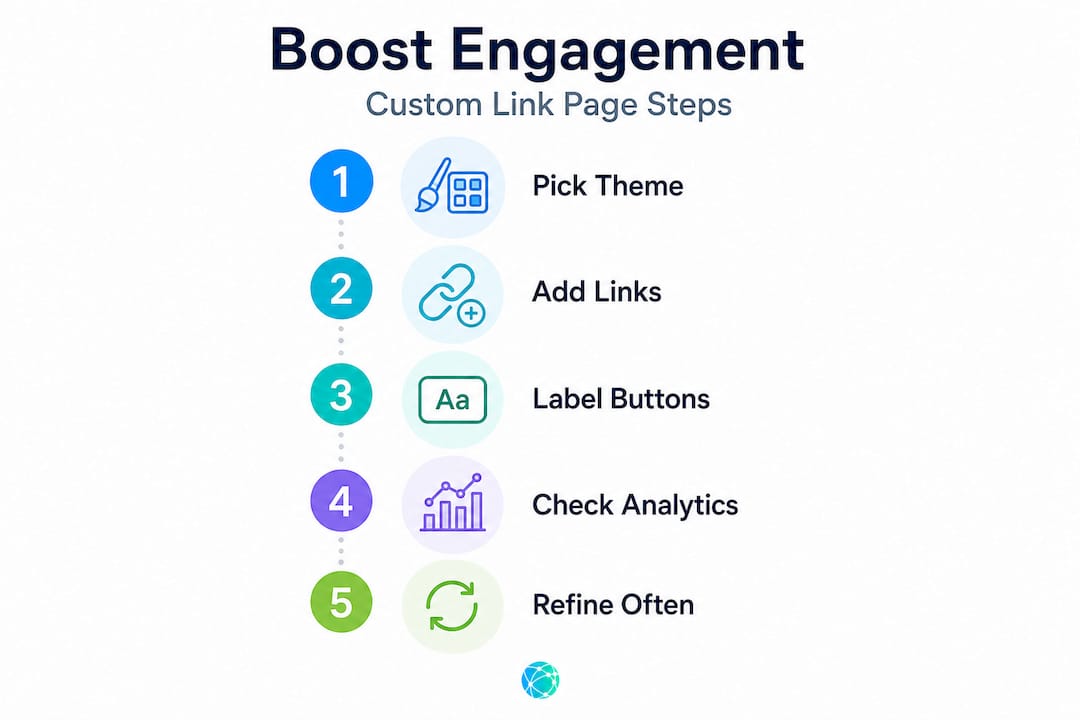
The smartest creators treat their link pages like living documents. They check analytics weekly, cut underperforming links without sentiment, and test new arrangements to see what moves the needle. A link page you built six months ago and haven't touched since is working against you, not for you.
It's also worth challenging the assumption that more customization options equal better results. The tools with the most features aren't always the ones that produce the best engagement. What matters is whether the tool gives you the specific features your audience needs, quickly and reliably. All-in-one link tools that combine analytics, custom domains, and clean design often outperform feature-heavy platforms that take hours to configure properly.
Successful link pages are designed around the user's journey, not the creator's ego. That shift in perspective is small, but the impact on results is significant.
Get started: Create your custom link page with Linkflow
Ready to apply what you've learned? Linkflow makes customization easy and fast, without the trade-offs that hold most creators back.

Linkflow gives you access to a free link in bio page that you can set up in under two minutes, with no technical skills required. Choose from professionally designed customizable bio templates that are already optimized for mobile and built around conversion best practices. Every account also includes a free QR code generator so you can extend your link page to printed materials, packaging, and offline promotions. Real-time analytics show you which links your audience actually clicks so you can keep refining your page over time. Start building a link page that works as hard as your content does.
Frequently asked questions
Will customizing my link page break my old URLs?
Yes, changing links can break old URLs, and as noted in scheduling link guidance, some tools offer no redirect options, leaving previous visitors with a broken experience. Always check for redirect support before updating any live link.
Can I customize shared event links on all platforms?
No, many platforms restrict customization for shared event types. According to Calendly's scheduling page documentation, shared event types can't always be customized and may require platform-specific workarounds.
Does TikTok allow link page customization for all accounts?
TikTok requires accounts to reach at least 1,000 followers before unlocking bio link access, meaning link page customization isn't available to newer accounts regardless of which tool you use.
What's the best way to avoid clutter on my link page?
Only add links that serve a clear purpose for your audience, and use pre-built templates to keep your layout clean from the start. Review your analytics monthly and remove any links that consistently underperform.