

Digital link sharing is the practice of distributing direct URLs, QR codes, or encoded digital identifiers that give individuals and businesses immediate access to specific online content, files, or product information. Unlike navigating a website from the homepage, these links drop users directly at the destination. From GS1 Digital Link standards connecting physical products to rich digital content, to Samsung Galaxy's cloud-based file transfers, to the "link in bio" hubs that power Instagram and TikTok creator strategies, understanding digital link sharing is now a core skill for anyone managing an online presence.
What is digital link sharing and how does it work?
Share links are direct URLs designed to provide immediate access to specific digital content, bypassing traditional website navigation entirely. That single design choice is what makes them so powerful. Instead of asking a user to find a product page through a menu, you hand them the exact address.
The mechanics vary by technology. At the consumer level, a share link is simply a URL copied from a browser or generated by a platform like Google Drive or Dropbox. At the industrial level, GS1 Digital Link encodes product identifiers into web-resolvable URIs, connecting physical products with dynamic digital content through a single QR code. One scan can serve a retailer's point-of-sale system and a consumer's product information page simultaneously.

GS1 Digital Link resolvers act as smart routing layers, interpreting the product identifiers inside a URI and directing users to content based on context: their language, device type, or geographic location. This is not a static redirect. It is a dynamic content delivery system built on a global standard.
Cloud-based tools add another dimension. Samsung Galaxy's link sharing uses a hybrid of Bluetooth, Wi-Fi Direct, and cloud servers to transfer large files without requiring the recipient to have an account. Links stay active for 48 hours, which solves the email attachment size problem without creating permanent public access.
Key technologies behind digital link sharing include:
- Direct URLs: Copied or generated links pointing to a specific file, page, or asset
- QR codes: Encoded links readable by smartphone cameras, used in retail, print, and events
- GS1 Digital Link URIs: Global standard links embedding product identifiers for supply chain and consumer use
- Cloud share links: Time-limited links from services like Google Drive, Dropbox, or Samsung Link Sharing
- URL shorteners: Condensed links from tools like Bitly or Lflow's free URL shortener that improve appearance and enable click tracking
Pro Tip: When generating share links from cloud storage, always set an expiration date. A link that never expires is an open door you may forget you left unlocked.
Types of digital link sharing and their use cases
Not all shared links serve the same purpose. The digital link sharing definition shifts depending on whether you are a consumer sharing a playlist, a brand connecting a product label to compliance documentation, or a creator directing followers to a store.
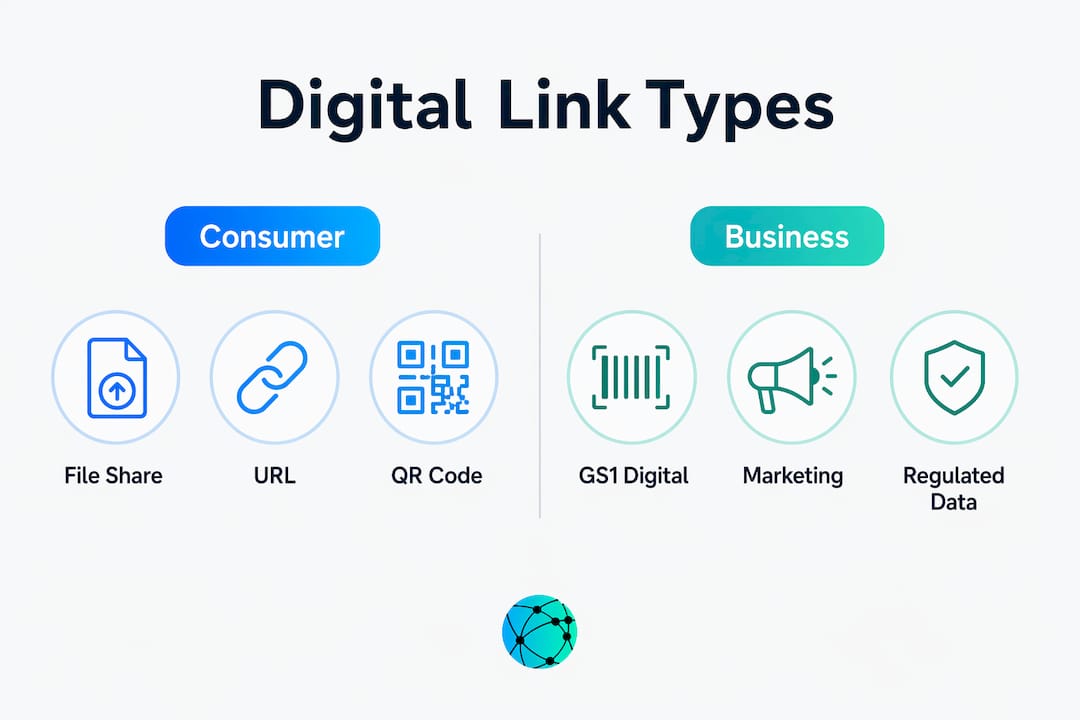
| Type | Primary use case | Best for |
|---|---|---|
| File share links | Sharing documents, images, or videos via cloud storage | Individuals, teams, remote collaboration |
| GS1 Digital Link | Connecting physical products to digital info via QR codes | Manufacturers, retailers, regulated industries |
| Social media share links | Distributing content URLs across platforms | Creators, marketers, brands |
| Link in bio hubs | Centralizing multiple destinations in one profile URL | Instagram, TikTok, YouTube creators |
| Encrypted or deniable links | Sharing sensitive content with privacy protection | Legal, HR, security-conscious organizations |
GS1 Digital Link deserves special attention for businesses in regulated industries. The EU's Digital Product Passport regulation requires manufacturers to attach verifiable product data to physical goods. A single GS1 Digital Link QR code on a product label can satisfy that requirement while simultaneously serving marketing content to consumers. Many brands currently dual-mark their products, maintaining traditional 1D barcodes alongside GS1 Digital Link QR codes to preserve compatibility with older retail scanning systems while enabling new digital experiences.
For individuals, the most common use case is sharing large media files that exceed email limits. A photographer sharing a wedding gallery, a musician sending a demo to a label, or a designer delivering project files all rely on cloud share links. The recipient gets access without needing an account, and the sender controls how long that access lasts.
Security considerations and best practices for sharing digital links
Open-link sharing allows anyone with the URL to access a resource without authentication. This is possession-based access, and it poses a real security risk when applied to sensitive materials. The audit trail disappears. You cannot verify who accessed the file, and revoking access requires disabling the link entirely, which may disrupt legitimate users.
Open-link sharing should be treated as an exception, not a default. Effective organizations replace anonymous link sharing with authenticated, logged, and expiry-controlled methods. That shift is not just a technical preference. It is a governance requirement in industries handling personal data, legal documents, or financial records.
Follow these best practices to share digital links securely:
- Set expiration dates. Every link to sensitive content should have a defined lifespan. 48 hours is a reasonable default for most file transfers.
- Require authentication where possible. Password-protected links add a second layer of control beyond simple URL possession.
- Log access. Use platforms that record who accessed a link and when. This is non-negotiable for compliance-sensitive content.
- Restrict download permissions. Viewing access and download access are different. Grant only what the recipient needs.
- Use encrypted links for sensitive content. Tools like Lflow's deniable encrypted link tool provide an additional layer of privacy for content that must not be attributable.
- Audit your active links regularly. Shared links accumulate over time. A quarterly review of active share links prevents unmanaged persistent access.
Pro Tip: Before sharing any link containing personal or confidential data, ask yourself: "Would I be comfortable if this URL appeared in a public forum?" If the answer is no, add a password or use an authenticated sharing method instead.
The risk is not hypothetical. A single unprotected link to a client contract, shared in a Slack channel and forgotten, can remain accessible for years. The shift from identity-bound access to possession-based access is one of the most underappreciated security vulnerabilities in modern digital workflows.
How to share digital links effectively on social media
Social media link sharing is constrained by platform design. Instagram does not allow clickable links in post captions. TikTok restricts link placement to the bio for most accounts. X (formerly Twitter) allows links in posts but its algorithm deprioritizes posts containing external URLs. Understanding these constraints is the starting point for any effective link sharing strategy.
The "link in bio" hub is the most widely adopted workaround. Instead of placing a different URL in every post, creators and brands maintain a single profile link that leads to a centralized page listing all current destinations. Lflow's guide on why centralized links matter for creators explains how this approach also simplifies analytics, since all traffic flows through one trackable point.
Platform-specific tactics that improve digital link sharing performance:
- Instagram: Place your primary hub link in the bio. Use Stories with link stickers for time-sensitive promotions. Reference "link in bio" in captions to direct followers.
- TikTok: The bio link is your only reliable clickable destination. Make it a hub page, not a single URL.
- X (Twitter): Post the link in a reply to your own tweet rather than in the original post to reduce algorithm penalties. This tactic preserves reach while still making the link accessible.
- LinkedIn: Links in posts perform better when placed in the first comment rather than the post body, for the same algorithmic reason.
- LINE and messaging apps: Open Graph Protocol previews generate thumbnails and titles automatically when a URL is shared. A well-configured OGP setup significantly increases click-through rates by giving the recipient visual context before they tap.
Long URLs reduce clicks on social media. A condensed, branded short link looks more trustworthy and is easier to copy manually if needed. Adding a brief explanatory sentence alongside any shared link increases user confidence and click rates. "Here's the recording from today's session" performs better than a bare URL with no context.
Algorithm penalties in social media can reduce organic reach for posts containing direct external links. Posting links in comments or using a centralized bio link hub mitigates this effect without sacrificing discoverability. For creators managing multiple platforms, a single link in bio page with organized sections for each content type is the most efficient solution available in 2026.
Key takeaways
Digital link sharing works best when you match the link type to the use case, apply security controls proportional to the content's sensitivity, and adapt your distribution tactics to each platform's constraints.
| Point | Details |
|---|---|
| Core definition | Digital link sharing distributes direct URLs, QR codes, or encoded identifiers for immediate content access. |
| GS1 Digital Link | A global standard that connects physical products to dynamic digital content through a single scannable QR code. |
| Security risk | Open-link sharing is possession-based access; always set expiration dates and log access for sensitive content. |
| Social media tactics | Platform algorithms penalize direct external links; use link in bio hubs and comment-based link placement instead. |
| Link appearance matters | Short, branded URLs with brief explanatory text increase click confidence and overall engagement rates. |
Why link sharing strategy is more nuanced than most people realize
I have spent years watching individuals and businesses treat link sharing as an afterthought. Copy a URL, paste it somewhere, done. That approach works until it does not. A forgotten Google Drive link with "anyone with the link can edit" permissions is a data incident waiting to happen. A creator who puts a single product URL in their Instagram bio instead of a hub page loses every other conversion opportunity that visitor represented.
What changed my thinking was working through GS1 Digital Link implementations for retail clients. The resolver architecture concept, where one link dynamically serves different content based on who is asking, is a model worth applying beyond supply chains. Your link in bio hub is a resolver. Your URL shortener with UTM parameters is a resolver. The principle is the same: one entry point, intelligent routing, measurable outcomes.
The security conversation is the one most people skip until something goes wrong. Possession-based access is genuinely dangerous for anything beyond low-stakes content. I have seen organizations share board meeting documents via open Google Drive links because it was convenient. The convenience is real. So is the risk.
My practical advice: treat every link you create as a decision about access control, not just navigation. Who should have this? For how long? What should they be able to do with it? Answer those three questions before you generate the link, and your digital link sharing practice becomes a deliberate system rather than a habit.
The future of digital link sharing points toward smarter resolvers, richer metadata in previews, and AI-assisted link management that surfaces stale or over-permissioned links automatically. The tools are getting better. The fundamentals of good judgment about access and context will not change.
— Axion
Manage all your links in one place with Lflow
Lflow gives creators, brands, and businesses a single hub to manage every link they share. Build a free link in bio page in under two minutes, add unlimited links, and customize the design with your own colors, fonts, and domain. Every page includes a free downloadable QR code for offline promotion and real-time analytics so you can see exactly which links your audience clicks.

For sensitive sharing, Lflow's encrypted link tool protects content that should not be publicly attributable. For social media creators on Instagram, TikTok, YouTube, and LinkedIn, Lflow's mobile-optimized hub pages replace the single-link limitation with a fully branded destination that converts visitors into customers, subscribers, and fans.
FAQ
What is the digital link sharing definition?
Digital link sharing is the distribution of direct URLs, QR codes, or encoded digital identifiers that provide immediate access to specific online content, files, or product information. It bypasses traditional website navigation and connects users directly to the intended destination.
What are digital links used for in business?
Businesses use digital links for file sharing, marketing campaigns, product information delivery via QR codes, regulatory compliance through standards like GS1 Digital Link, and audience engagement on social media platforms.
How do I share digital links safely?
Set expiration dates on all sensitive links, require password authentication where possible, use platforms that log access, and treat open-link sharing as an exception rather than a default practice.
Why can't I post clickable links on Instagram?
Instagram restricts clickable links to the bio section and Stories link stickers. The standard workaround is a link in bio hub page that consolidates all your current destinations behind a single, always-current profile URL.
What is GS1 Digital Link?
GS1 Digital Link is a global standard that encodes product identifiers into web-resolvable URIs, allowing a single QR code to serve multiple audiences including retail scanners, consumers, and regulatory systems with dynamically routed content.