
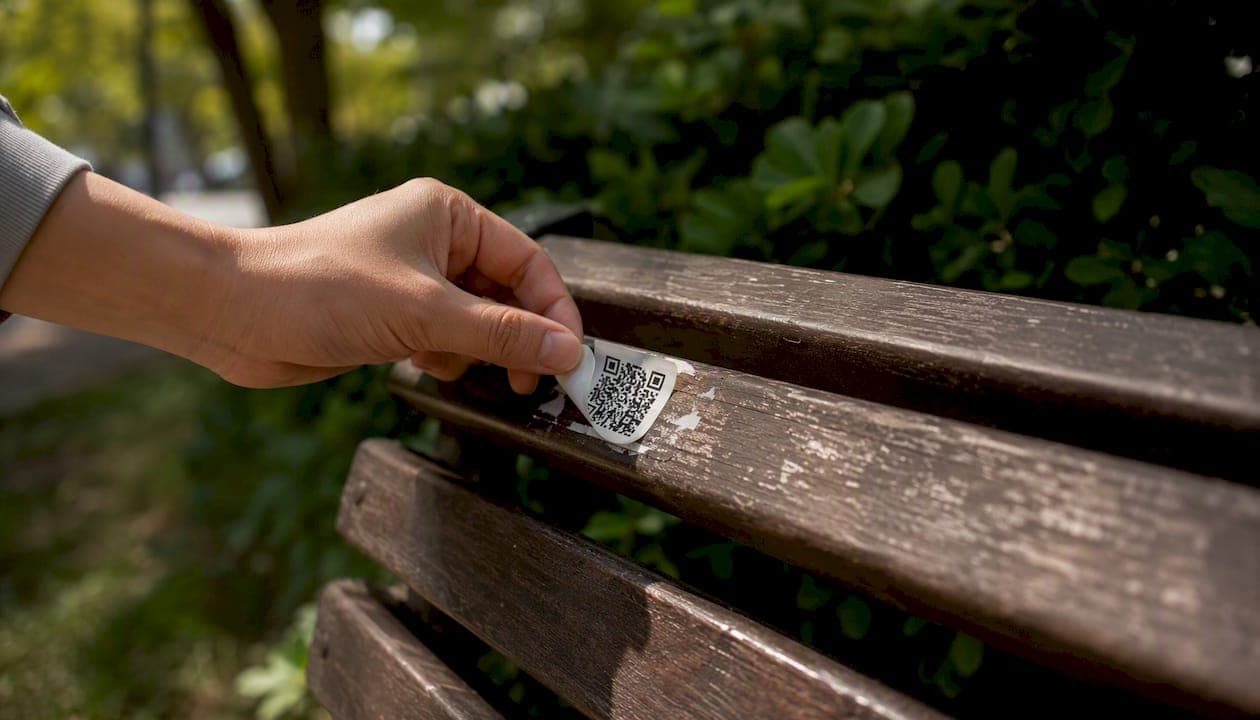
QR codes are safe to use, but only if you verify where they lead before you open anything. The code itself is just a delivery mechanism — a container. The risk lives entirely in the destination URL, and Duke University's Information Security team puts it plainly: the code tells you nothing about where you're going until you're already there.
Before you scan anything unfamiliar, do these four things:
- Verify the source. Did you expect this code? A QR code on a restaurant menu you requested is different from one in an unsolicited email.
- Preview the URL. Most phone cameras show a URL preview before you tap. Read it. Check the domain name carefully.
- Run a reputation check. Paste the URL into VirusTotal or a dedicated QR safety checker before opening it.
- Never enter credentials after an unexpected scan. If a page you reached by scanning immediately asks for a password, stop. The FTC warns this is a primary tactic scammers use to steal account information.
Key Takeaways
QR codes are safe delivery mechanisms, but the destination URL is where every real risk lives — verify it before you open anything.
| Point | Details |
|---|---|
| Risk is in the destination | QR codes are neutral; threats come from where they send you, not the code itself. |
| Verify before you tap | Preview the URL, check the domain carefully, and run it through VirusTotal or IsThisQRSafe. |
| Watch for physical tampering | Check for stickers over printed codes, especially on parking meters and public signage. |
| Act fast after a bad scan | Close the page, disconnect, scan for malware, change passwords, and report to the FTC or IC3. |
| Generate codes responsibly | Use HTTPS destinations, a reputable platform, and label codes with their destination. |
Table of Contents
- What are the real risks when you scan a QR code?
- How attackers use QR codes against you
- Why QR codes create a "trust gap" that attackers exploit
- How to verify a QR code safely before you open the destination
- Device and app settings that reduce QR risks
- Red flags that a QR code might be malicious
- If you scanned a malicious QR: what to do right now
- A best-practices checklist you can follow right now
- How QR codes work — and why that creates vulnerabilities
- Physical tampering: the QR threat hiding in plain sight
- How to generate QR codes safely for personal or business use
- Why QR safety matters to us at Lflow
- Sources
What are the real risks when you scan a QR code?
QR codes themselves are neutral, but Malwarebytes confirms they can deliver the same threats as any malicious link — just with an extra layer of obscurity that makes them harder to catch. Here are the main threats you'll encounter:
| Threat | Attacker's goal | Quick sign to watch for |
|---|---|---|
| Quishing (QR phishing) | Steal login credentials or personal data | Spoofed login page, mismatched domain |
| Drive-by malware download | Install malware or spyware on your device | Unexpected file download prompt |
| Fake payment portal | Capture card or bank details | Payment page with no HTTPS or odd domain |
| Credential harvesting | Collect usernames and passwords at scale | Form asking for login right after scan |
| Unauthorized device actions | Pair to Wi-Fi, add contacts, send texts | Unexpected permission request on scan |
| Tracking and privacy exposure | Build a behavioral profile | Short URL with no preview, third-party redirect |
Quishing is the most common. An attacker creates a QR code that points to a convincing clone of a bank login page or a Microsoft 365 sign-in. You scan, you type your password, and they have it. Fake payment portals follow the same logic but target financial data directly. Drive-by downloads are less common on mobile but still possible, especially if your browser auto-opens certain file types.
How attackers use QR codes against you
The attacker playbook for QR scams is not complicated, which is part of why it works. A few tactics show up repeatedly.
Sticker replacement is the most brazen. Someone prints a QR code sticker and pastes it over a legitimate one — on a parking meter, a restaurant table, or a public notice board. You scan what looks like the official code and land on a fake payment page. Parking-meter scams using this method have been reported across multiple U.S. cities, with local police departments issuing warnings alongside broader advisories from Google and law enforcement.
Email and PDF embedding is subtler. Attackers embed QR codes in phishing emails or PDF attachments specifically because text-based spam filters scan for malicious URLs in text — not in images. A QR code in a PDF bypasses most corporate email security entirely. The email looks like a routine invoice or HR notice; the QR code inside it leads somewhere else.
Redirect chains are what make URL previews unreliable. An attacker uses a URL shortener that shows a clean preview URL. Tap it, and it redirects through two or three intermediate domains before landing on the malicious page. The preview you saw was technically accurate — it just wasn't the final destination. Even a URL that starts with a recognizable brand name can redirect to something completely different after one or two hops.
Why QR codes create a "trust gap" that attackers exploit
The core security failure is simple: QR codes are designed to be scanned, not read. A printed URL gives you something to evaluate before you type it. A QR code gives you nothing.
Security practitioners at Kaspersky frame this as the root cause of most QR-based attacks: without a visible domain, both users and automated text-based filters are less effective at catching malicious links. A phishing URL embedded in a QR code sails past the same filters that would flag it instantly in plain text.
This trust gap is why the verification steps in the next section matter. You cannot evaluate a QR code by looking at it. You have to extract the URL and inspect it before you go anywhere.
How to verify a QR code safely before you open the destination
Follow these steps in order. Each one adds a layer of protection.
- Inspect the physical code and its context. Is there a sticker over a printed code? Does the placement look off? A QR code taped over another one is a red flag. Check whether the surrounding branding matches the organization it claims to represent.
- Use your camera's URL preview. Point your camera at the code but don't tap the notification yet. Read the URL. Check the domain name character by character — attackers use lookalike domains like "paypa1.com" instead of "paypal.com."
- Copy the URL and paste it into VirusTotal. VirusTotal checks a URL against dozens of reputation engines simultaneously. It takes about ten seconds and catches most known malicious domains.
- Use a dedicated QR safety checker. Tools like IsThisQRSafe extract the URL, follow every redirect in the chain, and check the final destination against reputation databases — not just the first URL you see. This is the most reliable free option for evaluating a suspicious code.
- When in doubt, navigate manually. If a QR code claims to be from your bank or a government agency, close it and type the organization's official URL directly into your browser. No legitimate institution requires you to scan a QR code to access your account.
Pro Tip: Before tapping any URL preview, copy the link and paste it into a plain text editor first. This lets you see the full domain without any formatting tricks — some phishing pages use Unicode characters that look identical to standard letters in a browser's address bar.
Adobe Express's security guidance adds one more layer: verify HTTPS and look for certificate warnings when you do land on a page. A missing padlock on a payment or login page is a hard stop.
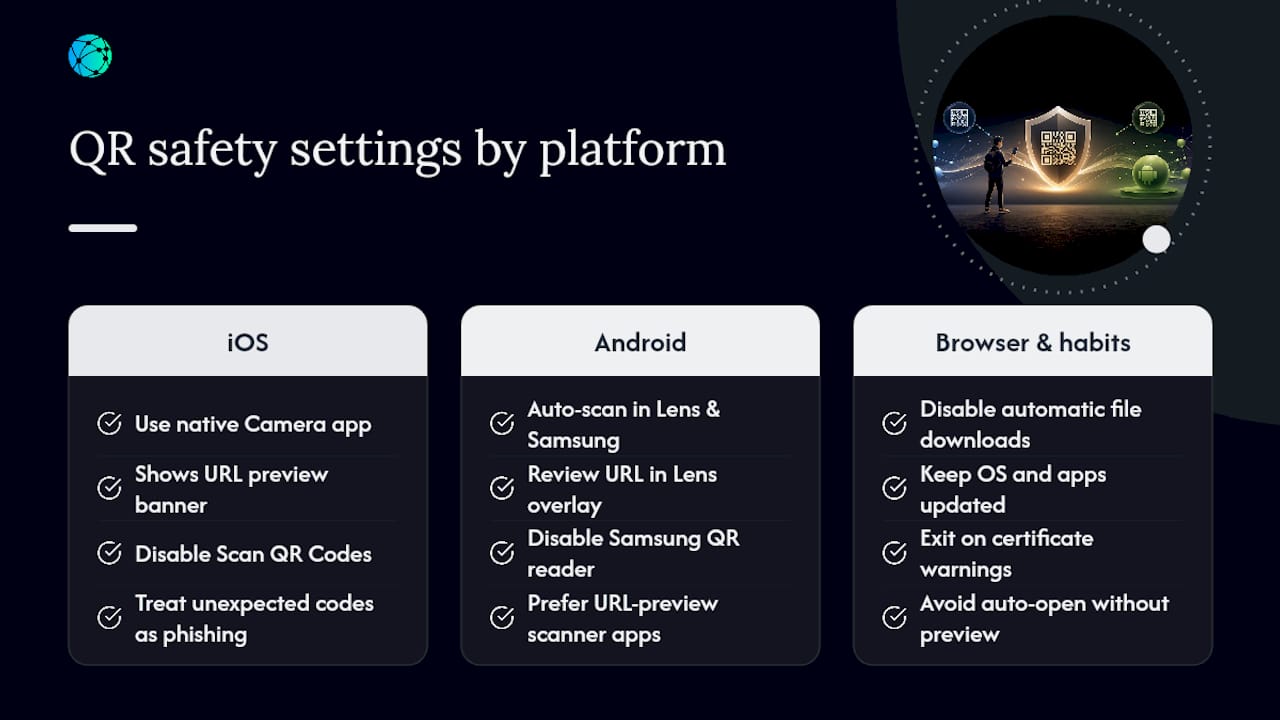
Device and app settings that reduce QR risks
A few settings changes meaningfully reduce your exposure without adding friction to legitimate scanning.
On iOS, the native Camera app shows a URL preview banner before it opens anything — use that instead of third-party scanner apps you don't recognize. You can disable QR scanning entirely in Settings > Camera > Scan QR Codes if you want to force yourself to use a deliberate, preview-capable app each time. Washington University's Information Security Office recommends treating unexpected codes as phishing vectors by default, which makes disabling auto-scan a reasonable default for high-risk environments.
On Android, Google Lens and Samsung's camera both scan QR codes automatically. In Google Lens, there's no single global off switch, but you can avoid auto-opening by reviewing the URL in the Lens overlay before tapping. Samsung's camera settings let you disable the QR code reader under Camera Settings > Shooting Methods. For either platform, prefer a scanner app that explicitly shows the full destination URL and follows redirects before opening.
Browser and general habits matter too. Disable automatic file downloads in your mobile browser (Chrome: Settings > Site Settings > Automatic Downloads). Keep your OS and apps updated — most mobile malware exploits known vulnerabilities that patches already fix. If a page you reached by QR code triggers a certificate warning, leave immediately.
Red flags that a QR code might be malicious
Most dangerous QR codes announce themselves if you know what to look for.
- Unsolicited context. A QR code in an unexpected email, text, or package insert deserves immediate skepticism.
- Physical tampering. A sticker placed over a printed code, or a code that looks slightly misaligned with surrounding design elements.
- Mismatched branding. The code claims to be from a brand, but the URL preview shows a different domain or a generic hosting service.
- Obfuscated or very short URLs. A URL shortener in a QR code hides the final destination. That's not automatically malicious, but it requires a redirect-following check before you proceed.
- Immediate credential or payment prompts. Any page that asks for a login, card number, or Social Security number right after a scan — with no prior context — is almost certainly a scam.
- Forced downloads or permission requests. A QR code that triggers a file download or asks for camera/microphone access without a clear reason is a hard stop.
If you're unsure about any of these, don't scan. Visit the organization's official website directly and find what you need there.
If you scanned a malicious QR: what to do right now
Act quickly. The faster you move through these steps, the less damage gets done.
- Close the page immediately. Don't interact with anything on it — no buttons, no forms, no "close" popups.
- Disconnect from your network if a file started downloading. Turn off Wi-Fi and mobile data to stop any active data transfer.
- Check for unexpected app installs. On iOS, review your recently installed apps. On Android, go to Settings > Apps and sort by install date.
- Run a mobile security scan. Use a reputable mobile security app to scan for malware or suspicious processes.
- Change passwords for any accounts you may have exposed. Start with email and financial accounts. Enable multi-factor authentication (MFA) on every account that supports it.
- Monitor your financial accounts. Watch for unauthorized charges over the next 30 days. Contact your bank immediately if you see anything unexpected.
- Report the incident. File a complaint with the FTC at ReportFraud.ftc.gov. For suspected fraud or identity theft, report to the Ic3. If you found a tampered physical code in a public location, notify the venue owner and local police.
- Seek professional help if you notice persistent unusual behavior — battery drain, unexpected data usage, apps opening on their own, or any sign of ransomware. These warrant a professional device inspection.
A best-practices checklist you can follow right now
Keep this list handy. It covers the highest-impact habits for safe QR code scanning.
- Verify the source before scanning. Unsolicited codes deserve the most scrutiny.
- Always preview the URL. Read the domain carefully before tapping.
- Run a reputation check on unfamiliar URLs. VirusTotal or IsThisQRSafe takes ten seconds and can save you hours of cleanup.
- Never enter credentials after an unexpected scan. Legitimate services don't require a QR code to log in.
- Keep your device OS and apps updated. Patches close the vulnerabilities mobile malware exploits.
- Enable MFA on key accounts. Even if a password is stolen, MFA blocks most unauthorized access.
- Use a scanner app that follows redirects. A preview of the first URL is not enough when attackers chain shorteners.
How QR codes work — and why that creates vulnerabilities
A QR code (Quick Response code) is a two-dimensional matrix barcode that encodes data — most commonly a URL — as a pattern of black and white squares. When your camera reads the pattern, it decodes the binary data and passes the URL to your browser or app. The whole process takes under a second.
That speed is the vulnerability. The encoding is entirely opaque to the human eye. Unlike a printed URL, which you can read and evaluate, a QR code gives you no information until the decode is complete. There's no way to tell from the visual pattern whether the encoded URL points to a legitimate site or a phishing page. The code also supports up to around 3,000 alphanumeric characters, which means a long, obfuscated URL with multiple redirect parameters fits easily inside a standard code with no visible difference from a clean one.
Dynamic QR codes add another layer of complexity. Unlike static codes, which encode a fixed URL permanently, dynamic codes point to a redirect URL that can be changed after the code is printed. This is useful for legitimate businesses — you can update a destination without reprinting materials — but it also means a code that was safe yesterday can point somewhere malicious today if the underlying redirect is compromised. Understanding the difference between static and dynamic QR codes matters when you're deciding how much to trust a code you've scanned before.
Physical tampering: the QR threat hiding in plain sight
The most underappreciated QR risk isn't in your inbox — it's on a parking meter, a restaurant table, or a public bulletin board. Physical QR code tampering requires no technical skill. An attacker prints a sticker, pastes it over a legitimate code, and waits.
Parking meters across the U.S. have been targeted repeatedly. Victims scan what they believe is the city's payment portal, enter card details on a convincing fake, and don't realize anything is wrong until unauthorized charges appear. The FBI and local police departments have issued repeated warnings about this pattern.
A few physical checks take seconds and catch most tampered codes. Run your finger across the code's surface — a sticker will have a slight raised edge. Check whether the code's design matches the surrounding printed material. If a QR code is on a flyer taped to a pole with no other identifying information, treat it as unverified. Legitimate organizations put QR codes in context: on branded materials, with a clear description of where the code leads.
How to generate QR codes safely for personal or business use
If you're creating QR codes — for a business card, a menu, a social profile, or a marketing campaign — the choices you make at generation time directly affect how much your audience can trust them.
Use a reputable generator platform with a clear privacy policy. Avoid obscure free tools that may inject their own tracking parameters or redirect your traffic through their servers without disclosure. Lflow's free QR code generator generates clean, downloadable codes tied to your own branded link, with real-time scan analytics so you can monitor for unusual activity.
Always link to HTTPS destinations. A QR code pointing to an HTTP URL will trigger browser warnings on most modern devices, which erodes trust immediately. Test every code across at least two different devices and operating systems before publishing it. If you're using dynamic codes, audit your redirect destinations regularly — a compromised redirect turns your legitimate code into an attack vector without any visible change to the printed material.
For businesses managing digital presence and reputation, labeling QR codes with a plain-text description of the destination ("Scan to visit our menu at restaurant.com") gives users a way to verify before they scan. That one small addition builds trust and reduces the chance someone avoids your code out of caution.
Why QR safety matters to us at Lflow
Lflow exists to help creators, influencers, and brands consolidate their digital presence into a single, trusted link. QR codes are a core part of that — every Lflow page comes with a free, downloadable QR code for offline promotion. That means we have a direct stake in QR codes being used safely and responsibly.
When someone scans a Lflow QR code, they should be able to trust where it leads. That trust depends on the entire ecosystem being handled carefully: the generator platform, the destination URL, and the person who created the code. This guide exists because we believe users deserve a clear, honest picture of the risks and the tools to manage them — not just reassurance that "QR codes are generally safe."
Sources
- QR Code Security Guide | Information Security
- QR codes explained: How they work and how to use them securely | Malwarebytes
- Scammers hide harmful links in QR codes to steal your information | FTC Consumer Alerts
- IC3 Public Service Announcements