

Choose a custom domain when your site is a long-term brand asset. Choose a subdomain when speed matters more than polish or the project is a smaller extension of something you already run. A custom domain wins on trust, search authority, and control; a subdomain wins on setup time and cost. Either way, you'll need to verify DNS ownership and lock down security before going live.
TL;DR:
- A custom domain is more suitable for long-term brand building, higher search authority, and establishing perceived credibility, especially for professional or business sites.
- Subdomains are faster and cheaper to set up, making them ideal for temporary projects, campaigns, or when organizational separation is needed without long-term branding concerns.
- Proper DNS setup involves verifying ownership through TXT records, managing A or CNAME records, and enabling TLS, with propagation typically taking up to 48 hours.
- Subdomain takeover poses a security risk if old DNS records are not promptly deleted after decommissioning or switching hosts.
- For SEO, consolidating content under a main domain or subfolder generally simplifies ranking signals, though subdomains can serve distinct audiences or tasks with independent backlink profiles.
Table of Contents
- Custom Domain vs Subdomain: What Each Term Actually Means
- Does a Subdomain Hurt SEO Compared to a Custom Domain?
- How Domain Choice Affects Branding and Email Deliverability
- Setting Up DNS: Records, Verification, and TLS Basics
- The Real Security Risk: Dangling DNS and Subdomain Takeover
- Custom Domain, Subdomain, or a Separate New Domain?
- Migrating to a Custom Domain Without Breaking Things
- How Lflow Handles Custom Domains for Creators
- How Analytics Tracking Differs Between the Two Setups
- What Hosting Providers and Website Builders Actually Allow
- Author Perspective: Pragmatic Trade-Offs for Small Businesses
- Get Your Own Domain Live Without the DNS Headache
- Sources
- FAQ
Custom Domain vs Subdomain: What Each Term Actually Means
An apex (or root) domain is the plain address you'd put on a business card, like example.com. A www subdomain (www.example.com) is technically a subdomain but functions as the default front door for most sites. Any other prefix, like blog.example.com or shop.example.com, is a true subdomain, typically pointing to a different service or section.
You control domain registration through a registrar (GoDaddy, Namecheap, Cloudflare Registrar), but the DNS records that route traffic live wherever your nameservers point, often a separate host. Platform-hosted subdomains, like a free account on a SaaS tool, are provisioned automatically the moment you sign up.
- Apex domain: main brand identity, used for the primary site
- www subdomain: the standard entry point, often mirroring the apex
- Custom subdomains: separate apps, regions, or campaigns (
app.example.com,es.example.com) - Platform subdomain: a free identifier a vendor issues (
yourname.platform.com)
Does a Subdomain Hurt SEO Compared to a Custom Domain?
Both apex domains and subdomains are fully indexable by Google. The bigger driver of ranking is link authority and content relevance, not the naming pattern itself. That said, subdomains sometimes get treated as semi-distinct entities, which means they can carry a separate backlink profile and need their own SEO push to build authority.
SEO analysis from Ahrefs shows that consolidating content under a single host, typically as a subfolder, often simplifies how ranking signals aggregate across a site. A subdomain makes more sense when the content genuinely serves a different audience or product line than the main domain.
- Use a subfolder or the main domain when content supports the same core topic
- Use a subdomain when the section needs technical or organizational separation (a help center, a separate app)
- Preserve SEO during a migration with 301 redirects, updated canonical tags, and a submitted sitemap
Pro Tip: If you migrate hostnames, expect search visibility to fluctuate for 30 to 90 days while Google recrawls and reassigns signals. Don't panic at week two.
How Domain Choice Affects Branding and Email Deliverability
A custom domain reads as a business that's invested in itself. When you're pitching a client, negotiating a contract, or running a storefront, yourbrand.com signals permanence in a way yourbrand.freeplatform.com doesn't. Custom domain branding guidance points out that branded links also tend to earn higher click-through rates than generic shortened ones, since people trust a recognizable name over a string of characters.
Email and SMS sending add another layer. Authentication records like SPF, DKIM, and DMARC are tied to whichever domain sends the message, so your choice affects deliverability and reputation risk.
- A dedicated custom domain protects your primary brand reputation from bulk sending mistakes
- A subdomain can isolate sending risk while keeping some brand continuity, useful for marketing blasts
- High-volume cold outreach is often safer on a completely separate domain, according to lemlist's deliverability guidance, so a reputation hit doesn't touch your main site
Setting Up DNS: Records, Verification, and TLS Basics
Getting a custom domain live comes down to a handful of DNS records, in this order:
- A record (or ALIAS/flattening) for the apex domain, pointing to your host's IP or flattened target, since apex domains can't always use a standard CNAME
- CNAME record for
wwwor other subdomains, pointing to the provider's hostname - TXT record for domain verification, proving you control the domain before the provider activates it
GitHub's documentation on custom domains recommends using a www subdomain over a bare apex domain, since it sidesteps some DNS constraints and plays more predictably with automated TLS issuance. Verification usually happens through a TXT token or a temporary CNAME value, and it exists specifically to stop someone else from impersonating your domain or claiming an abandoned one.
Most providers now issue and renew TLS certificates automatically once DNS is confirmed, so you rarely touch certificate files directly anymore.
Pro Tip: Set your DNS records a day before you need the domain live. Propagation is usually fast, but occasionally takes up to 48 hours depending on your registrar's TTL settings.
The Real Security Risk: Dangling DNS and Subdomain Takeover
Dangling DNS happens when a CNAME or A record still points to a service you've canceled or abandoned, leaving the door open for someone else to claim that endpoint and serve their own content under your domain. Subdomain takeover is the exploit version of that: an attacker registers the now-unclaimed resource and effectively hijacks forgotten.yourbrand.com.
Microsoft's Azure architecture guidance recommends requiring domain verification for every onboarding attempt and using randomized TXT tokens rather than reusing old ones, which prevents accidental reuse or impersonation.
- Delete DNS records immediately when you decommission a subdomain or switch providers
- Require fresh, randomized verification tokens for each new domain connection
- Monitor certificate expiration and DNS changes, since a misconfigured TLS certificate is often the first visible sign of a bigger problem
Pro Tip: Audit your DNS zone file twice a year. Old CNAME entries pointing to shut-down services are the most common cause of takeover incidents.
Custom Domain, Subdomain, or a Separate New Domain?
Answer these questions honestly and the right choice usually becomes obvious:
- Is this a long-term brand asset? Yes, use a custom domain. No, a subdomain or free platform link is fine.
- Will you send high email or SMS volume from it? Yes, consider a separate domain to isolate reputation risk.
- How comfortable are you with DNS? Low comfort favors a platform-hosted subdomain with guided setup.
- Do you need to scale into multiple sites or regions? Yes, plan for subdomains or subfolders under one apex domain.
- Do you need strict tenant isolation (separate clients, separate risk profiles)? Choose a new domain instead of a shared subdomain.
- How much migration risk can you tolerate right now? Low tolerance means start on a subdomain, upgrade to a custom domain later.
- Does the project need instant credibility (pitching investors, launching a store)? Custom domain, every time.
- Is this temporary or experimental? A vanity or platform subdomain avoids wasted setup effort.
Whatever you choose, test authentication flows and redirects before you announce the change publicly.
Migrating to a Custom Domain Without Breaking Things
- Buy the domain through a registrar you trust
- Create the required A, CNAME, and TXT records
- Verify ownership with your provider
- Enable TLS and confirm the certificate issued correctly
- Set 301 redirects from old URLs to new ones
- Update canonical tags to point at the final domain
- Watch Search Console and analytics for crawl errors over the following weeks
DNS propagation typically resolves within a few hours, though it can stretch to 48 hours. TLS certificates usually issue within minutes once DNS is verified. Watch for classic gotchas: OAuth callback URLs breaking because Supabase's documentation notes that authentication flows tied to cookies and callback URLs can silently fail after a domain change, mixed-content warnings from old hardcoded HTTP links, and CDN-level DNS caching that delays your changes from showing up.
How Lflow Handles Custom Domains for Creators
Lflow supports custom domains alongside dynamic link tracking, real-time analytics, and QR code generation, all from one dashboard. Onboarding follows the same pattern covered above: verify ownership through a TXT or CNAME record, let TLS activate automatically, confirm routing works, then check click and scan data in your analytics panel. If your decision checklist pointed toward "custom domain, moderate technical comfort," this is exactly the workflow it describes.
How Analytics Tracking Differs Between the Two Setups
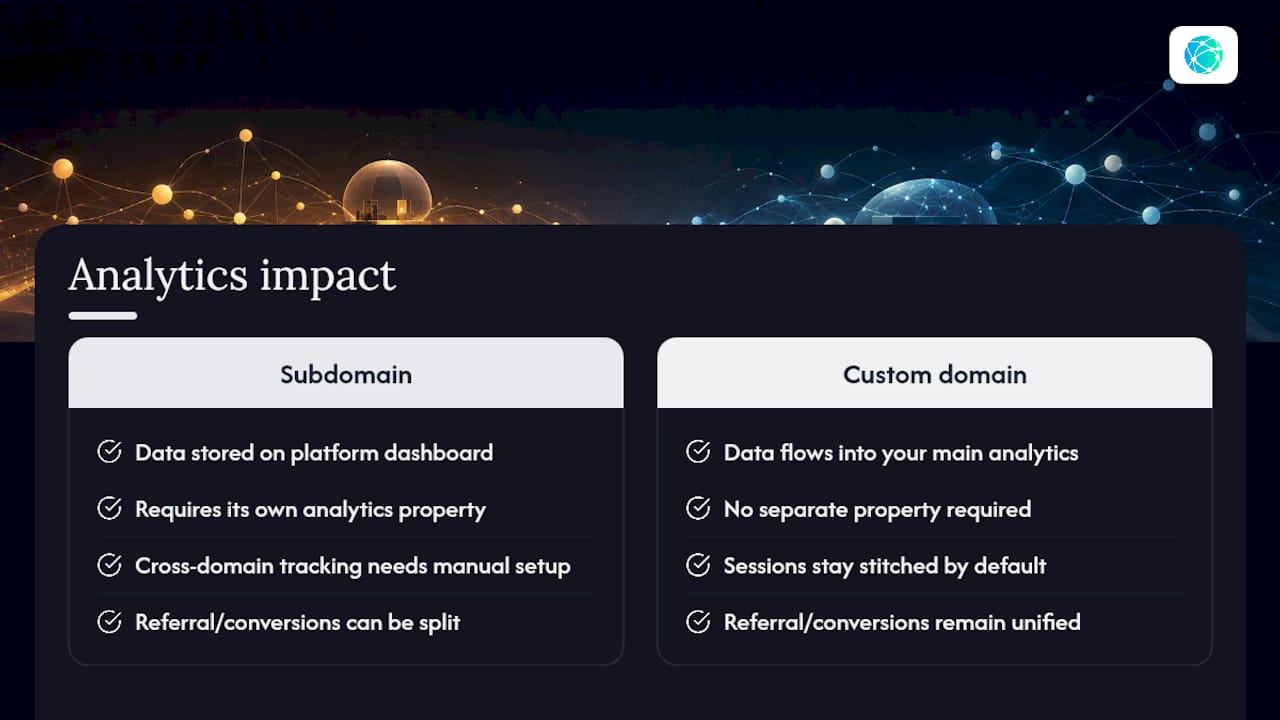
Analytics behave differently depending on where your traffic actually lives. A subdomain hosted on a third-party platform routes its traffic through that platform's tracking system by default, which means your data sits in a separate dashboard from your main site's Google Analytics or Search Console property. You'll often need to add the subdomain as its own property to see it clearly, and cross-domain tracking between the main site and the subdomain requires manual configuration to stitch sessions together.
A custom domain tied directly to your own analytics setup keeps everything under one roof. Referral traffic, conversion paths, and campaign attribution stay unified instead of getting split across two properties. This matters most when you're running paid ads or tracking a customer journey that touches both your main site and a linked page, since a fragmented setup makes it easy to double-count visitors or lose the thread entirely.
For link-in-bio pages specifically, a custom domain also means the click and scan data from QR codes, shortened links, and bio pages roll into one clean report instead of scattering across whatever subdomains a platform assigns by default. If you're reporting engagement numbers to a client or sponsor, one dashboard beats explaining why three different subdomains each show a fraction of the real traffic.
What Hosting Providers and Website Builders Actually Allow
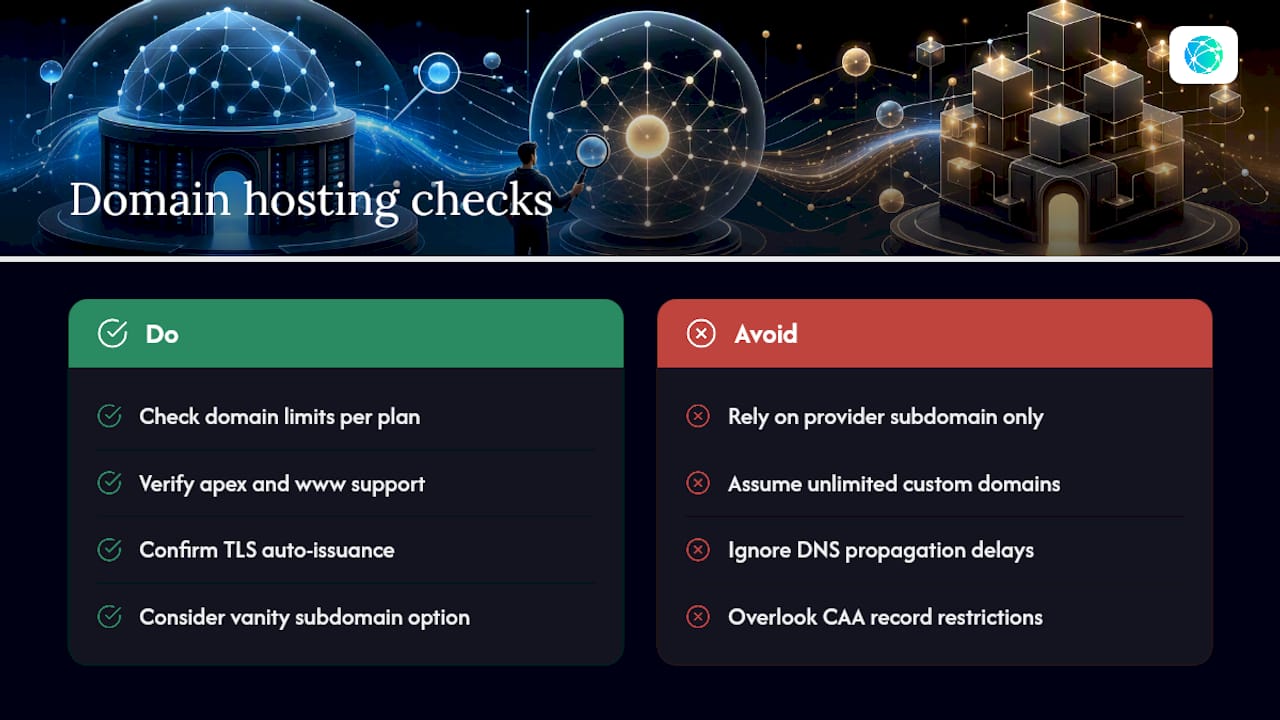
Free plans on most website builders and SaaS platforms restrict you to their subdomain by default. Custom domain support is almost always gated behind a paid tier, and even then, providers often cap how many custom domains you can connect per account. Some platforms only support a www subdomain for the custom domain and won't route the bare apex correctly, which is why GitHub Pages explicitly recommends the www pattern over the apex domain for stability.
Other common restrictions: some builders won't let you use a subdomain of a domain that's already connected elsewhere on their platform, DNS changes can take longer to reflect if the provider caches records aggressively, and TLS certificate issuance sometimes fails silently if a CAA record on your domain blocks the provider's certificate authority. Vanity subdomains, a middle ground where you get a branded prefix under the provider's own domain, are worth knowing about too. Supabase documents this pattern as a way to get partial branding without the DNS overhead of a full custom domain, which can be a reasonable stepping stone if you're not ready to commit.
Before you commit to a platform, check its documentation for domain limits per plan, whether both apex and www are supported, and whether TLS is automatic or something you configure manually.
Author Perspective: Pragmatic Trade-Offs for Small Businesses
Most small businesses overthink this decision. If you're pitching clients or building a brand people will search for by name, get the custom domain now, not after you "grow into it." The one mistake to avoid: connecting a domain without deleting old DNS records from a previous host first.
— Axion
Get Your Own Domain Live Without the DNS Headache
If wrestling with A records and TXT verification sounds like more than you want to manage alone, some link-in-bio platforms offer solutions to simplify this process for creators who want branding benefits without technical complexity.

Start with the free link-in-bio plan to see how the setup works, or check the pricing page if you already know you want custom domain support and advanced analytics from day one. Either path gets you a branded link live in minutes, not days.
Sources
For deeper technical detail: Microsoft's multitenant domain guidance covers verification architecture, GitHub's custom domain docs explain provider-level setup, and Ahrefs' SEO comparison breaks down subfolder versus subdomain ranking behavior. For growth-focused domain strategy, Baby Love Growth's domain authority guidance is worth a look too.
- Domain Name Considerations in Multitenant Solutions - Azure Architecture Center | Microsoft Learn
- About custom domains and GitHub Pages
- Choose subdomain vs separate domain | lemlist Help Center
FAQ
What Are the 7 Types of Domains?
Common categories include generic top-level domains (.com, .org), country-code domains (.uk, .de), sponsored domains (.gov, .edu), subdomains, apex domains, vanity domains, and infrastructure domains used internally by hosting providers.
Is Domain Flipping Illegal?
Buying and reselling domain names is legal in most jurisdictions, but registering a domain that infringes on someone else's trademark specifically to resell it, known as cybersquatting, can expose you to legal claims.
What Is the Difference Between a Subdomain and a Domain?
A domain (like example.com) is a registered, standalone address, while a subdomain (like blog.example.com) is a prefix added to an existing domain, typically used to separate content or apps without buying a new domain.
Is It Worth Getting a Custom Domain?
For most creators and small businesses planning to build a lasting brand, yes. A custom domain improves perceived trust, supports stronger long-term SEO consolidation, and gives you full control over redirects, email authentication, and platform independence that a free subdomain can't match.
When Should I Use a Subdomain Instead?
Use a subdomain for temporary campaigns, internal tools, or sections that need technical separation from your main site, especially when speed of setup matters more than long-term branding.